Creating a strategy
In short
- A strategy trades one pair on one connection.
- In the form you set the budget, the number of parts, the averaging step and the TP — the app builds the grid at the current price at once.
- "Save" — the strategy is created and stays stopped; "Start" — saves it and starts a cycle at once.
A strategy runs cycles on one pair on one connection. In the new strategy form you set the grid: how much money to put in, into how many parts to split it, at what distance to buy more and what profit to take. While you fill in the form, the app builds the grid at the exchange's current price and shows you the result right away.
Open the form
- Open the key vault if it is locked (Connections and the key vault).
- On the "Strategies" tab, click "+ New strategy".
There is no "+ New strategy" link while the vault is locked. If there are no connections yet, the app says "Add an exchange connection first.".
At the top of the form — "How the strategy trades": "Own settings" (an ordinary strategy, this page) or "Copy trades" — a copy that trades by the rules of another user's strategy (Copying trades).
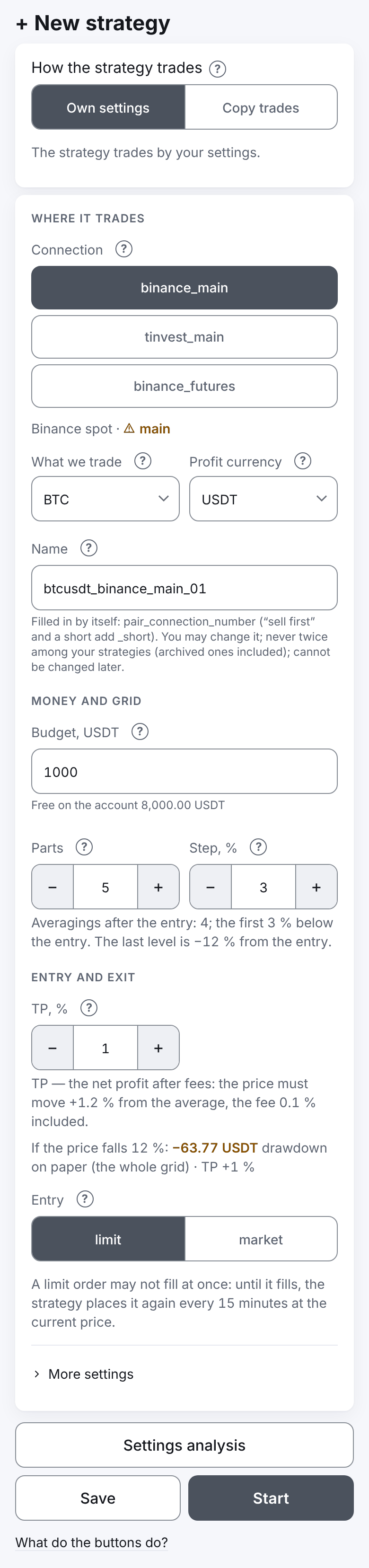
The form is one column on any screen: the fields from top to bottom, under them the warnings (if any) and the buttons. The first button is "Settings analysis" across the whole width: it opens a window with the grid at the current price — the chart and the steps' table, see Settings analysis. Under it is one row of two equal buttons: "Save" and "Start" (what each does). Under the buttons are the "why it does not save" line and the link "What do the buttons do?": it opens one window with the hints of all the form's buttons (there is no "?" beside each button). Under the "TP | Leverage" row a grey line says the whole grid's drawdown and the TP, so that a change is seen without opening the window.
Form fields
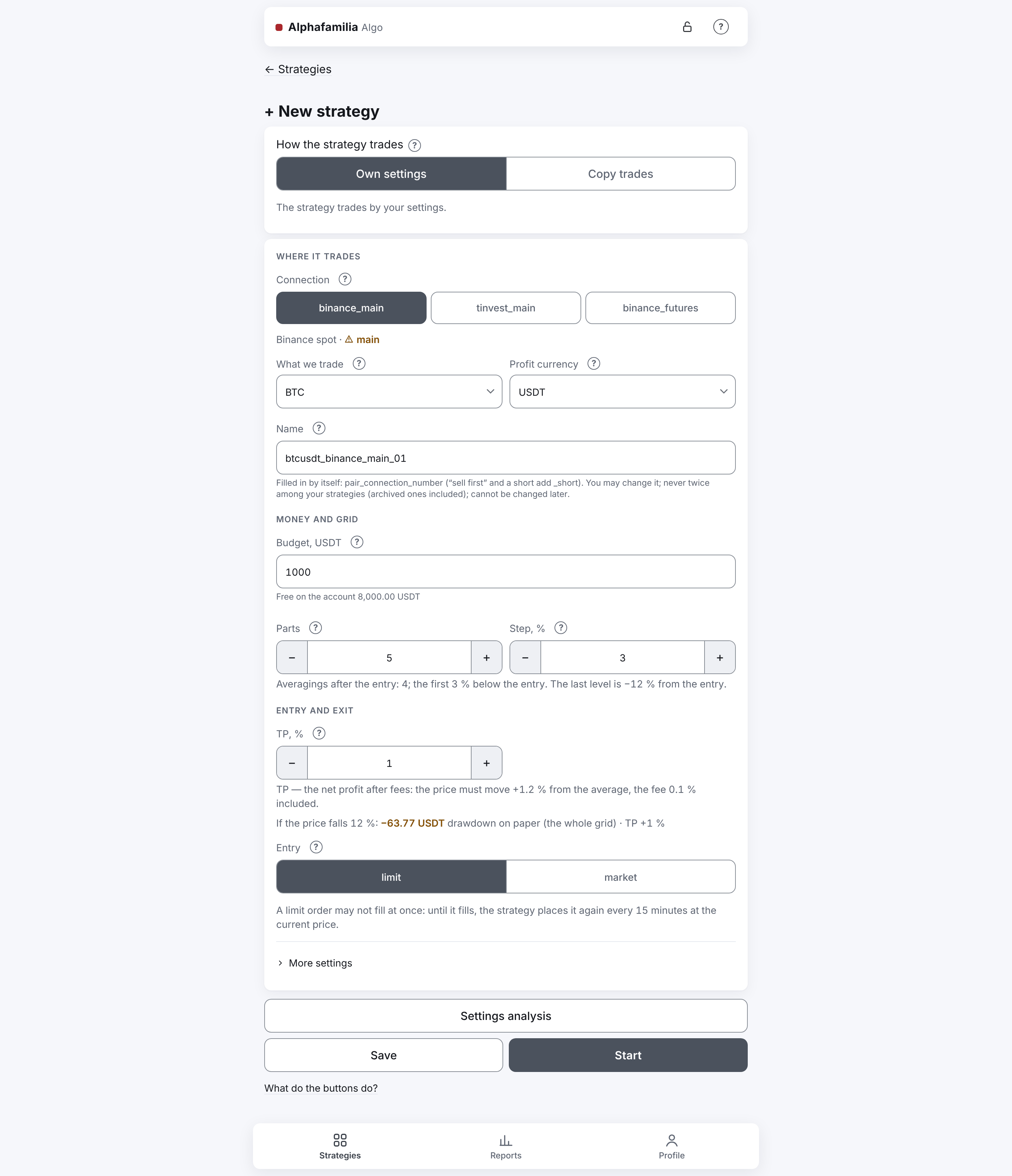
The form is compact: the fields have short labels, and the full explanations are in the "?" sign of each field. The fields are in three groups under small headings: "Where it trades" (the connection, the pair, the name), "Money and grid" (the sum, the parts and the step), "Entry and exit" (the TP, the leverage, the entry). From top to bottom:
- "Connection" — each connection is a button of its own, all of one width, several in a row; a long name wraps inside its button, every name is seen whole. Under them — the connection's market and environment, e.g. "Binance spot · main";
- "What we trade" and "Profit currency";
- "Name" — already filled in from the pair and the connection, e.g.
btcusdt_binance_spot_01(more); - "Budget, USDT" — across the whole width; after the comma — the budget's currency (for "sell first" on spot — the coin: "Budget, BTC"; on futures the field is called "Position size, USDT");
- the pair "Parts | Step, %", with one line of explanation under it: how many averagings after the entry, how far the first one is and (once the grid is calculated) where the last level is, e.g. "Averagings after the entry: 3; the first 2 % below the entry. The last level is −6 % from the entry.";
- the pair "TP, % | Leverage" (the leverage on futures only), with a line on how far the price must move to the TP with the fee: "TP — the net profit after fees: the price must move +1.2 % from the average, the fee 0.1 % included."; on futures here too — "Margin ≈ X USDT (position size ÷ leverage)";
- "Entry";
- the folded section "More settings" with the rare settings: "Mode", the pairs "Offset, % | Part growth" and "Step growth | Not above, USDT" ("Not below, USDT" with "sell first"), each with its line of explanation, and "Profit in the coin".
Number fields have "−" and "+" buttons. For the part growth and the step growth they change the value by 1 %; an exact number can be typed too.
In the tables below the fields are named in full, as in the title of their "?" hint: "Parts" — "Parts of the budget", "Step, %" — "Price change % to average at", "TP, %" — "TP (net profit), %", "Offset, %" — "Entry offset from the current price", "Not above (below)" — "Cycle start condition".
| Field | What it is | Risk | Allowed |
|---|---|---|---|
| Connection | The exchange account and the market the strategy trades on; the strategy's market is the connection's. | Cannot be changed later; on a live connection the strategy trades real money. | A connection with its market set. |
| What we trade · Profit currency | The strategy's pair: the asset and the currency the budget and the profit are counted in. | Cannot be changed later. | Only pairs from the administrator's lists that the exchange trades now. |
| Name | The strategy's name in the list, Telegram messages, reports and exports. | Cannot be changed later; you never reuse a name, even after archiving. | 1–64 latin letters, digits and “_”. Filled in from the pair and the connection — you may change it. |
| Fee for the TP | The rate the TP price is planned with: your account's rate on the exchange (Binance, BingX, Bybit, Coinbase), the broker's maximum on T-Invest (until the actual fee is known — it is counted from the strategy's trades of 1,000 RUB or more; then the actual one), or an estimate if the exchange did not answer. | If the exchange's rate is higher the strategy takes it and the TP moves further; in a cycle the real trades count. | Not entered. |
| Budget | The planned position size of a cycle: the entry and all DCA. In the profit currency, or in the coin for “sell first”. Futures margin = size ÷ leverage. Not a loss limit: bought coins fall with the market. | The position may end a bit larger: market entry (slippage; a limit entry is exact), one quantity step more with the fee in the coin, manual DCA beyond the budget. Fees on top; keep the budget free. | Above 0; a part at least the exchange minimum. |
| Leverage | How many times the position size exceeds your margin: margin = position size ÷ leverage. The leverage does not change the grid. | The higher the leverage, the closer the liquidation (about −100 % ÷ leverage from the average price with one position); grid levels below it never fill. The exchange keeps one leverage per pair: strategies of one pair must share it; a new one applies from the next cycle, only with no position and no orders. COIN-M: the collateral is BTC itself and loses value as the price falls — the liquidation is closer than on USD-M at the same leverage. | 1–10; 5 or less is advised. |
| Parts of the budget | How many orders the grid has: the entry plus the DCA parts. | More parts — smaller each; a part below the exchange minimum does not let the strategy be saved. 1 — no averaging. | 1–100, whole. |
| Price change % to average at | How many % from the entry price the price must fall (rise for “sell first”) before the first DCA; the gaps add up after that. | A small step — DCA on ordinary swings and a budget spent fast; a large one — rare DCA. The whole grid's depth is the “last level” in the summary below. | 0.01–50 %. |
| TP (net profit), % | The cycle's net profit after fees, in % of the cycle's cost; the strategy keeps an exit order at that price from the average. | Below two fees the cycle earns next to nothing; too high — the cycle may stay open long. | 0.01–99 %. |
| Entry | “Limit” — an order at the price with the offset, moved every 15 minutes to the current price until filled; “market” — at once, at the current price. | Market — slippage, the entry sum is not known in advance; limit — the entry may wait. | One of the two. |
"More settings":
| Field | What it is | Risk | Allowed |
|---|---|---|---|
| Mode | “Buy first” (long) buys and sells higher; “sell first” (short) sells and buys back lower. On spot “sell first” needs the coin on the account — the budget is set in it. COIN-M: long only for now. | Cannot be changed — only a new strategy. | One of the two. |
| Entry offset from the current price | The limit entry this many % away from the current price (below for “buy first”, above for “sell first”). 0 — at the current price. | More than a few % — the entry fills only on such a move, and the strategy may wait long. | 0–50 %; limit entry only. |
| Part growth | How many % each next part grows. 0 — equal parts; 10 — each 1.1 times the last. | With a large growth the first parts get tiny (below the exchange minimum), the last — very large. | 0–50 %. |
| Step growth | How many % wider each next gap between levels is. 0 — equal gaps. | The grid gets deeper — check the “last level” in the summary. | 0–50 %. |
| Cycle start condition | Do not start a cycle while the price is above this one (below for “sell first”). A condition for starting a new cycle only; inside a cycle the price is not checked against it. | If the price is already above it, the strategy is saved and waits — maybe long. | A price above 0; may be left empty. |
| Keep the profit in the coin | The profit stays in the asset (BTC, shares), not in the currency. | Not available for new strategies; strategies that already work so go on. | — |
More about some fields
- "Name". Filled in by itself — see The strategy's name below. If you already have this name (an archived strategy included), a line under the field says so at once: "You already have a strategy “…” (or it is archived) — the server will not take this name." Another user's strategy may have the same name.
- "What we trade" and "Profit currency". Chosen from two lists, not typed. The lists have only the pairs the administrator allowed in "What may be traded" (Administration) and the exchange trades now. If the administrator has allowed no pair of the market, the lists are replaced by "The administrator has not allowed any pair on “…” yet — no strategy can be created here." The system administrator sees the link "Open “Administration” → “Trading pairs”" under it, other users — "Ask the administrator to allow pairs." If the pair's data did not come, the reason is under the pair.
- The fee for the TP. Not typed — taken from the exchange. On Binance, BingX, Bybit and Coinbase — your account's maker rate ("your account's rate"): a TP is a limit order; the entry and the averagings are counted by the fee the exchange really charged. On T-Invest — until the strategy knows the real rate, the broker's maximum rate of 0.3 % ("the broker's largest rate") is used; once the strategy's fully paid trades reach a turnover of 1,000 ₽ or more, the TP is planned by the real rate if it is below 0.3 % (it never goes above 0.3 %). In the cycle the fee the broker really charged is always the one counted. If Binance did not answer, an estimate of 0.1 % is used; the strategy refines the rate itself once the exchange answers. The fee is shown in the line under "TP | Leverage".
- "Budget". The sum of one cycle's trades — the entry and all DCA parts together. For "buy first" and on futures — in the profit currency, for "sell first" on spot — in the coin. In the latter case a line under the field shows how much that is in the currency at the current price: "≈ 32,125.05 USDT at the current price" (once the grid of this pair is calculated). On futures the field is called "Position size": the size of the position (the notional), the grid is sized from it, and the margin (your own money on the account) = position size ÷ leverage; the line under "TP | Leverage" says "Margin ≈ X USDT (position size ÷ leverage)". Under the field — how much is free on the connection's account and how much of it is promised to the running strategies: "Free on the account 812.40 USDT · promised to other strategies 40.00 USDT" (free is rounded down to the cent; "unknown (the vault is locked or the exchange did not answer)" — the exchange gave no balance). So you see whether the money is enough and how much can be withdrawn (Top up or withdraw money). The budget is the planned size of the position, not a hard ceiling: the position may end a bit larger for three reasons — a market entry (slippage; a limit entry is exact), one quantity step more when the fee is taken in the coin (BingX and Bybit spot, and Binance spot when the account does not pay its fees in BNB) and a manual averaging beyond the budget. Fees are on top of the budget.
- "Leverage" — on futures only, 1–10. The leverage does not change the grid — only the margin: the "Margin ≈ X USDT" line changes with the position size and the leverage. If a strategy of this account already runs on this pair, the leverage is filled in and cannot be changed (the "−" and "+" buttons do not work either): "A running strategy trades this pair — the leverage must be the same." The leverage on Binance is one per pair of an account. More — USD-M futures.
- "Profit in the coin" — visible but switched off: not available for new strategies (on futures there is no such field). Strategies that already keep the profit in the coin go on doing so.
The strategy's name
Once the connection and the pair are chosen, the "Name" field fills in by itself: <pair>_<connection>_<number> in small letters, e.g. btcusdt_binance_spot_01 (here binance_spot is the name of your connection, not the market). A "sell first" strategy on spot and a short on futures get _short before the number: btcusdt_binance_spot_short_01 — so the long and the short of one pair differ by name.
- The number is the next one after the highest number of your strategies whose names start the same way: with
btcusdt_binance_spot_01and_02, the new one gets_03. Archived strategies count too (a name is never reused); capital and small letters are the same here. The number has two digits at least:_01…_09,_10. - Only latin letters, digits and "_" go into the name: other signs of the pair and of the connection's name are left out. A long connection name is shortened so that the whole name fits in 64 characters; the pair,
_shortand the number stay whole. - While you have not changed the name, it changes by itself with the pair, the connection or the mode. If the connection has no pairs or the pairs did not load, the field becomes empty.
- Your own name: just type it in the field — after that the app does not change it. If you clear the field completely, the name fills in by itself again at the next change of the pair, the connection or the mode.
- Rules: 1 to 64 latin letters, digits and "_". The names of older strategies (up to 12 characters) work as before. The field corrects nothing silently: a space — "No spaces: latin letters, digits and “_” only.", more than 64 characters — "64 characters at most."; until the name is corrected, the strategy is not saved.
- The name cannot be changed after the strategy is created.
A connection made before the markets were split is not offered in the form — a note under "Connection" says so (Connections and the key vault).
How the levels are calculated
- The averaging levels are counted from the actual entry price.
- The gaps between levels add up. With a step of 2 % and "step wider by" 0 %, the levels are: 2 %, 4 %, 6 %… With a step of 2 % and "step wider by" 20 %: 2 %, 4.4 %, 7.28 %…
- The budget is split between the parts by their growth. With 0 % the parts are equal. With 50 % each next part is 1.5 times the previous one. The percent is kept exactly: 10 % is exactly ×1.10.
- The quantity of each part is rounded down to the exchange's step. So the sum of the parts is sometimes a little less than the budget.
Mode and profit
| Mode | Entry | Averaging | TP | Profit stays in |
|---|---|---|---|---|
| Buy first, profit in the quote currency | buy | lower | sell the whole amount | USDT (roubles) |
| Buy first, profit in the asset | buy | lower | sell a part to get back what was spent | BTC (shares) |
| Sell first, profit in the quote currency | sell your own asset | higher | buy back the same quantity | USDT (roubles) |
| Sell first, profit in the asset | sell your own asset | higher | buy with all the proceeds | BTC (shares) |
"Sell first" on spot sells only your own asset that is free on the account. The strategy does not sell more than there is.
Settings analysis
The "Settings analysis" button above the "Save" and "Start" buttons opens a window with the grid at the current price: the price line, the chart and the steps' table — how the grid behaves. This is what the settings typed give at the exchange's current price; the window saves nothing and sends nothing to the exchange. On a phone the window slides up from the bottom, on a computer it stands in the middle; a long content scrolls inside the window. Close it with "Close", Esc or a press outside it; what is typed in the form stays.
The button works when "Save" and "Start" do: every field is right and the grid is calculated. While the server calculates the grid after a change (half a second) it cannot be pressed, and the line under the buttons says "The grid is being calculated…". If the server cannot build the grid or the exchange would refuse some parts, the reason and the size needed are said right under the fields, above the warnings — no need to open the window for that.
"Start" still asks to confirm first — the window "Save and start…" with the connection, the pair, the size and a line on the drawdown on paper with the whole grid (Save).
Under the "TP | Leverage" row in the form itself one grey line lets you see a change beside the fields without opening the window. First — the drawdown on paper if the price reaches the grid's last level (as the steps' table's last row), in yellow, then the TP: "If the price falls 12 %: −63.77 USDT drawdown on paper (the whole grid) · TP +1 %". It is not a loss: the strategy waits for the price to come back to the TP. For "sell first" and a short — "If the price rises …".
Where the exchange keeps the money
If the account has less than the budget, the form warns: "Free on the account …, budget …" (warnings). Often the money is there but lies on an account of the exchange the strategies do not see. Step 3 of the "First steps" checklist (for real money) says where to move it:
| Market | Line |
|---|---|
| BingX spot (futures) | "BingX: after a deposit the money lies on the Fund account. Move it to the spot (futures) account: “Assets” → “Transfer”." |
| Bybit | "Bybit: the strategies see only the Unified Trading account. If the money is on the Funding account, move it: “Assets” → “Transfer”." |
| Binance USD-M futures | "Binance: move USDT from the spot wallet to the futures one (USDⓈ-M): “Wallet” → “Transfer”." |
| Binance COIN-M futures | "Binance: move BTC to the COIN-M wallet: “Wallet” → “Transfer”." |
| Coinbase | "Coinbase: the strategies see only the portfolio the key belongs to. Move the money into that portfolio." |
| T-Invest | "Top up the account chosen in the connection." |
Binance spot has no such line: a deposit lands on the spot wallet anyway.
Do not sell the strategy's coins by hand until the strategy is archived: the system counts the coin together with all the strategies of this asset (Top up or withdraw money).
Warnings
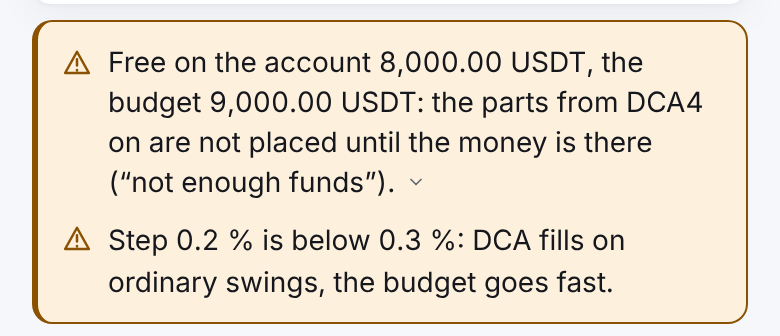
After each calculation of the grid the app checks what the settings lead to and shows warnings — yellow boxes in the form, under the fields, right above the buttons. Each warning shows its first sentence; tap it to open the rest. Under the warnings, above the buttons, it then says: "There are warnings — look at them before saving. Saving is allowed." Warnings forbid nothing — a strategy can always be saved. What each one means and what to do — below.
The grid at the current price
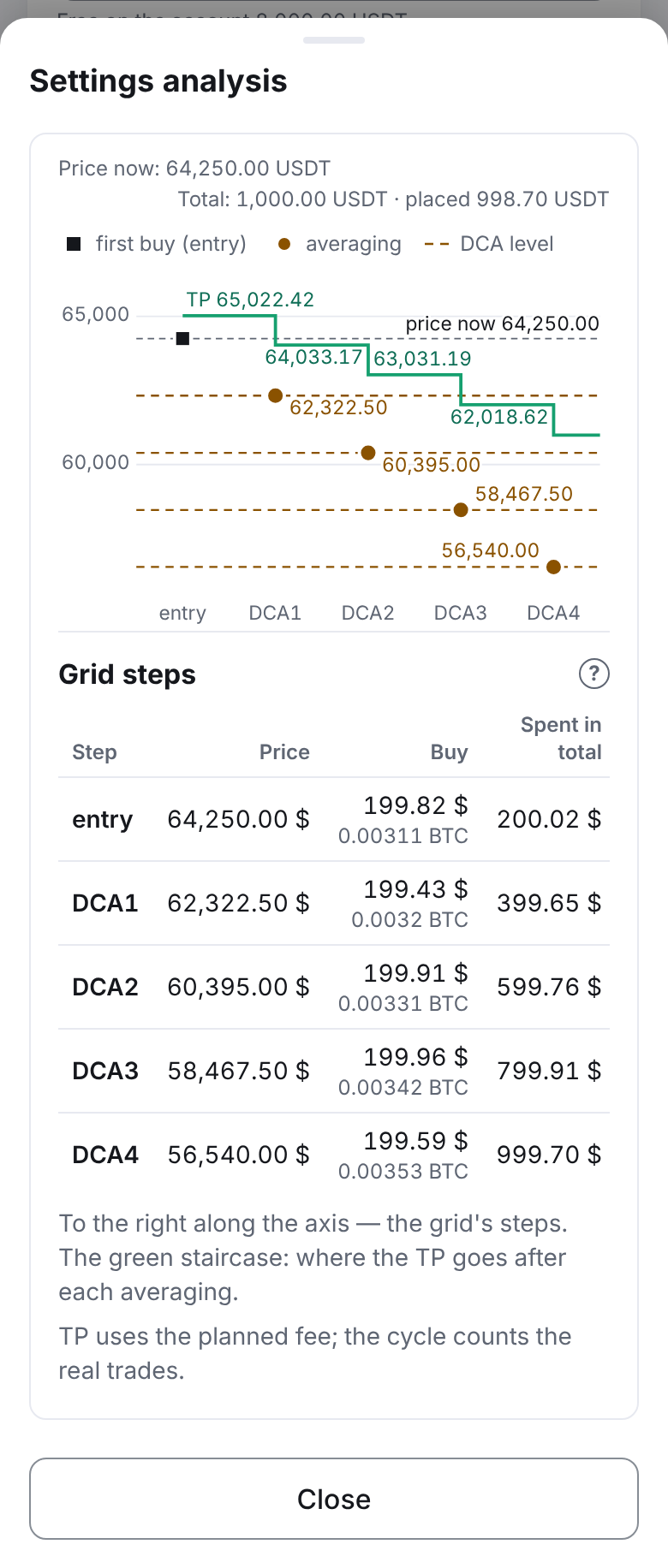
The "Settings analysis" window is the grid at the current price (it is recalculated half a second after each change of the form). The mode, the pair and the leverage are not repeated in it — they are in the form's fields. At the top, in one small line, — "Price now" (the exchange's current price, with a limit entry too) and "Total" (the sum of all parts as meant: the budget, on futures the position size; with "sell first" on spot, the budget in coins at the parts' prices). After "·" — "placed …": what the exchange takes after the quantities are rounded down to its step. Under it the chart, under the chart the steps' table.
Steps' table
One row is one step of the grid: "entry", "DCA1", "DCA2"… The table answers "what happens if the price reaches this step". Every averaging brings the TP closer to the price and makes the cycle's profit larger. On a phone and in Telegram the table scrolls sideways, the "Step" column stays; on a computer it is seen whole. The "?" at the heading "Grid steps" explains every column.
| Column | What it means |
|---|---|
| "Price" | The price of this step's order |
| "Buy" ("Sell" for "sell first") | The step's amount and how many coins (contracts) it is after rounding to the exchange's step: "192.42 $ (1.7 AAVE)" |
| "Spent in total" ("Sold in total") | All the money in the position after this step — every buy up to it with its fees |
| "TP price" | The price at which the strategy sells everything if the price has reached this step |
| "Break-even price" | The price at which closing after this step gives nothing: the average price with the buys' and the sale's fees |
| "Drawdown" | The result on paper if the price has reached the step and not come back yet: everything up to it bought, nothing sold. In money and in % of what was spent: "−60.45 $ / −6.19 %", in yellow. It is not a loss until you close the cycle yourself: the strategy waits for the price to come back to the TP. There is no stop loss — below the last step the drawdown grows |
| "Profit" | The cycle's net profit if the price has reached the step and come back to the TP price: "+9.76 $", in green. Counted from the grid as the exchange will place it; with the profit in the coin — in the coin |
An example — AAVE, Binance USD-M futures, long, leverage 1×, 5 parts of 200 USDT, step 3 %, TP 1 %, fee 0.02 %:
| Step | Price | Buy | Spent in total | TP price | Break-even price | Drawdown | Profit |
|---|---|---|---|---|---|---|---|
| entry | 113.19 $ | 192.42 $ (1.7 AAVE) | 192.46 $ | 114.37 $ | 113.24 $ | −0.08 $ / −0.04 % | +1.92 $ |
| DCA1 | 109.79 $ | 197.62 $ (1.8 AAVE) | 390.12 $ | 112.61 $ | 111.49 $ | −5.93 $ / −1.52 % | +3.90 $ |
| DCA2 | 106.40 $ | 191.52 $ (1.8 AAVE) | 581.68 $ | 110.88 $ | 109.78 $ | −17.87 $ / −3.07 % | +5.82 $ |
| DCA3 | 103.00 $ | 195.70 $ (1.9 AAVE) | 777.42 $ | 109.08 $ | 108.00 $ | −35.97 $ / −4.63 % | +7.77 $ |
| DCA4 | 99.61 $ | 199.22 $ (2 AAVE) | 976.68 $ | 107.25 $ | 106.19 $ | −60.45 $ / −6.19 % | +9.76 $ |
The money in the table carries a sign: "$" for USDT and USDC, "€" for euros, "₽" for roubles; in a coin (COIN-M, profit in the coin) — the coin's code. A step the exchange will not take is a row with the exchange's reason. There is no liquidation in the table: it depends on the leverage, the collateral and the account's other positions.
Above the table — the same grid on a chart (at most 240 points high). Left to right are the steps: "entry", "DCA1", "DCA2"… (named under the points). The square in the colour of the text is the first buy (the entry; with "sell first" and a short the legend says "first sale (entry)"); with an entry at the current price it sits on the grey dashed line "price now 134.09". Each averaging level is a yellow (amber) dashed line across the chart with a yellow dot and the level's price. The green "staircase" is where the TP goes after each step: the first step is labelled "TP 135.57", the next ones with the price only. With "buy first" each step is lower than the one before — every averaging lowers the TP; with "sell first" (short) it is mirrored: the levels are higher, the TP rises with each step. On the left — grey gridlines (usually three or four) with round prices. Above the chart — the legend; its hint is at the end of the "Levels". A label stands above its line or point, below it or on its other side, and does not lie on the lines or on other labels; when there is no room, the less important one is left out (the price now is always shown). The chart shows the entry and the first six DCA levels; with more parts a line under it says how many more: "Further DCA levels: 23.", and the list below has every part. The chart is drawn from the same numbers as the list under it, without another request to the exchange.
A part the exchange would not accept is highlighted: instead of the quantity — the part as meant, before rounding ("≈ 0.000635 BTC ≈ 49.10 USDT"; if rounding left something — "→ 0.0006 BTC = 46.40 USDT"), and below it the exchange rule it breaks, with the exchange's own numbers:
- "below the exchange step 0.001 BTC ≈ 77.40 USDT" — less than one quantity step: rounding down gives 0, there would be no order (on T-Invest — "below one lot = 10 SBER ≈ 3,000.00 RUB"; "below the exchange's smallest quantity …" — when that is more than one step);
- "below the exchange minimum 50.00 USDT" — the order sum is below the smallest the exchange accepts;
- "above the exchange's largest order …" — more than the exchange takes in one order.
Under the grid — "Grid parts the exchange would refuse (rules): numbers (0 is the entry)" and a hint of the settings at which every part passes: "For all parts (5) to pass, the budget must be at least 157.60 USDT." (on futures — "…the position's size must be at least 472.70 USDT"; the leverage does not affect the grid, so there is no "leverage N or more" hint). You can also use fewer parts. The hint is calculated at the current price, with the exchange's rules and rounding to its step. If a part is above the largest order there is no hint: a bigger sum would not help.
Example (Binance mainnet, BTCUSDT futures, price 77,413.6; step 0.001 BTC, minimum 50 USDT; position size 300 USDT, 5 parts, step 0.5 %, parts larger by 10 %): the parts are 49 to 72 USDT, while one order is at least 0.001 BTC ≈ 77 USDT. No part passes; it needs a position size of at least 472.7 USDT (at any leverage; the margin at leverage 3 ≈ 157.6 USDT). On the testnet the step is 0.0001 BTC — there only the entry fails (46.4 USDT is below 50), and a size of at least 330.9 USDT is needed.
The save buttons work only when all fields are valid and the grid is calculated; settings with parts the exchange would refuse are not saved — the message names the rule. Why the buttons do not work yet is said in one line under them — the first thing not ready, from top to bottom: "Add a connection first: “Profile → Settings → Exchange connections”.", "The field “…” is not ready: …", "Choose the pair.", "Loading the pair's data…", "The pair's data did not come — the reason is under the pair.", "The grid is being calculated…" or "The grid did not pass the check — the reason is above, under the fields.". When everything is ready, there is no line.
At the end of the "Levels": "TP uses the planned fee; the cycle counts the real trades." So the TP prices in the cycle may differ from the grid by a few cents.
Example
A Binance connection, the pair BTCUSDT, price 60,000 USDT. Settings: "buy first", profit in USDT, budget 1000 USDT, 4 parts, step 2 %, each next part larger by 50 %, steps wider by 0 %, TP 1 %, the exchange's fee 0.1 %, market entry.
The budget is split in the proportion 1 : 1.5 : 2.25 : 3.375. The grid the app shows:
| Part | Price, USDT | Distance | Quantity, BTC | Amount, USDT | TP after this part |
|---|---|---|---|---|---|
| entry | 60,000.00 | 0 % | 0.00205 | 123.00 | 60,721.33 |
| DCA1 | 58,800.00 | −2 % | 0.00313 | 184.04 | 59,987.51 |
| DCA2 | 57,600.00 | −4 % | 0.0048 | 276.48 | 59,172.26 |
| DCA3 | 56,400.00 | −6 % | 0.00736 | 415.10 | 58,283.37 |
"Total: 1,000.00 USDT · placed 998.63 USDT". Less than 1000 is placed because the quantities are rounded down to the exchange's step of 0.00001 BTC.
How this strategy goes through a cycle — on the page Starting and the cycle.
Save
At the bottom of the form, under "Settings analysis", are two buttons in one row:
- "Save" — the strategy is created and stays stopped. It does not trade until you start it on its screen.
- "Start" — saves the strategy and starts a cycle at once (the confirmation window calls it so: "Save and start"). The entry is made the way chosen in the "Entry" field: at market or with a limit order. If "Not above" is set and the price is higher, the strategy waits with the reason "entry condition".
What each button does is said in short in the window of the link "What do the buttons do?" under them.
Both buttons ask for confirmation first. After saving, the strategy's screen opens. If the save failed, a card with the reason appears above the buttons — what to do.
The "Start" confirmation is like a copy's: it names the connection, the pair, the budget and the kind of money, then the entry chosen: "Save and start strategy … on …: BTC/USDT, budget 200.00 USDT? This is real money. Entry with a limit order …" (a practice connection — "The connection is a practice one — not real money."). The entry — at market or a limit order with its offset, and the "Not above (below)" condition when it is set. The last line is the risk of the whole grid, as in the steps' table's last row: "At −10.74 % from the entry (DCA4) a drawdown on paper: −41.02 USDT (−4.1 %) — until the price comes back to the TP." (a grid of one part has no such line). The window's action button is "Save and start". Warnings do not stop the saving.
Important. The connection (and with it the market), the pair, the mode and the profit currency cannot be changed later. For those, create a new strategy. Everything else is changed with "Change settings" — see Managing a strategy.
Frequent check errors
Errors are what keeps a strategy from being saved. The message is under the field, under all the fields (the grid's errors — above the warnings) or above the buttons — as the card "Not saved" (the server's answer to a save).
| Message | Cause and what to do |
|---|---|
| "Fill in the field.", "A number is needed.", "A whole number is needed." | The field is empty or not a number. Both a point and a comma work in fractions; a saved value and the result of "−" / "+" are shown with a point, as the text beside them: "1.8". "Fill in the field." appears only once you have started typing, left the field or clicked "Save": a form just opened with empty fields (for example, "Budget") is not marked red. The line under the buttons saying why the strategy is not saved names the empty field at once |
| "At least …", "More than …", "At most …", "At most … decimal places." | The value is outside the allowed limits (see the table of fields) |
| "Characters not allowed." | The name has a hyphen, Cyrillic letters or another sign besides latin letters, digits and "_" |
| "No spaces: latin letters, digits and “_” only." | The name has a space. Remove it or put "_" instead |
| "64 characters at most." | The name is longer than 64 characters. Shorten it |
| "Grid parts the exchange would refuse (…): … (0 is the entry). Change the budget or the number of parts." | In brackets — the rules broken ("below one quantity step", "below one lot", "below the smallest quantity", "below the smallest order sum", "above the largest order"), after the colon — the numbers of the parts. Some part is smaller than one order of the exchange (on Binance spot the minimum is usually 5 USDT, on BTCUSDT futures 50 USDT with a step of 0.001 BTC) or above the largest. Raise the budget (on futures, the position size; the leverage will not help) to the hint under the fields (the same as under the grid in "Settings analysis"), reduce the number of parts or the growth of the parts |
| "No such pair on the exchange" | The pair is gone from the exchange (delisted) |
| "The pair … is not allowed by the administrator.", "The administrator has not allowed any pair on this market." | The lists "What may be traded" changed while the form was open. Open the form again or ask the administrator |
| "The exchange does not trade this pair now — choose a pair from the list." | The exchange halted the pair or is delisting it while the form was open. Choose another pair |
| "A running strategy trades this pair with leverage …× — the leverage must be the same." | On futures the leverage is one per pair of the account. Keep the running strategy's leverage |
| "Parts and steps grow by 0 to 50 %." | The number in the field goes from 0 to 50 |
| "The fee is not typed — it comes from the exchange. Reload the page.", "Profit in the coin is not available for new strategies.", "A strategy's market is its connection's. Choose another connection." | The page was opened before the system was updated and sends the old fields. Reload the page (close and open the app) |
| "The connection has no market chosen …", "This connection has strategies of two markets …" | A connection made before the markets were split. See Connections and the key vault |
| "The exchange did not answer — try later." | No connection to the exchange, it has a failure, or it asks itself to try later (overloaded); it says nothing about the pair. Try again later |
| "The vault has no key for this connection." | The open vault has no key of the chosen connection. Check the connection in "Profile" → "Settings" → "Exchange connections", and if needed use "Replace key" |
| "The exchange gave no price — market closed or no connection." | T-Invest is outside a trading session, or there is no connection. Try again later |
| "Wrong settings: …" with an explanation, for example "Wrong settings: the last grid level reaches a zero price — fewer parts or a smaller step" | The combination of fields does not work; the explanation says what exactly. A frequent case with "buy first": the sum of all steps is 100 % or more, and the grid goes down to zero. Reduce the number of parts, the step or the step growth |
| "Name: 1–64 latin letters, digits or '_'" | Wrong name (the server did not take it). Correct the name |
| "You already have a strategy with this name (archived ones included)." | Make up another name |
| "The account already has … open orders on this pair — the exchange takes no more. …" | The account has so many orders on this pair that the exchange will not accept three more (entry, DCA, TP). Stop some strategies of the pair or cancel your own orders |
If the save failed
Every "Save", "Start", "Create", "Confirm" and "Add" button in the application behaves the same way: while the request runs, the button says "Saving…" and takes no second press; when done, it says "Saved ✓" for a second and a half, a message with a ✓ sign appears at the bottom of the screen (a press closes it), and when the screen stays, a marked line "✓ Saved…" stays under the button. If it failed, a card with a red bar appears at the button's place instead of a vanishing message: what was not done and why, with "×" and "Retry"; it stays until you close it.
If saving failed, a card with a red bar on the left appears above the buttons: the title "Not saved", the reason under it, "×" on the right — close. If the reason is the connection (no answer from the server, the exchange did not answer, the server is being updated or restarted), the card has a "Retry" button; everything typed stays. When the server did not answer at all, the card's title is "Not known whether it is saved" and its text "No answer from the server — the strategy may have been created. “Retry” checks the list of strategies first.". Then "Retry" first looks at the list of your strategies: if a strategy with this name is already there, the app says "The strategy “…” has been created." and opens it, sending nothing a second time. If the list could not be got, nothing is sent: "The list of strategies did not come — nothing was sent; press “Retry” again." If you change the form, the card with "Retry" disappears — it is another strategy now. A refusal because of the settings has no "Retry": fix the settings.
The form's warnings
Warnings do not keep a strategy from being saved: they say what the settings lead to. Their numbers come from the current grid and from the exchange, written in the page's language ("7,592.86", "−12 %"); "free" is rounded down to the cent. If the budget is above what is free but the rounded numbers would read the same, both are shown exactly. If the free balance on the account is unknown (the vault is locked, the exchange did not answer), the warnings about money are not shown.
| Warning | What it means | What to do |
|---|---|---|
| "Free on the account … USDT, the budget … USDT: the parts from DCA… on are not placed until the money is there (“not enough funds”)." (or "…even the entry is not placed…") | The budget is more than is free on the account in the budget's currency (on futures — the margin, position size ÷ leverage, is more than is free; the text: "…the margin … USDT (position size ÷ leverage)…"). The first part there will not be enough for is named | Top up the account or lower the budget. Otherwise at that part the strategy sends "Not enough funds" and retries on schedule |
| "Other working strategies of this connection are promised …; free …, … left for the budget of …: the money may not be enough for all." | There is enough money for this strategy, but not for all together: the running strategies of the same connection may still take their part of the budget. "Promised" is what their cycles will still take: the unfilled parts of the levels (except cancelled and skipped ones) and resting manual orders, with the fee; what is invested already, manual purchases included, is not counted twice. On futures — the margin of these parts plus the fee on their full size | Top up the account or lower the strategies' budgets. If the strategies seldom reach their last parts, you may leave it |
| "At leverage … the liquidation is ≈ −… % from the average price. DCA… — beyond it: they never fill, the exchange closes the position first. Lower the leverage, the step or the parts." (with one such level — "…it never fills…") | Futures: these levels lie beyond the liquidation price of the position built before them (counted with the exact sums of the levels, so a level exactly on the edge is named too). It is an estimate for an isolated position; on Cross the exchange holds the position longer, so the warning is cautious | Lower the leverage, the step or the number of parts |
| "Leverage …: the liquidation is ≈ −… % from the average price. 5 or less is advised." | Futures: the leverage is above 5 | Lower the leverage if you are not sure |
| "TP … % is below two fees (… %: the entry and the exit at … %) — the cycle earns next to nothing." | The TP is below two exchange fees | Raise the TP |
| "Step … % is below 0.3 %: DCA fills on ordinary swings, the budget goes fast." | The step is below 0.3 % (for T-Invest shares and funds — below 0.5 %) | Raise the step |
| "The last level is −… % from the entry: nearly the whole budget is put in on the way." | The grid's last level is more than 50 % away from the entry | If that is not meant, lower the number of parts, the step or the step growth |
| "The entry … % below the price is more than the step … % (or 3 %): it fills only on such a move; the order is moved every 15 minutes." | The offset of the limit entry is more than the grid's step or more than 3 % | Lower the offset if you want to enter sooner |
| "The price now … is above …: the strategy is saved and waits until the price falls." (with "sell first" — "below … rises") | The "Not above (below)" condition is not met now | Nothing, if that is meant; otherwise change the condition |
| "One part: no averaging, only the entry and the TP." | There is 1 part | Nothing, if that is meant |
| "The last part is … times the first (… → … USDT): the first parts are small, most of the money is at the end of the grid." | The part growth makes the last part 10 times the first or more | Lower the part growth or the number of parts |
| "The account has … BTC, the budget is … BTC: “sell first” sells the coin of the account — the parts it is not enough for are not placed." | Spot, "sell first": less free coin than the budget | Top up the coin or lower the budget |
| "Already working on BTC/USDT of this connection: …. The pair's strategies' orders count together (the exchange's limit). The system counts these strategies' coin together: do not sell it by hand." (on futures — "…they share one position and one leverage… The system counts these strategies' position together: do not close it by hand.") | Another strategy runs on the same pair of the same connection | Nothing, if that is meant. Do not sell the coin (close the position) by hand: the account check adds up the records of all the asset's strategies. On futures the strategies of one side of a pair share one position on the exchange |
| "Already working on BTC of this connection against another currency: …. The system counts these strategies' coin together: do not sell it by hand." | Spot: a strategy on the same coin of the same connection trades against another currency (BTC/USDT and BTC/USDC) — the account check counts the coin together | Nothing, if that is meant. Do not sell this coin by hand |
| "The account is in One-way mode: switch on Hedge Mode … The strategy does not start a cycle while the account is in the wrong mode." (or "Multi-Assets mode is on…") | Binance futures (USD-M, COIN-M) and BingX: the account's mode is read before the start — by the same read the key's strategies use (at most once a minute), nothing is switched. A strategy with such an account would wait with the same reason. The pair's margin (Isolated) is not checked before the start; Bybit switches the mode itself | Switch the mode at the exchange — the strategy starts the cycle itself |
Next: Starting and the cycle