I want to trade crypto with a strategy
At the end of this path a spot strategy on Binance, BingX, Bybit or Coinbase trades your money and has passed its first cycle. Spot is the plain buying and selling of coins, without leverage.
Read Getting started first: how the strategy works and what the money risks. Want to try without money first — I want to try without money.
What you need
- Access to the app — Getting started.
- An account at the exchange: Binance, BingX, Bybit or Coinbase, with the identity check passed and two-factor protection on.
- From 200 USDT on the exchange's spot account. At BingX a deposit lands on the Fund account — move it to the spot account (“Assets” → “Transfer”). At Bybit spot trades from the Unified Trading Account: if the money is on the Funding account, move it to the Unified one (“Assets” → “Transfer”). At Coinbase (an EEA account) the money is in EUR or USDC, from 180 EUR or 200 USDC, best in a separate portfolio for the strategies (Coinbase).
- Allowed pairs. The pairs for strategies on each market are allowed by the system administrator. If the strategy's form says “The administrator has not allowed any pair on “…” yet — no strategy can be created here.”, write to the system administrator in Telegram — @alphafamilia: which pairs you need. The list of pairs can be extended on request.
- 20–30 minutes.
Steps
The key at the exchange
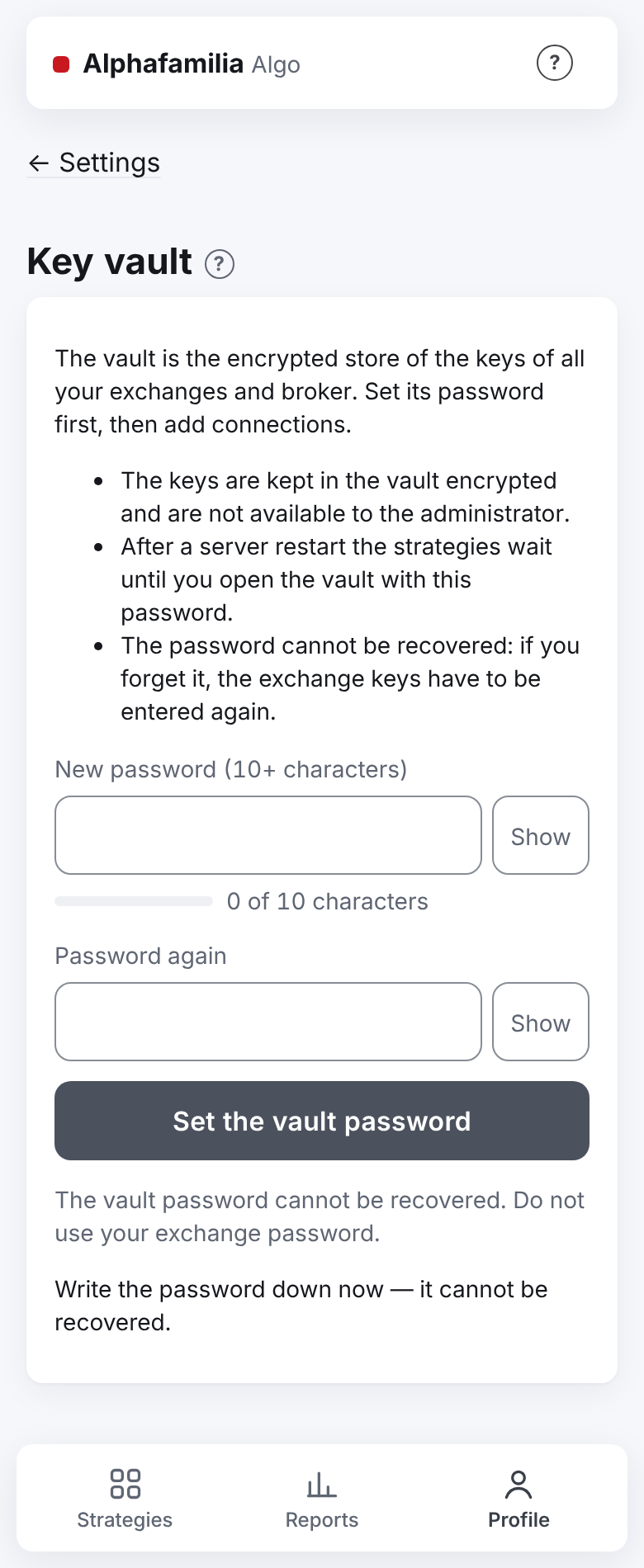
Open the app. In the “First steps” checklist press “Set the vault password” — the “Key vault” screen opens. Think of a password of 10 characters or more, type it twice and press “Set the vault password”. The screen reminds you: “Write the password down now — it cannot be recovered.” If the vault exists already, skip this step.
On the “Strategies” tab, in the “Connect an exchange” item, press “For trading” (the same two choices are on the vault's screen under “The vault is ready…”). Later the same place: “Profile → Settings → Exchange connections” → “+ New connection”.
At the step “1 · Market and environment” choose the market: “Binance spot”, “BingX spot”, “Bybit spot” or “Coinbase spot”. The environment — “main” (at BingX, Bybit and Coinbase — “live account”). The switch turns yellow: this is real money. Press “Next: the key →”.
The step “2 · Key and check” shows the checklist for your exchange, the server's address and a link to the exchange's guide. Press “Copy” at the server's address.
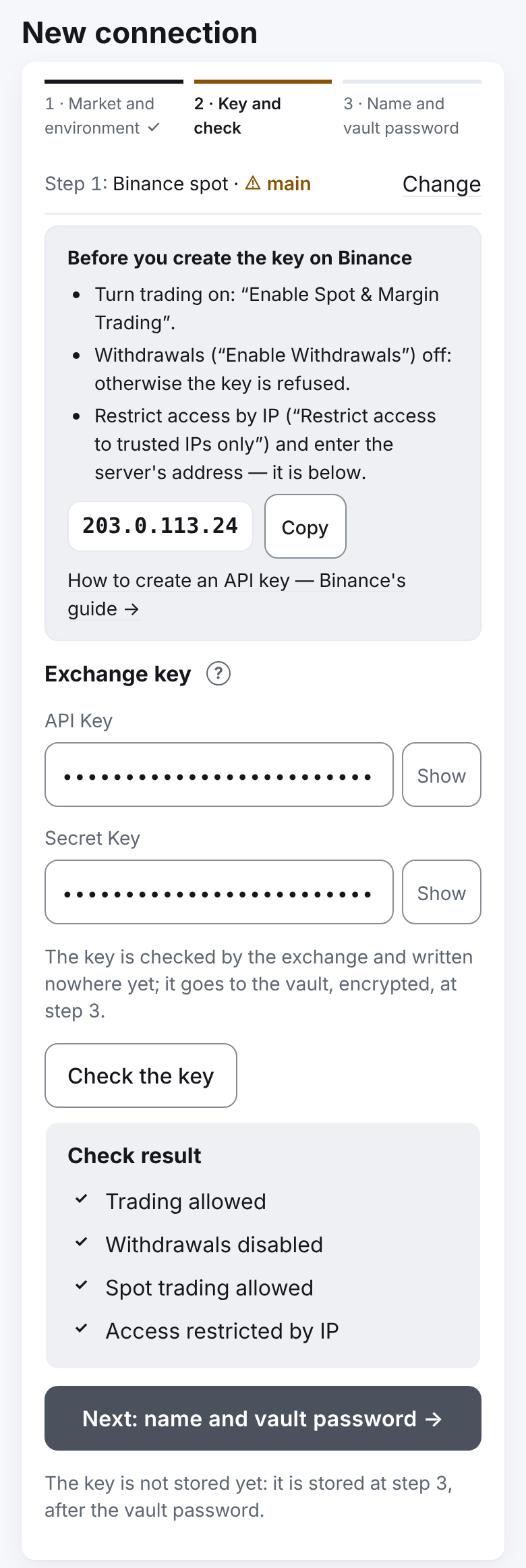
On the exchange's site create an API key by the checklist:
- spot trading — on;
- withdrawals — off (the app refuses a key that may withdraw);
- access only from the server's IP address — paste the address copied.
How to do it at each exchange — Keys at the exchange and the exchanges' guides: Binance, BingX (in detail), Bybit (in detail), Coinbase — the CDP portal, an ECDSA key with the View and Trade permissions (in detail).
Copy the API Key and the Secret Key. The exchange shows the Secret Key once.
The connection in the app
- Paste the key into the “API Key” and “Secret Key” fields. Press “Check the key”.
- Look at the “Check result”. ✓ — good, ✗ — the key will not be taken, ! — allowed, but better fixed (for example, no IP restriction). A Binance key without an IP list cannot trade — then one ✗ line: “Binance allows trading only to a key with an IP list. Add the server's address … to the key's IP list …” — do so and press “Check the key” again. All right — press “Next: name and vault password →”.
- The connection's name fills in by itself, for example
binance_spot_prod. Type the vault password into “Vault password — to save the key into the vault”. - Press “Add the live key” and confirm: this is real money.
The money and the strategy
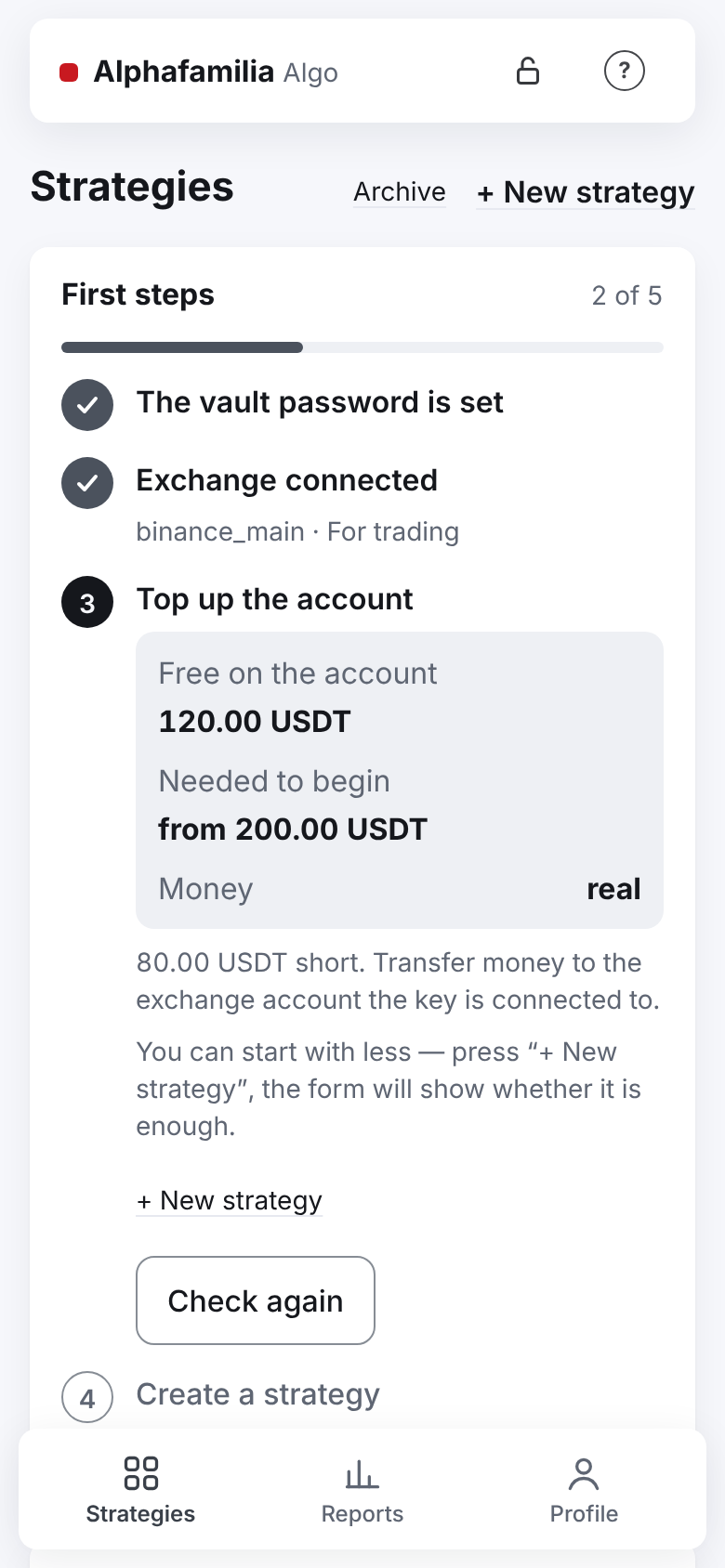
On the “Strategies” tab the “Top up the account” item shows how much is free on the account. From 200 USDT is needed. Topped up — press “Check again”. Under the sum — where the exchange keeps the money the strategies see: BingX — from Fund to the spot account, Bybit — from Funding to the Unified Trading one, Coinbase — into the key's portfolio. 200 USDT is the recommended minimum — with it the grid's parts are surely above the exchange's minimum order: “You can start with less — press “+ New strategy”, the form will show whether it is enough.”
Press “+ New strategy”.
Choose the connection. In “What we trade” choose a coin, for example BTC, in “Profit currency” — USDT. The pairs in the list are allowed by the system administrator; no pairs — see If something goes wrong.
Type the “Budget”, for example 200 USDT. Leave the rest as it is: 5 parts, a step of 3 %, a TP of 1 %, the entry by a limit order. This is a ready, careful setting. What each field changes — the “?” sign of the field and I want to understand the settings. Under the connection the form says, in yellow with a triangle, “live — real money”.
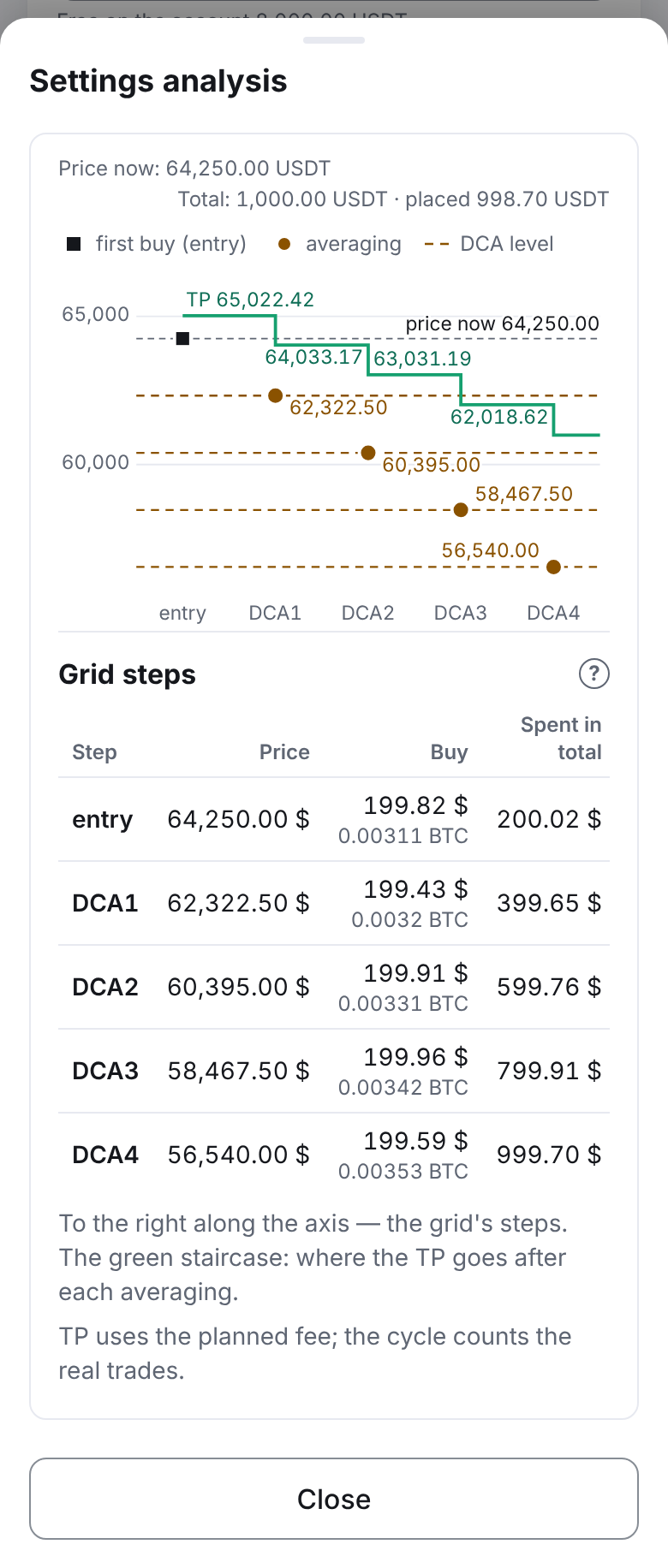
Press “Settings analysis” and look at the grid at the current price: the chart and the steps' table — the prices, the sums, the TP, the drawdown and the profit at each step. If the parts are below the exchange minimum, the form says so under the fields: raise the budget or lower the number of parts.
Press “Start” — it saves the strategy and starts it at once. The window asks: “Save and start strategy … on
binance_spot_prod: BTC/USDT, budget 200.00 USDT? This is real money. …” — check the connection and the sum and confirm.
How to know it worked
- Telegram brought “▶️ Strategy started”.
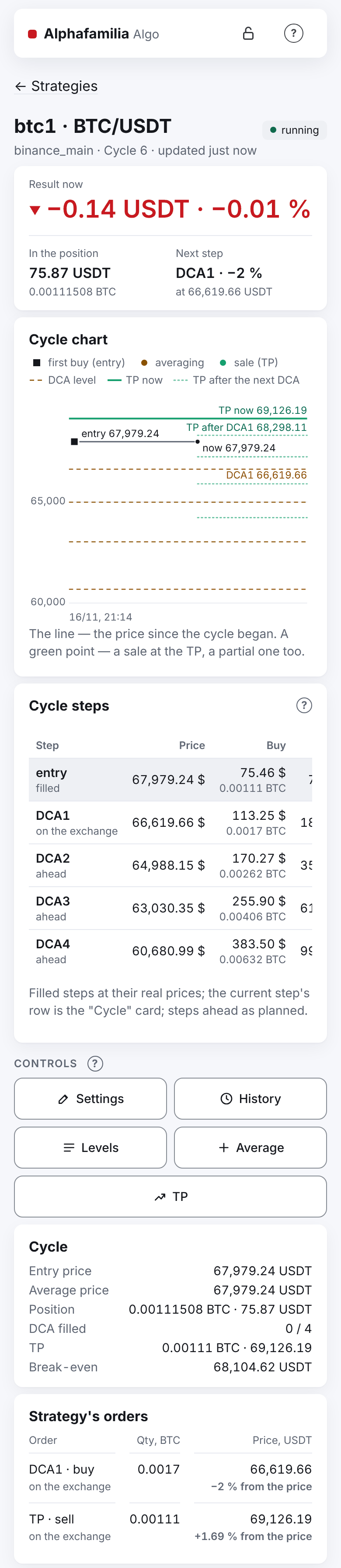
- In the list the strategy is “running”. On the strategy's screen, “Strategy's orders” shows the entry.
- The entry has filled — “🟢 Buy filled: entry”; the TP and the next averaging level have appeared.
- The TP has filled — “💰 Cycle 1 closed” with the cycle's profit. The strategy has started cycle 2 at once.
- The closed cycles — in “Recent cycles” on the strategy's screen and in “Reports”.
- Do not sell the strategy's coins by hand until the strategy is archived: the system counts them together with the other strategies of this coin, and those go into an emergency. The “Stop” window says the same. In detail — Top up or withdraw money.
What you risk
- The price falls below the last level. The whole budget is bought, the strategy waits for the TP. There is no stop-loss: the strategy does not sell at a loss by itself. A loss “on paper” can last long.
- The budget is not a loss limit. The coins the strategy bought fall in price with the market. Put into a strategy only what you are ready to hold for long.
- “Stop” does not sell. The orders are cancelled, the coins bought stay on your account.
- The key. Give the key no right to withdraw and restrict it to the server's address. Type the key only into the app's form.
How to limit the risk: a small budget, more parts and a wider step (a longer ladder), first — a test environment (I want to try without money).
If something goes wrong
- “Withdrawals enabled — such a key is refused”. Turn withdrawals off for the key at the exchange and press “Check the key” again.
- “The server's address … is not in this key's IP list”. Add the server's address to the key's IP list at the exchange.
- “The exchange does not accept this key”. The app lists the common reasons: a test network key chosen for the live environment (or the other way round), the Secret Key not copied whole, the key deleted at the exchange, on Binance — the server's address not in the key's IP list. Fix it or create the key again.
- “Top up the account” shows less than you have. The money is on another account: BingX — on Fund, Bybit — on Funding (if it is there), Coinbase — in another portfolio. Move it.
- “The administrator has not allowed any pair on “…” yet — no strategy can be created here.” Write to the system administrator in Telegram — @alphafamilia — which pairs you need; the list of pairs is extended on request.
- The strategy does not begin a cycle. Look at the “Waiting: …” line on the strategy's screen.
- No “+ New strategy” link. The vault is locked — open it with the vault password.
- “⚠️ Binance (…): little BNB left for fees”. Paying fees in BNB is on at the exchange, and the free BNB beyond what the strategies hold is below 0.02 BNB or below 12 USDT. Buy a little BNB or switch paying fees in BNB off on the exchange. The strategies go on working; the message comes at most once a day.
The rest — Something went wrong — how to fix it. The connections in detail — Connections and the vault.