I want to manage my strategies
At the end of this path you can start and stop strategies, cancel levels, average manually, move the TP, change settings, act on several strategies at once and archive the ones you no longer need. How a cycle works is in Getting started; an unfamiliar word — in the glossary.
What you need
- At least one strategy (cryptocurrency, shares or no money).
- An open vault: while it is locked the strategies do not work and there are no command buttons.
Start, stop, settings and archive ask for a confirmation first; “Done” is at the bottom of the screen, a refusal is a card “Not done: …” at the button's place, with “Retry” and “×”. The manual actions (“Levels”, “Average”, “TP”) are done at once, with a window only for what is dangerous.
Steps
Start
On the “Strategies” tab press the strategy — its screen opens.
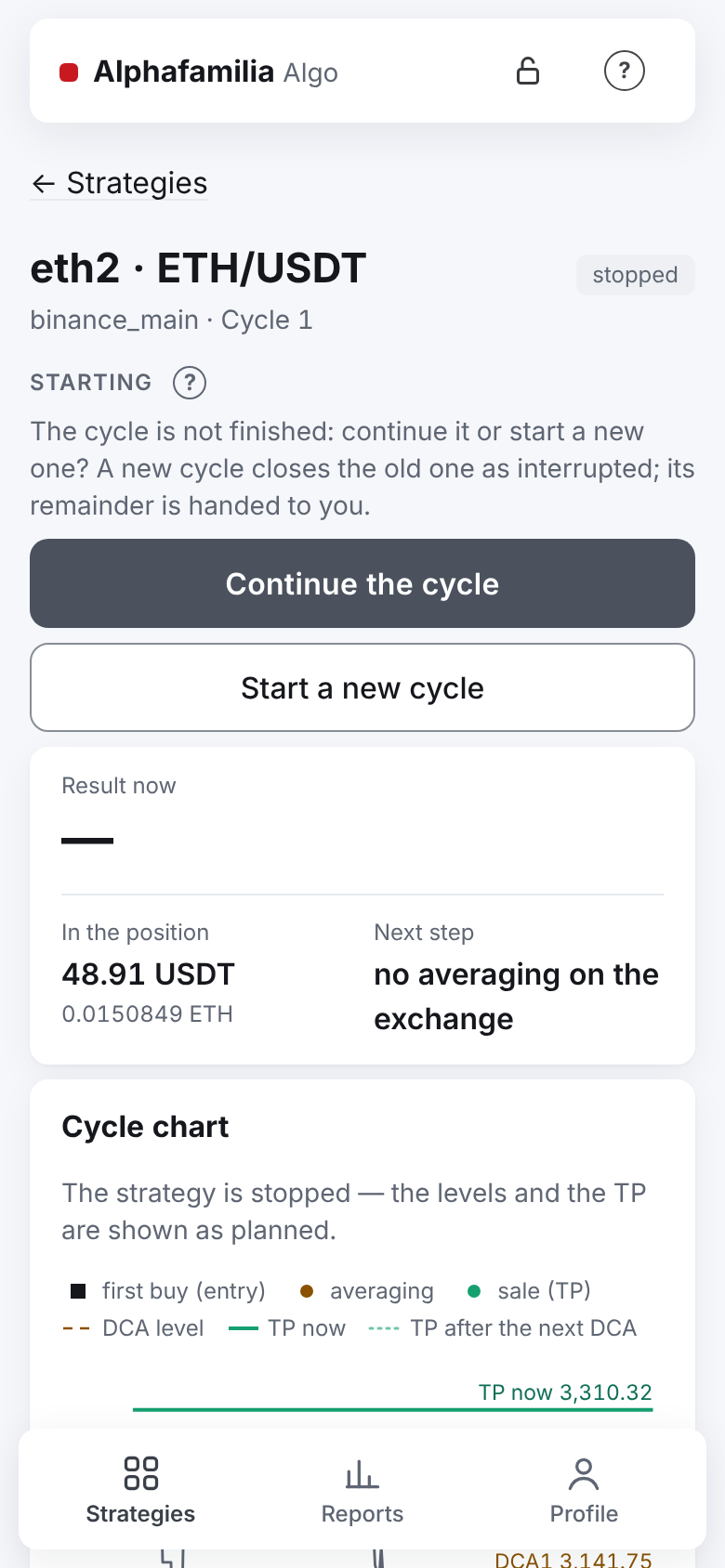
Press “Start” at the top of the screen, in the “Starting” block, and confirm.
If the strategy has an unfinished cycle, there are two buttons instead of “Start”: “Continue the cycle” (the strategy finishes it by the same grid) and “Start a new cycle” (the old one closes as “interrupted”, its remainder is yours, the strategy does not sell it). The old cycle closes once the exchange confirms its orders are cancelled; until then the screen says “Closing: waiting for the orders to be cancelled”.
Stop
There is no “Pause” button. There are two ways to stop — both in the “Stopping” block at the very end of a running strategy's screen:
“Stop after this cycle” — the strategy finishes the current cycle at the TP and begins no new one. The calmest way. Once pressed, the button is gone — that shows the command was taken.
“Stop” (red frame) — the strategy cancels its orders at once. What was bought is not sold (on futures the position stays open without a TP). The confirmation names the position and the result now.
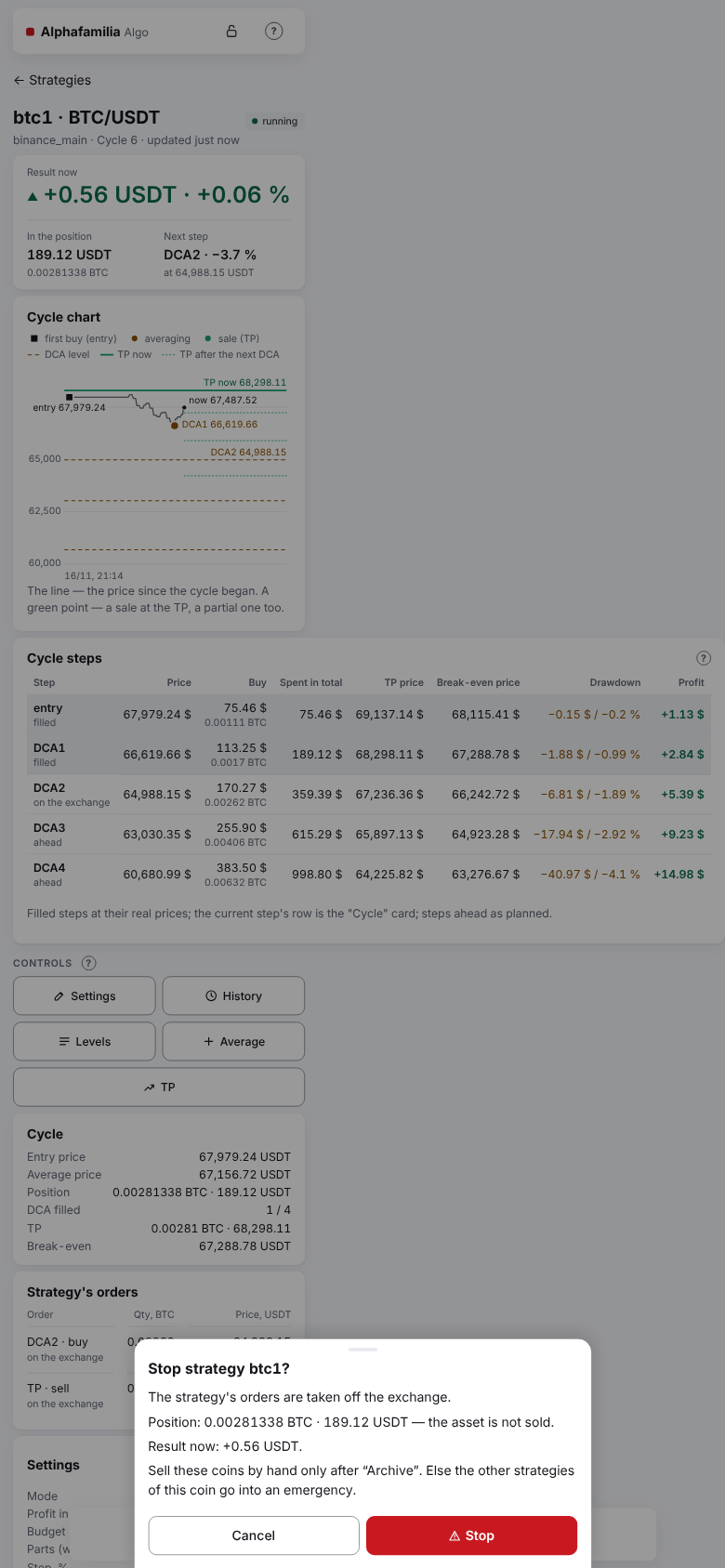
Changed your mind after “Stop after this cycle”: press “Stop”, then “Continue the cycle”. After “Stop”, a strategy with an unfinished cycle shows “Continue the cycle” and “Start a new cycle” at once instead of “Start”. The strategy's orders are taken off and placed again, the strategy finishes the cycle and begins the next one. There is no separate cancel button. Or wait for it to stop and press “Start”. If you are copied, copies without a cycle of their own may stop on “Stop” — their owners start them again.
Levels: cancel or restore an averaging
The “Levels”, “Average” and “TP” buttons (in the “Controls” block) are on a running strategy after its entry. Every action on these screens is done at once, with one tap; a confirmation window comes up from the bottom of the screen only for what is dangerous, and its buttons name the action.
- Press “Levels”.
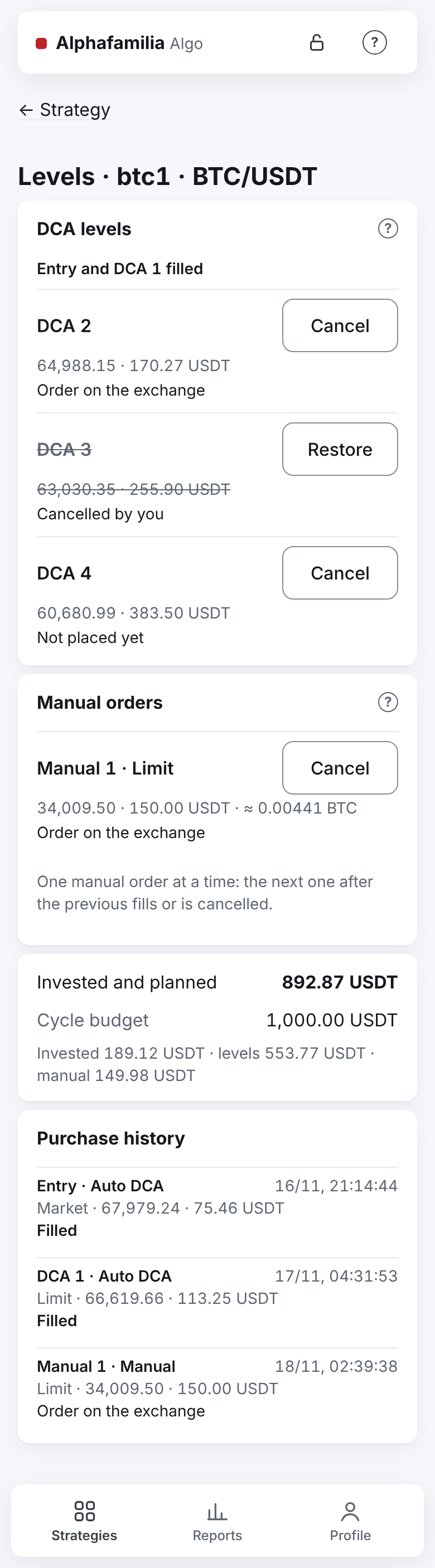
- In the “DCA levels” block the filled levels are gathered in one line (“Entry and DCA 1 filled”); the others show the price, the amount and the state: “Order on the exchange”, “Not placed yet”, “Waiting for funds”, “Cancelled by you”.
- To keep the strategy from buying at a level in this cycle, press “Cancel” in its row. Changed your mind — “Restore” in the same row. If the level's price is worse than the market by over 1 % or the invested would go over the budget, a window asks: “Restore” or “Do not restore”.
A cancel holds only until the cycle ends: the next cycle goes by the settings with the whole ladder. The entry is not cancelled (that is what “Stop” is for), nor is a filled level.
Further down the same screen:
- “Manual orders” — your manual purchases “Manual N · Limit / Market” with their state (“Order on the exchange”, “Filled”, “Cancelled by you”, “Error: …”). A standing limit order is taken off only here — with “Cancel” in its row (the strategy's screen has no such button); a cancelled one comes back with “Restore”, with the same number and its unfilled rest.
- “Invested and planned” against the “Cycle budget”: what is invested already and what the remaining levels and manual orders will take. Over the budget — the line is red, “Over the budget by …”.
- “Purchase history” — every purchase of the cycle: “Auto DCA” or “Manual”, the number, the type, the price, the amount and the outcome.
Average manually
- Press “Average”.
- Choose “Limit order” or “Market”.
- The “Amount” is filled in already — as the next level's; change it if needed. On futures it is the position's size; the margin (amount ÷ leverage) is under the field. On COIN-M the amount is in BTC, the quantity — whole contracts (COIN-M).
- For a limit order — the “Price”. Until you touch it, it follows the current rate.
- As you type, under the fields: the quantity (by the exchange's step), the new average, the new TP and its shift, “Invested after” and “Cycle with the grid”. In red and yellow — the hints: the price far from the market, “Fills at once”, the amount over three times the next level's, over the budget.
- Press “Buy at this price” or “Buy at the market” (for “sell first” and a short — “Sell…”). If the amount is big, the invested would go over the budget, the price is worse than the market by over 1 % or far from it, a window asks: “Buy for …” or “Back”. A price near the market that fills at once — no window, a “Fills at once” note.
It is a purchase beyond the ladder: no step of the ladder is spent, the TP is counted again after the fill. One manual order at a time: the next one after the previous fills or is cancelled. The “Levels” screen opens, the “Manual N” row shows its state; the fill always comes in Telegram, even with the strategy's trade messages off.
- A limit order short of money waits for funds and is retried on the schedule, like the strategy's averagings.
- Market buys at once for the amount, with no price limit. Not enough money or the exchange refused — an error, no retry (not after a top-up either). Not sent within 2 minutes — not sent at all.
Move the TP
- Press “TP”. At the top — “TP now” and whose it is: by the settings or set by you.
- Choose “In percent” and type the “Profit from the average” — or “At a set price” and type the “TP price”. The other value is counted by itself. A TP in percent is rounded to the price step so that the profit is not below the one set (for a long — up, for a short — down).
- Look at the “New TP”, the shift and the “Cycle result after fees”.
- Press “Move the TP” (it is on only for a new value). A TP worse than the break-even — the window “The TP is worse than break-even — the cycle closes at a loss” with the loss; the button “Move the TP” or, if the TP fills at once, “Close at a loss ≈ −…”; to refuse — “Back”.
Your TP holds until the cycle ends: in percent it follows the average after every purchase, at a price it stays put, the volume is the whole position. A new cycle — by the settings again. To get the strategy's TP back at once: on this screen “By the settings: TP … (+… % net)” only puts the strategy's TP price in, and “Move the TP” sends it; or the “Back to the strategy's TP” button in the “Controls” block on the strategy's screen. The settings' percent is the net profit after fees, so from the average (the “Profit from the average” field) it comes out higher: the settings' +1.5 % is about +1.7 %.
Change settings
- On the strategy's screen press “Change” in the “Settings” card (or “Settings” in the “Controls” block).
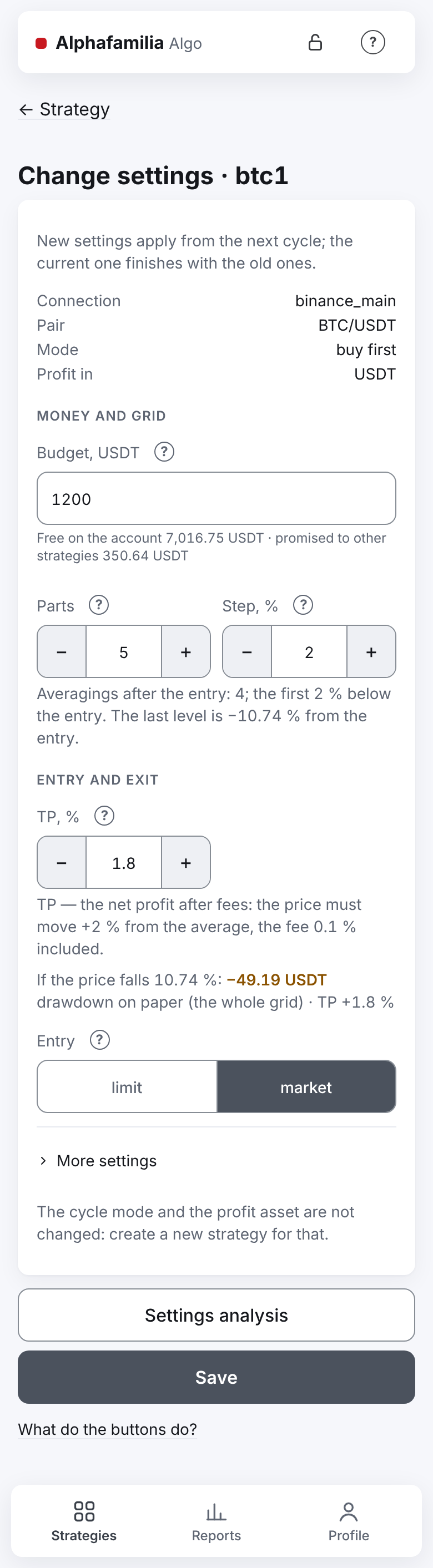
- Change the budget, the parts, the step, the growths, the TP, the entry or the leverage. What each field means — in I want to understand the settings.
- Press “Settings analysis”: the window shows the grid at the current price with the new settings. The short summary line under “TP | Leverage” is seen without the window too.
- Press “Save” and confirm: the window names only what changes.
New settings apply from the next cycle, the current cycle lives on by the old ones. If there is no cycle now — at once. While they wait, the “Settings” card has a “From the next cycle” block and a “Withdraw” button.
Several strategies at once
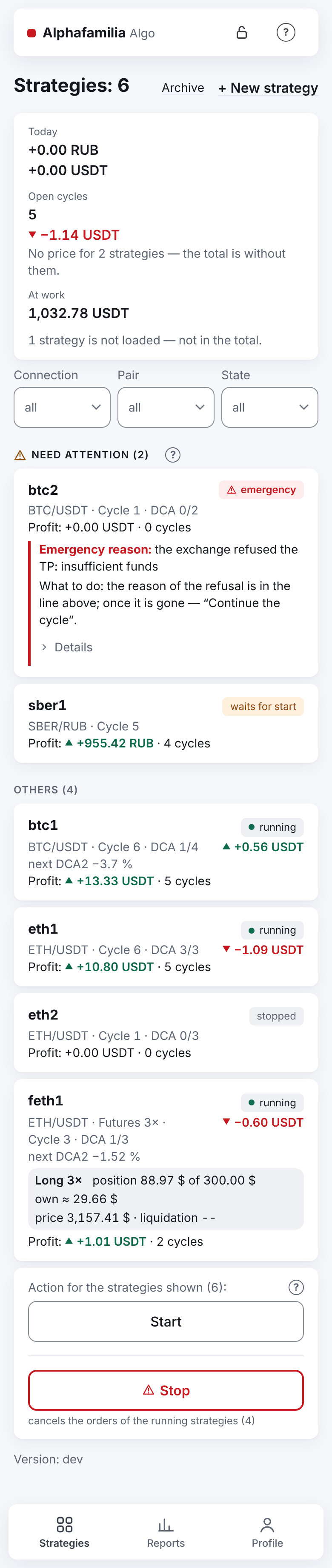
- On the “Strategies” tab, with 4 strategies or more, filter the list: “Connection”, “Pair”, “State”.
- Under the list (with two strategies shown or more) — “Action for the strategies shown (N):” and the buttons “Start” and “Stop”.
- Press a button and check in the window whom the command reaches.
The group “Start” starts only the strategies not running among those shown: stopped by you, paused, waiting for a start; running ones are left alone and emergencies are passed by. “Stop” stops the running, paused and waiting-for-a-start ones; the stopped and emergency ones are left alone. The window says so and how many strategies are in which state: “Now: running 2, paused 1.”. With nothing to act on, the button is off and says why. Need not all of them — filter first. There is no group “Stop after this cycle” — only on each strategy.
Archive and bring back
- Stop the strategy and wait until its orders are cancelled.
- Scroll the strategy's screen down, press “Archive” and confirm. After archiving, the list of strategies opens.
- The archive is on the “Strategies” tab, the “Archive” link beside “+ New strategy”. There a strategy has “Cycle history” and a “Bring back” button (the strategy comes back to the list stopped).
An unfinished cycle closes as interrupted; the remaining asset is yours.
Command journal
“Profile” → “Command journal”: every command, its outcome (“done”, “refused”, “running”, “interrupted”), the reason of a refusal and who gave it.
How to know it worked
- The mark next to the strategy's name: “running”, “stopped”, “emergency”; after a server restart — “waits for the vault” or “waits for start”.
- After a command — “Done” at the bottom of the screen.
- A manual order and its state are in “Levels”, in the “Manual N” row; the orders are in the “Strategy's orders” card. Your TP is marked “your price” in the “Cycle” card (one set in percent — “your TP +5 % net”).
- In Telegram: “✅ Manual N — the order is on the exchange”, after the fill — “🟢 Buy filled: Manual N”.
- In Telegram a group command brings one summary message.
What you risk
- “Stop” does not close the position: what was bought stays with you without a TP until you start the strategy again or deal with it on the exchange yourself.
- A manual averaging spends money beyond the ladder and may take the invested over the budget. A price worse than the current one — the order fills at once, as by the market. A “Market” purchase has no price limit.
- A cancelled level leaves the position smaller than planned: the average and the TP stay further from the price.
- A TP below the break-even closes the cycle at a loss. The consent to a loss holds for the position it was given at: after a new purchase the strategy takes such a TP off and sends “⚠️ Your TP price became a loss”.
- The group “Start” passes emergencies by — sort them out one by one (Something went wrong).
- If others copy you, the copies repeat your manual commands and new settings (what happens to the copies).
- Do not change or cancel the strategy's orders in the exchange's app — the strategy places them again. Manage only with the strategy's buttons.
If something goes wrong
| What you see | What to do |
|---|---|
| “Not done: Stop the strategy first.” on “Archive” | Press “Stop” and wait until the orders are cancelled |
| “Not done: The strategy still has orders on the exchange — wait until they are cancelled.” | Wait a few seconds and repeat |
| No “Levels”, “Average” and “TP” buttons | The strategy is not running, its entry has not filled yet, or it is a copy — a copy's trader does them |
| “The strategy is not running — only a running strategy takes changes.” | The strategy is stopped or loaded after a restart and not started — press “Start” |
| “There is a manual order already — wait for it to fill or cancel it in “Levels”.” | Cancel the manual order in “Levels” or wait for it to fill |
| “Manual N: the market buy was not made” | It is not retried: top up the account or lower the amount and buy again |
| “Checking…” | The exchange's answer did not come; the command is not sent again. Look at the state in the row in a few seconds |
| “The TP is filling — too late to change.” | The cycle is closing already — wait for its end |
| “The service is stopping (an update or a restart) — the command was not taken…” | Wait a minute and repeat |
| “The service restarted while the command ran…” | Check the strategy's state and repeat the command if needed |
| “The stop is recorded, but the exchange has not confirmed yet that these orders are off…” | Check the orders named on the exchange; the strategy takes them off itself and counts a fill if one happens |
| No “+ New strategy” and no buttons | The vault is locked — open it (Something went wrong) |
All the strategy's buttons in detail — in Managing a strategy.
Next
- Something went wrong — how to fix it — emergency, “waiting…”, no money.
- I want to understand the settings — what to change in the settings.
- I want others to copy my trades — show your strategies to others.