I want to stop for good
At the end of this path all your strategies are stopped, their orders are off the exchange, the strategies you no longer need are archived, and the money is on your account or withdrawn. How a cycle works is in Getting started; an unfamiliar word — in the glossary.
What you need
- An open vault: without it there are no command buttons.
- Access to the exchange or the broker — to sell what is left, if needed, and to withdraw the money. The strategy's key cannot withdraw money.
- Time: the calm way waits until each strategy closes its cycle at the TP — that depends on the market.
First choose the way:
| Way | What happens | When it suits |
|---|---|---|
| Calmly — “Stop after this cycle” on each strategy | Each strategy finishes its cycle at the TP and stops. The account holds money, not coins (except dust) | You are not in a hurry; you want to leave with the cycles' profit |
| At once — “Stop” (on a strategy or for all strategies shown) | The strategies cancel their orders at once. What was bought is not sold, futures positions stay open without a TP | You need to stop right now; you will deal with the remainder yourself |
Steps
Calmly: stop after the cycle
- On the “Strategies” tab press the strategy.
- Press “Stop after this cycle” and confirm. The button disappears — the command is taken. There is no separate label for it: while the cycle runs, the strategy shows only “Stop”.
- Repeat for each strategy: there is no group “Stop after this cycle”.
- Wait. When the cycle closes at the TP, “💰 Cycle N closed” comes, the strategy stops by itself and begins no new cycle. The strategy's screen shows “stopped”, the “Start” button, and the cycle card says “No cycle right now.”.
Changed your mind: press “Stop”, then “Continue the cycle” — the strategy finishes the cycle and trades on (Stop). There is no separate cancel button.
If you are copied, your copies stop after their cycle too (What happens to the copies).
At once: stop all
On the “Strategies” tab, with 4 strategies or more, clear the filters — all strategies must be shown.
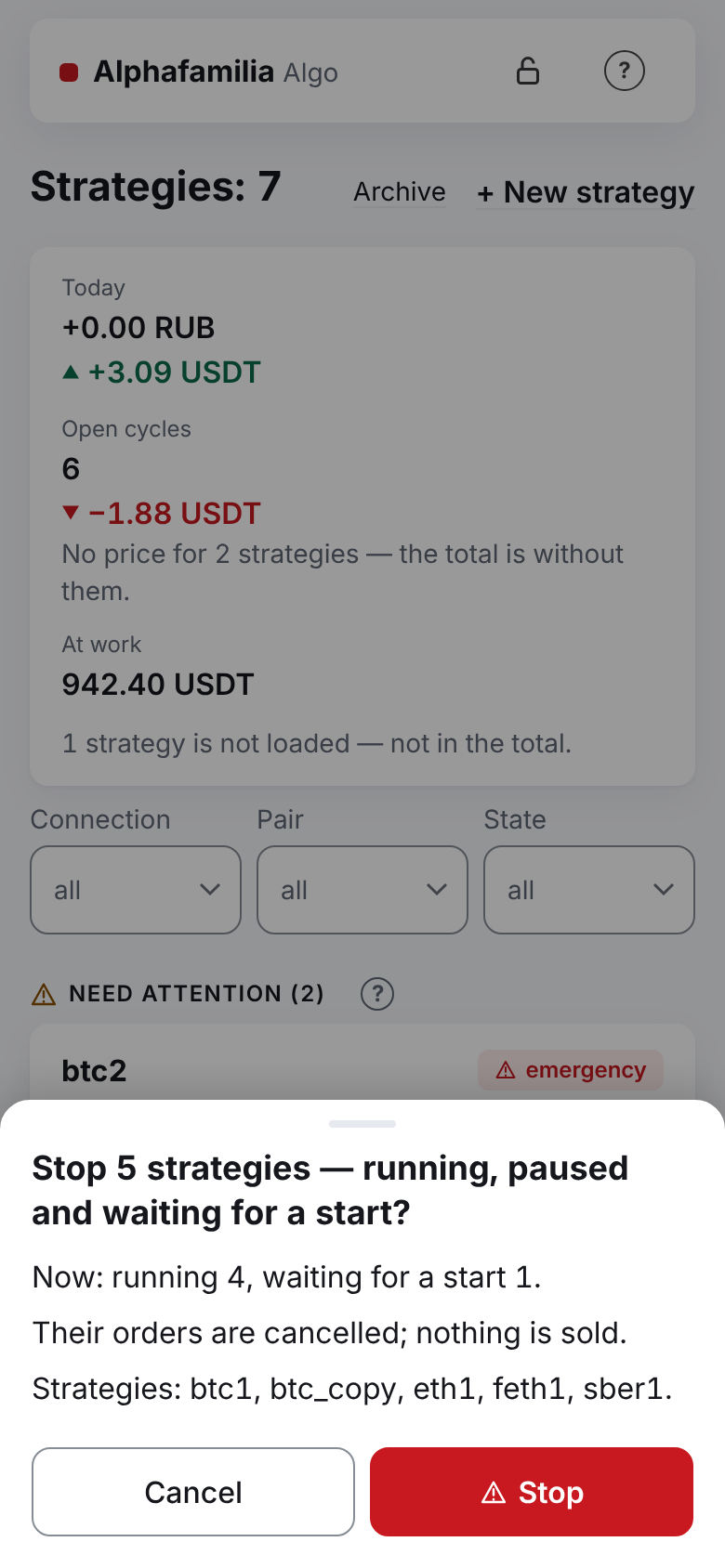
Under the list, in “Action for the strategies shown (N):”, press “Stop” (red frame).
Check the list of strategies in the window: “Stop N strategies — running, paused and waiting for a start?”, below it “Now: …” (how many strategies in which state), “Their orders are cancelled; nothing is sold.” and “Strategies: …” — and confirm. Strategies already stopped or in an emergency are left alone; with nobody to stop, the button is off.
In Telegram one message “ℹ️ Stop: N” comes with the list of strategies.
With a single strategy there is no group button: press “Stop” on the strategy's screen. The window names the position and the “Result now” (Stop).
Deal with what is left on the exchange
After “Stop” (or an emergency) a strategy with an unfinished cycle leaves:
- spot — the coin it bought (for “sell first” — the coin sold and not bought back);
- futures — an open position without a TP;
- T-Invest — the securities it bought.
The strategy neither sells nor closes any of it. You decide:
- Want to sell — first archive the strategy (below): the cycle closes as interrupted, the remainder becomes yours. Then sell or close the position on the exchange yourself.
- Do not sell before archiving if other strategies of the same asset (coin, side of a contract) work on this account: the stopped strategy's records stay in the common sum, and after the sale the working strategies of this asset with a share go into the emergency “less asset on the account than counted” — their orders, the TPs included, are cancelled. And after a sale do not press “Continue the cycle”: the strategy would not find its asset and would go into an emergency itself. Sold already — see Top up or withdraw money.
- Want to keep it — do nothing: the remainder is yours.
Until the cycle is closed, the strategy's asset is counted, even while the strategy is stopped. If, on the contrary, you want the strategy to sell it at the TP, press “Continue the cycle” and then “Stop after this cycle”.
Archive the strategies
- Wait until the strategy's orders are cancelled.
- Scroll the strategy's screen down, press “Archive” and confirm. If the cycle is unfinished, the window warns: “The unfinished cycle is closed as interrupted, the remainder is yours.”.
- Repeat for each strategy: there is no group archive.
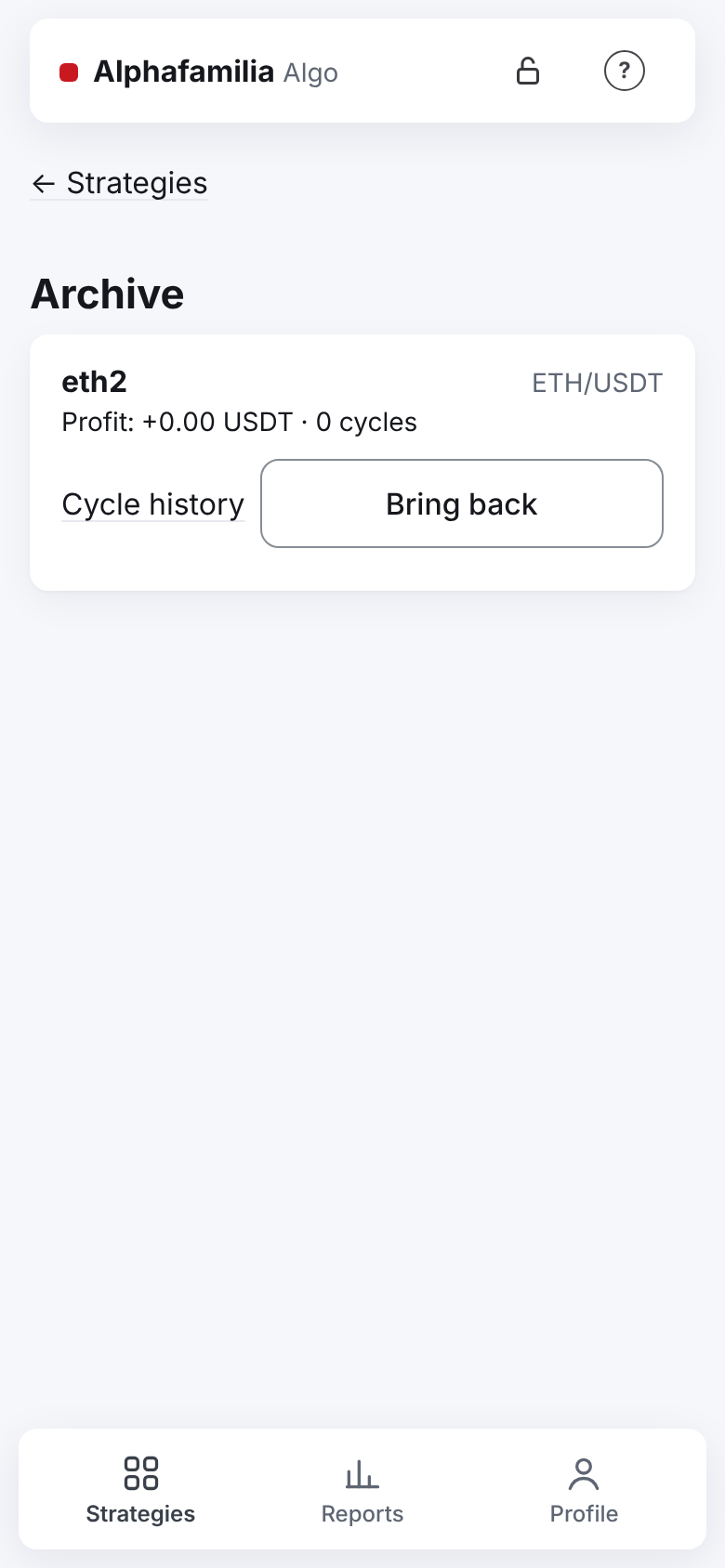
The archive is on the “Strategies” tab, the “Archive” link beside “+ New strategy”. The history of archived strategies is kept for ever and stays in the reports; to bring a strategy back — the “Bring back” button (it comes back stopped).
Withdraw the money
- Make sure no strategy's orders are left on the exchange (in the exchange's app — the list of open orders).
- Sell what you do not need and withdraw the money at the exchange or the broker the usual way.
- To take the access back, delete the strategy's key on the exchange. A connection can be removed in the app only when it has no strategies at all, archived ones included; so deleting the key on the exchange is enough. While the vault is open, one “🔴 The key of connection … no longer works” may come — that is expected.
How to withdraw money safely while strategies work — in Top up or withdraw money.
How to know it worked
- All strategies have the “stopped” mark (or are not in the list — they are archived).
- The “Strategy's orders” card is empty; the exchange has no open orders of the strategies.
- The summary above the list: “Open cycles” — 0 (if you closed the cycles or archived the strategies).
- Once all strategies are archived, the morning summary no longer comes.
What you risk
- After “Stop” what was bought stays without a TP: the price may fall, and there is no sale.
- On futures an open position without a strategy may reach liquidation — close it or watch it yourself.
- Sold the asset, then pressed “Continue the cycle” — an emergency.
- Sold a stopped strategy's asset before archiving it while strategies of the same asset work beside it — an emergency for them.
- “Stop after this cycle” may wait long: the cycle closes only when the price reaches the TP.
- Cancelled the strategy's orders by hand in the exchange's app while the strategy works — it places them again. Stop only with the strategy's buttons.
If something goes wrong
| What you see | What to do |
|---|---|
| “🔴 Orders left on the exchange” | The strategy could not cancel its orders — cancel them on the exchange by hand |
| “Not done: Stop the strategy first.” on “Archive” | Press “Stop” and wait until the orders are cancelled |
| “Not done: The strategy still has orders on the exchange — wait until they are cancelled.” | Wait a few seconds and repeat |
| The window “Done for N of M” after the group “Stop” | Stop the skipped strategies one by one — the reason is named in the window |
| No buttons and no “+ New strategy” | The vault is locked — open it (Something went wrong) |
| After “Stop after this cycle” the strategy is “stopped”, “No cycle right now.”, and you want to trade | Press “Start” |
| No “Stop after this cycle” button, the strategy is running | The command has already been taken — the strategy stops when the cycle closes at the TP |
| No “Stop after this cycle” button, the strategy is not running | It is there only for a running strategy |
Next
- Top up or withdraw money, change the budget.
- How much have I earned — the total for all time, the export for Excel.
- Security — keys and the vault.