Top up or withdraw money, change the budget
At the end of this path you know what you can do with the money on the exchange while the strategies work, what only after a stop, and how to change a strategy's budget or a copy's balance. How a cycle works is in Getting started; an unfamiliar word — in the glossary.
What you need
- Access to the exchange or the broker (site or app): you deposit and withdraw money there. The strategy's key cannot withdraw money — the service does not accept such a key.
- An open vault — so that the app sees how much is free on the account.
The main rule: a strategy's budget is the planned position size, not money set aside. On the exchange there are only the entry or the one nearest averaging, and the TP. The money for the next averagings lies free on the account, and the strategy takes it when the price reaches the level. Withdraw it — and the averaging is not placed. The position may end a little above the budget: a market entry (slippage), one quantity step more with the fee in the coin, your manual averaging beyond the budget. Fees are on top of the budget.
Steps
Top up the account
You can top up at any time; there is no need to stop the strategies.
- Deposit the money at the exchange or the broker.
- If the money did not arrive on the trading account, move it there on the exchange. At BingX a deposit arrives on the Fund account — move it to the spot or the futures account (BingX). A Binance futures strategy trades with the money of the USD-M futures account, a COIN-M strategy — with BTC on the COIN-M wallet (you move it there yourself, COIN-M).
- If the strategy was waiting for money (the line “Retry entry at …” or “Retry DCA… at …”, in Telegram — “🟠 Not enough funds”), it places the order by itself at the next try: in 5, 15, 30, 60 minutes, then once an hour. “✅ Funds are enough” comes. Your manual limit order waits the same way (“Waiting for funds” in “Levels”); a “Market” purchase without money is not repeated — buy again after the top-up.
A top-up by itself does not change the budget: the strategy still trades by the budget plan (the possible overshoots are above: a market entry, the step for a coin fee, a manual averaging).
Find out how much you can withdraw
The app shows the account's free money in the new strategy form — that is the only place, and nothing is created until you press “Save”: just look and leave the screen.
- Press “+ New strategy” and choose the connection you want to withdraw from. In “What we trade” choose any asset, in “Profit currency” — the currency you want to withdraw (for example, USDT).
- Enter any “Budget”.
- Under the “Budget” field a line appears: “Free on the account … · promised to other strategies …”. “Promised” is how much the working strategies of this connection may still take: the unfilled parts of their levels (except cancelled and skipped ones) and their standing manual orders, with the fee. On futures — the margin of those parts (amount ÷ leverage) and the fee on their full size. A working strategy with no cycle open right now “promises” its whole budget (on futures — the budget's margin: budget ÷ leverage), without the fee. On COIN-M “free” and “promised” are in BTC (the contracts' value turned into the coin).
- It is safe to withdraw no more than “free” less “promised”. Do not save the strategy: just leave the screen.
If there is no “promised” — the working strategies of the connection need nothing more. Instead of an amount, “unknown (the vault is locked or the exchange did not answer)” — open the vault and try again.
Withdraw money
- Withdraw on the exchange no more than the amount from the previous step.
- More than that — first lower the strategies' budgets (Change the budget) and wait for their cycles to end, or stop the strategies (I want to stop for good).
Sell, withdraw or move to another account the coin the strategy bought, or close a futures strategy's position by hand, only once this strategy's cycle is closed. The order:
- “Stop” the strategy and wait until its orders are cancelled.
- Archive the strategy (Archive the strategies): the unfinished cycle closes as interrupted, the remainder becomes yours, and the system stops counting it. The strategy is still needed — instead of the archive, “Start” → “Start a new cycle”: the old cycle closes too; then sell no more than the old cycle's remainder — the new cycle buys its own.
- Only now sell, withdraw or close the position.
A stop alone is not enough. Until the cycle is closed, the strategy's asset is counted, even while the strategy is stopped: the system adds up the records of all the strategies of this asset — working, stopped, in an emergency — and compares the sum with what is on the account (If the account has less asset). The exchange does not tell whose coins left. So if you sell a stopped strategy's coins, the working strategies of this asset that hold a share of their own go into the emergency “less asset on the account than counted”: on futures — within a minute, on spot — at the nearest check (a restart of the service or an update, a strategy's start, a TP refusal). Their orders, the TPs included, are cancelled. The stopped strategy itself stays stopped. No working strategies with a share — “🔴 The account does not agree” comes, and “Continue the cycle” on the stopped strategy puts that strategy itself into an emergency.
Sold before archiving — do as “What to do” of If the account has less asset says: the strategy whose coins were sold — “Start a new cycle” or archive, the others — “Continue the cycle”.
The dust of the last cycle (the tiny remainder the strategy carries into the next cycle) may be exchanged between cycles: the strategy stops counting it, with no emergency (The last cycle's remainder is gone).
Change the budget
On the strategy's screen press “Settings” in the “Controls” block (or “Change” in the “Settings” card).
Type the new “Budget”. “Settings analysis” shows the grid at the current price with the new ladder.
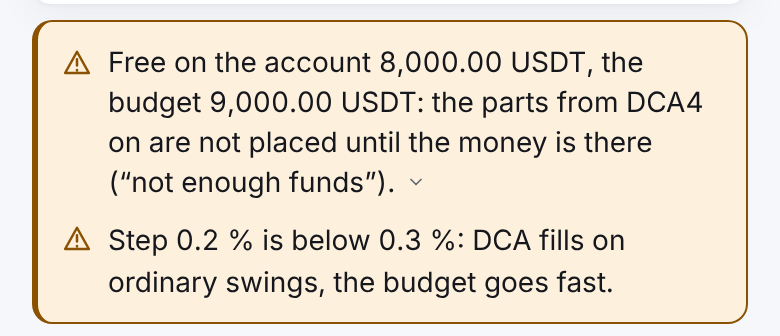
Read the warnings. If the money is short, the form says, for example: “Free on the account …, the budget …: the parts from … on are not placed until the money is there (“not enough funds”). You can save.” or “Other working strategies of this connection are promised …”.
Press “Save” and confirm: the window shows the line “Budget: … → …”.
The new budget applies from the next cycle: the current cycle lives on by its ladder and the old budget. If there is no cycle now, the budget applies at once. While it waits, the “Settings” card has a “From the next cycle” block and a “Withdraw” button.
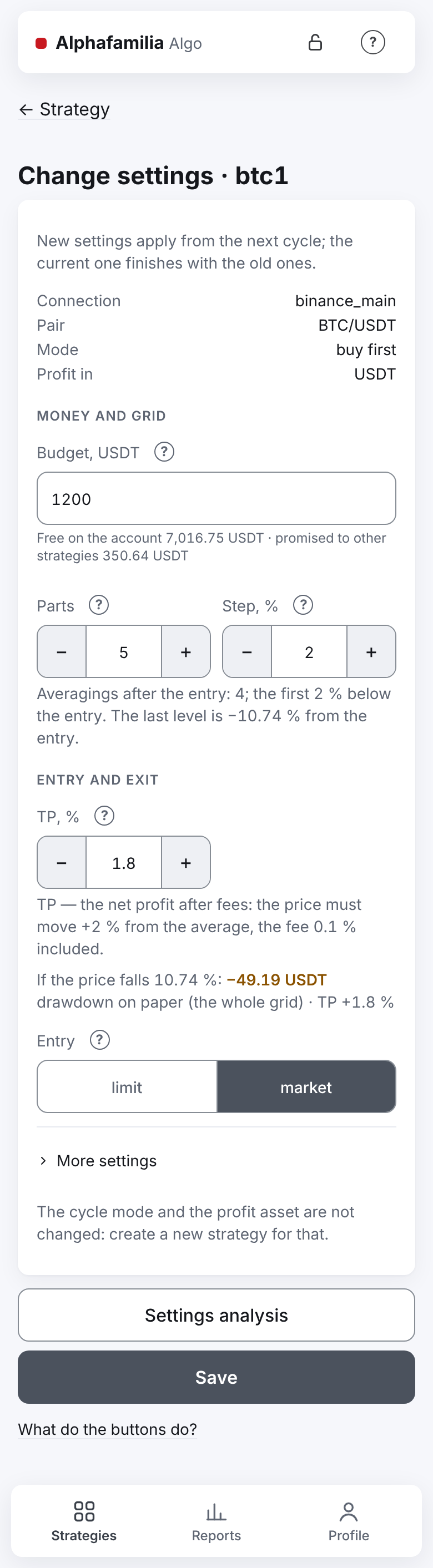
On futures the budget is the position size (the "Position size" field); the margin = size ÷ leverage, and a change of the leverage changes the margin only. For “sell first” on spot the budget is in the coin. The connection, the pair, the market, the cycle mode and the profit currency are not changed — make a new strategy for that.
Change a copy's balance
The lead strategy sets the copy's settings: the “Settings” card on the copy's screen shows its balance in the “Budget …” line, with no “Change” link. The only thing of its own a copy has is its balance.
- On the copy's screen press “Change balance” in the “Controls” block.
- On the “Change the copy's balance” screen type the new balance. Under the field — the minimum for the trader's rules at your exchange; below it — “Below the minimum … — such a balance cannot be saved.”.
- Press “Save”. At the bottom — “The balance changes from the next cycle”.
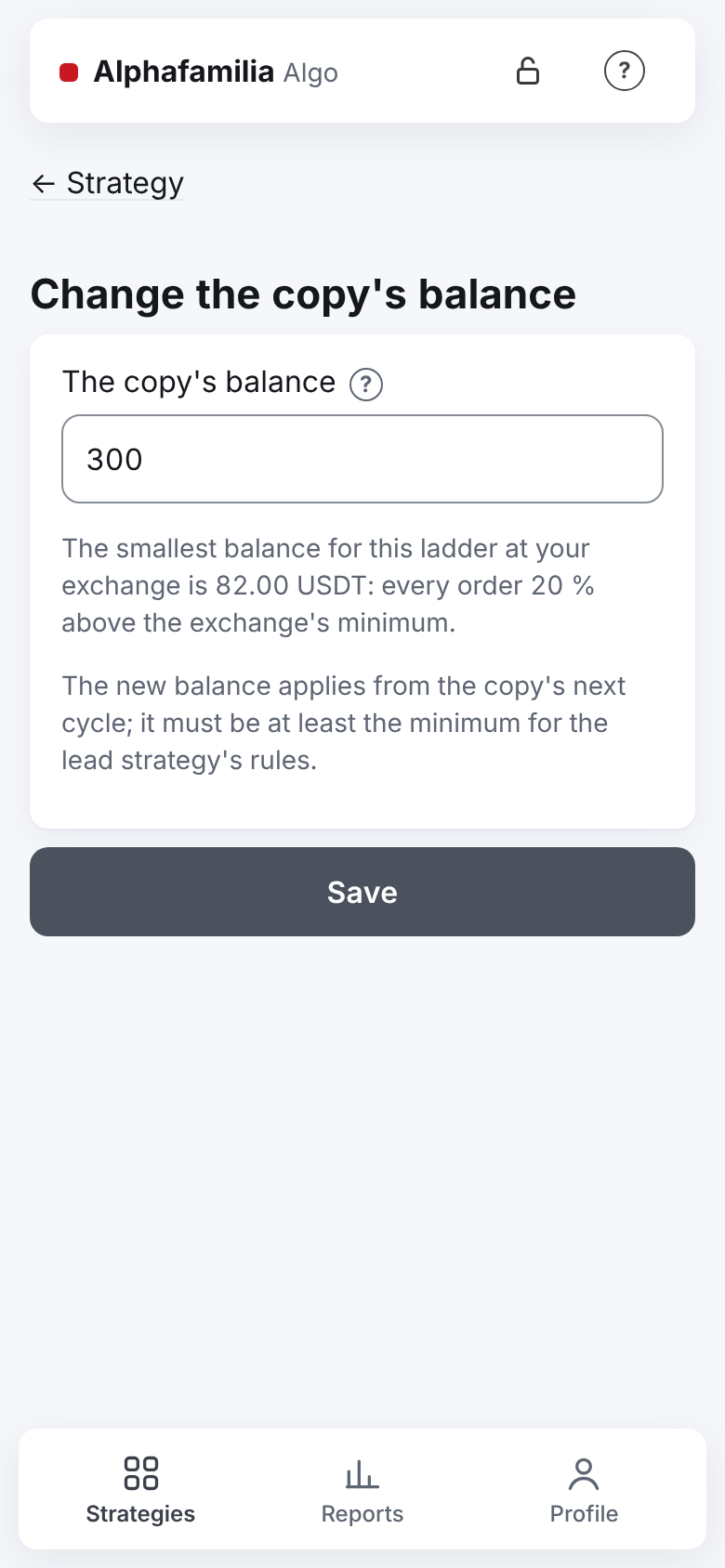
The balance applies from the copy's next cycle. If the copy waits with “the balance is below the minimum for the lead strategy's rules”, it begins a cycle by itself as soon as the balance fits. In detail — in The minimum balance.
How to know it worked
- After a top-up the strategy's “Retry … at …” line is gone, “✅ Funds are enough” came.
- After a withdrawal the strategies work as before: no “🟠 Not enough funds” on the next averagings.
- After a new budget the “Settings” card has the “From the next cycle” block; when a new cycle begins, the “Events” say “new settings took effect”.
What you risk
- Withdrew money “promised” to the strategies — the averagings are not placed when the price reaches them: the average does not come down, the cycle may drag on. The TP stays in place.
- A new budget does not rescue the current cycle: it lives on by the old ladder, which still needs money for the remaining averagings.
- Sold or withdrew a strategy's asset — an emergency; on spot the TP cannot sell what is missing.
- Futures: withdrawing from the futures account lowers the room before liquidation — watch the risk strip (Futures). At Bybit the spot and the futures of one account share the same money (Bybit).
- A copy repeats the trader's manual averagings and market purchases beyond the ladder — keep free money in reserve on its account.
If something goes wrong
| What you see | What to do |
|---|---|
| Topped up, but the strategy still shows “Retry … at …” | Wait until the time in the line — the strategy tries by itself. The money must be on the trading account, not on Fund or another wallet |
| “🟠 Not enough funds” after a withdrawal | Put the missing amount from the message back on the account, or lower the budget (from the next cycle) — Not enough money |
| The emergency “less asset on the account than counted” | Put the asset back and press “Continue the cycle”, or “Start a new cycle” — the remainder becomes yours (Emergency) |
| The budget is changed, but the ladder is the same | That is right until the cycle ends. Needed at once — stop the strategy and press “Start a new cycle” (the old cycle's remainder becomes yours) |
| “Free on the account: unknown (the vault is locked or the exchange did not answer)” | Open the vault; if it is open — wait and open the form again |
Next
- I want to stop for good — withdraw everything.
- How much have I earned — the profit by strategies and for a period.
- I want to understand the settings — the budget, the parts, the step.