Bybit: spot and USDT futures
Bybit is a crypto exchange with spot and USDT perpetual futures. In the app it has two markets: "Bybit spot" and "Bybit USDT futures", each with two environments — "live account" (real money) and "demo" (virtual money at live prices). A strategy works on Bybit as on Binance: entry, averagings, a TP on the whole volume. Below — how Bybit differs.
The account
- You need an account of the global bybit.com. Bybit EU (bybit.eu) does not fit: it has spot only, and its API keys are for broker apps only.
- Bybit restricts the global site for residents of the European Economic Area. If your Bybit verification is from an EEA country, check Bybit's terms for your country before you transfer money.
- The account must be a Unified Trading Account (UTA). A classic account's key is refused: "The key is of a classic Bybit account, and the strategy works only with the Unified Trading Account: upgrade the account to UTA on Bybit (Assets → “Upgrade to UTA”) and check the key again.".
- A Bybit subaccount for the strategies is handy: it has its own money and its own keys.
- The strategies see only the Unified Trading account. A deposit at Bybit may land on the Funding account (it depends on Bybit's settings; the app does not check it): if the money is there, move it to the Unified Trading account (“Assets” → “Transfer”). The app reminds you of it in the "First steps" checklist; the strategy form warns when the account has less than the budget.
The shared wallet
On the Unified Trading Account the spot and the futures work on one wallet:
- the spot coins are the futures' collateral;
- the spot's free money is less by the futures' margin ("The spot and the futures of one Bybit account share one wallet: the spot's free money is less by the futures' margin." — a hint in the strategy form);
- a futures loss may become a USDT debt, and in a liquidation the exchange may sell the spot coins.
The spot and the futures of one account may both be connected — as two connections. When the second is added the app warns: "The spot and the futures of this Bybit account share one wallet (the Unified Trading Account). The spot coins are the futures' collateral: in a liquidation the exchange may sell them.", and the cards of both connections get the mark "shared wallet".
Important. If the exchange sells spot coins in a futures liquidation, the spot strategy's records differ from the exchange, and it stops in an emergency. For large sums make a separate Bybit subaccount for each market — it has its own wallet.
The key
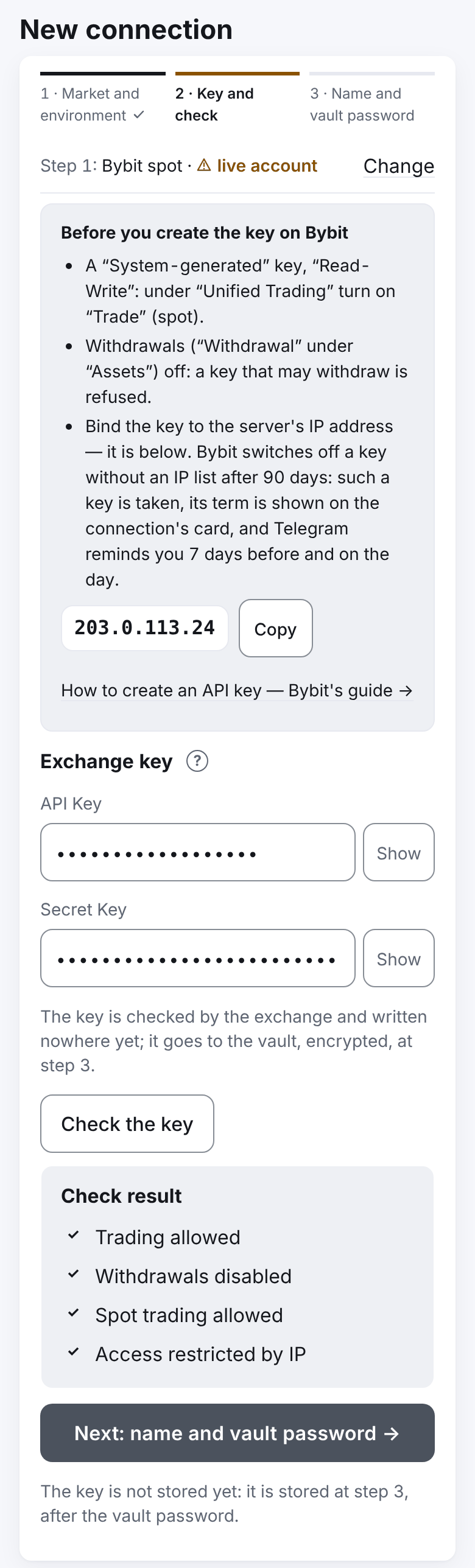
The key is created on Bybit: profile → "API" → "Create New Key" → "System-generated API Keys".
- Find the server's address: in the app, "Profile" → "Settings" → "Exchange connections" → "+ New connection" → a Bybit market → "Next: the key →". The address is shown above the key's fields with a "Copy" button; there too — the reminder "Before you create the key on Bybit" and the link "How to create an API key — Bybit's guide →".
- On Bybit choose "System-generated", "Read-Write".
- Switch on the permissions: for spot — "Unified Trading" → "Trade"; for futures — "Contracts" → "Orders" and "Positions". One key may have both sets — then it can be entered into both connections.
- Withdrawals ("Withdrawal" under "Assets") — off. A key that may withdraw is refused.
- Bind the key to the server's IP address.
- Copy the API Key and the Secret Key (Bybit shows the secret once) and enter them in the app: "Check the key".
The key's term
Bybit switches off a key without an IP list after 90 days (and 7 days after the Bybit account's password is changed). The app takes such a key, but:
- the connection's card shows "The key works until 30.01.2027 (89 d)"; 7 days before the line is marked, after the term — "The key expired on … — replace it";
- Telegram reminds you 7 days before and on the day: "The key of connection … expires in N d" and "… expires today".
A key bound to the server's IP has no term. But if the server moves to another address, the key stops working — its IP must be changed then. Once a day the server checks the keys itself and tells you if a term changed, a key stopped working, withdrawals were switched on or the trading permission is gone (The key's term and daily check).
Replace a key — "Replace key" on the connection's card, with the connection's strategies stopped (Replace the key).
The demo account
Bybit's demo is test trading inside your live account: spot and futures, live prices, virtual money (the demo funds are requested on Bybit's site in "Demo Trading" mode). The app does not support Bybit's test network (testnet) — only the demo.
- The demo key is made apart: on bybit.com switch to "Demo Trading" mode and create the key there. A live key does not work on the demo, and the other way round.
- In the app choose the environment "demo".
- On the demo futures Bybit does not tell the account's fee rate: the TP is planned with Bybit's base rate as an estimate. On the demo spot the account's rate is read, as on the live account.
- Bybit keeps the demo account's orders for a short time (about 7 days).
Futures account settings
| Setting | What is needed | Who sets it |
|---|---|---|
| Position mode (USDT futures) | Hedge | The strategy switches it on itself if the account has no open USDT-perpetual positions and orders; a Telegram message tells of the switch |
| Limit orders' price band | "Reject orders" | The strategy switches it itself; a Telegram message tells of the switch |
| Margin | Regular (cross) | You: Assets → Unified Trading Account → Margin Mode → Cross Margin |
| Portfolio margin | Not supported | You: switch to Regular (cross) |
| Leverage | One for both sides of a pair | The strategy sets the leverage of its settings; all strategies of one pair have the same |
Why "reject": by default Bybit silently moves a limit order priced outside the allowed limits to the nearest allowed price. For a strategy this is dangerous: an averaging would fill not at its own price. So the strategy switches the band to "reject".
Both switches change the settings of the whole account — for your manual trading on it too. So each is told in a message: "Bybit (…): the account's USDT futures switched to hedge mode" and "Bybit (…): the futures limit order price protection switched to “reject”".
If the strategy could not switch by itself or the margin is wrong, it does not trade and shows the reason, for example: "Bybit futures are in one-way mode, and the strategy could not switch them to hedge: the account has open USDT-perpetual positions or orders. Close them or switch on hedge mode in Bybit's settings (Derivatives → Position Mode)" or "The margin is isolated: switch to Regular (cross) — on Bybit: Assets → Unified Trading Account → Margin Mode → Cross Margin".
The rest about futures — leverage, funding, liquidation, the risk strip — is as on Binance: Futures. The strategy takes funding from Bybit's transaction log; Bybit writes a payment there a few minutes after the hour, so it reaches the cycle up to 20 minutes later — the cycle that held the position at the payment, even one already closed. The liquidation price is shown in the strategy's overview.
Fees and MNT
- On spot a buy's fee is charged in the coin bought, a sell's — in the quote currency; on futures — in USDT. So that after the fee in the coin the planned quantity is left for the TP, a spot purchase (entry, averaging, manual) buys one quantity step more. For the TP plan the strategy reads your account's maker rate (on demo futures — the base one).
- Bybit may charge the fee in its own coin MNT (at a discount) — like BNB on Binance. The strategy converts it at MNT's price. If Bybit has no MNT market for the pair's currency, the strategy stops in an emergency with the reason. The simplest is to switch fee payment in MNT off in Bybit's settings.
- Bybit charges a trade's fee rounded up to 8 decimals; the strategy counts the same. "Dust" may stay on the account — up to 0.00000001 of a coin per trade: Bybit keeps more decimals than it shows.
Other
- Request limits. Bybit limits the requests of each account and of the server's address (600 requests in 5 seconds). If Bybit blocks the server's address (answer 403), the Bybit strategies wait at least 10 minutes and a message comes; TPs are placed first. The answer 403 "Server is busy" is not a block: requests to Bybit wait one minute with no message and go on; ten minutes and the message — only if the refusal repeats within the next 5 minutes.
- Fills from the event stream. Bybit itself reports fills. By default (the compare mode) the strategies count trades by the exchange's trade history, and the stream's trades are compared with it; differences are written to the server's log. The mode in which a trade from the stream is a fact at once (counting and the TP sooner: before, 7–11 s) is switched on by the system administrator separately for futures and for spot (
[service] bybit_futures_fills_from,bybit_spot_fills_fromin "Server settings"; spot — only after a live check of the fee in MNT). Then the full reconciliation with the history runs every 5 minutes; a broken stream — the strategy goes back to the history; a trade the stream lost (the order filled but its trade is missing) the strategy reads from the history after 2 seconds. On a difference in side, quantity, price or fee coin the strategy stops trusting the stream; a fee differing in the last digit and a time within a second are only noted. Bybit sends an order and its execution as two messages, so the urgent read of the history for a "gap" (the order filled but its trade is missing) starts not at once but 2 seconds after the news of the order — in both modes.bybit_stream_sampleswrites the first lines of the stream to the log for a check — only at the developer's request. Iffills_from = "rest", the streams of all exchanges give no facts (see "Server settings" in For the system administrator). - Late trades. A trade that comes later is counted; an order without trades is read again after 2 minutes. The strategy waits for a TP's trade up to 12 minutes without going into the "less asset on the account than counted" emergency. Strategies of one account may trade with each other: one trade — two rows, each counts its own.
- A lost answer to an order. The strategy looks the order up by its number and never sends it again blindly. "There is no such order" is concluded only 10 minutes after sending: Bybit's history lags.
- Old orders. Bybit keeps filled orders for 2 years. If an order older than two years is found neither in the history nor in the trades, the strategy stops in an emergency with a message.
- Reports group Bybit strategies as "Bybit" and "Bybit futures"; coin rates come from Bybit if it is your only crypto exchange.
Next: Copying trades