I want to understand the settings
At the end of this path you know what each field of the strategy form does, how the ladder of orders comes out of them and when new settings take effect. How a cycle works is in Getting started; an unfamiliar word — in the glossary.
What you need
- An open vault and at least one connection — then the “Strategies” tab has “+ New strategy”.
- Nothing has to be saved: the form counts everything at once while you change the numbers. Looking is free of risk.
Steps
On the “Strategies” tab press “+ New strategy”. On top keep “Own settings”.
Choose “Connection”, “What we trade” and “Profit currency”.
Type the “Budget” (the field “Budget, USDT”: after the comma — the budget's currency).
Change “Parts”, “Step, %” and “TP, %” and watch the line under “TP | Leverage”: what happens if the price reaches the grid's last level, and the TP — “If the price falls 12 %: ▼ −63.77 USDT (the whole grid) · TP +1 %”. The whole grid — the chart and the steps' table — is in the window of the “Settings analysis” button.
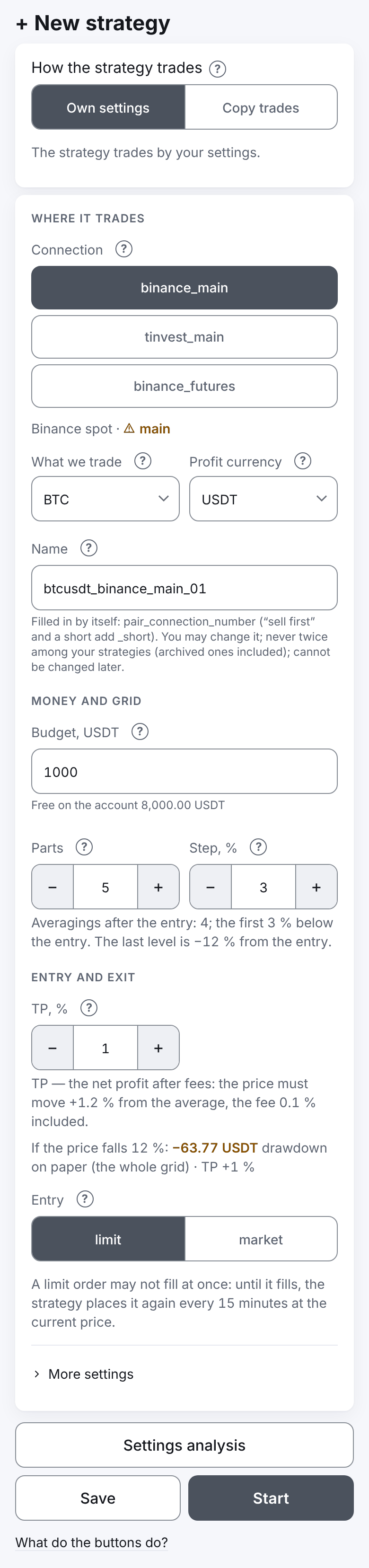
Open “More settings” — it holds “Mode”, “Offset, %”, “Part growth, %”, “Step growth, %” and “Not above, USDT”.
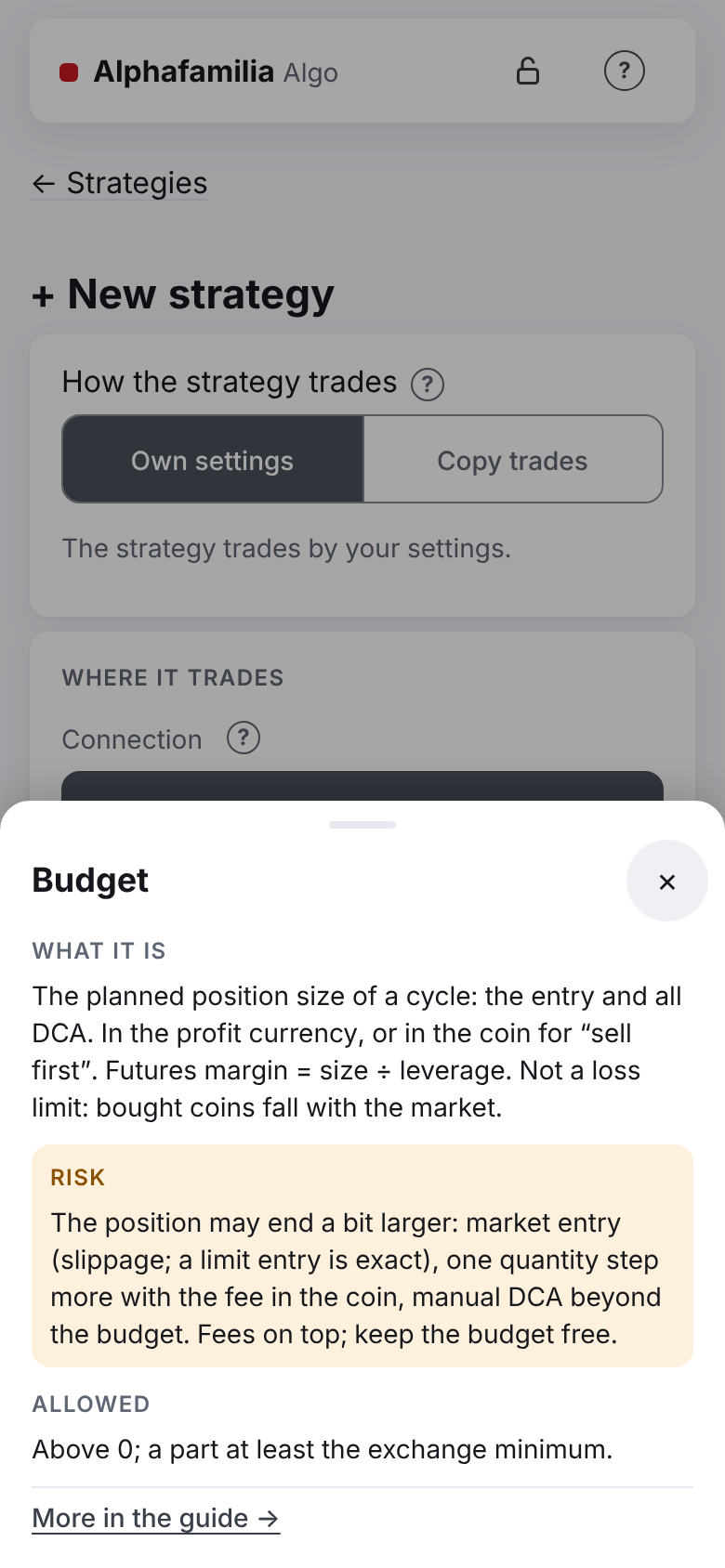
The “?” sign at a field opens its tip: what it is, the risk, what is allowed. About the buttons at the bottom of the form — the link “What do the buttons do?” under them.
What each field does
| Field | What it sets | What it changes |
|---|---|---|
| “Connection” | The exchange account and the market (spot or futures) | Where the strategy trades. Never changes later |
| “What we trade”, “Profit currency” | The pair: what is bought and what money is counted in | Never changes later |
| “Budget, USDT” (on futures — “Position size, USDT”) | The planned position size of a cycle — the entry and all averagings together | The size of each order. At least the budget (on futures — the margin) must be free on the account, or some orders are not placed. Fees come on top. The position may end a little larger: a market entry, one quantity step more with the fee in the coin, a manual averaging |
| “Parts” | How many orders the budget is split into: the entry plus the averagings | 5 parts — the entry and 4 averagings. More parts — each smaller; the form does not take a part below the exchange's minimum |
| “Step, %” | How many % below the entry the first averaging is (for “sell first” — above) | The gaps add up: with a step of 3 % the levels are −3, −6, −9, −12 % from the entry |
| “TP, %” | The cycle's net profit after fees, in % of what the cycle spent | How far the price has to rise from the average for the cycle to close |
| “Entry” | “limit” — an order at a price with the offset; “market” — buying at once | A limit entry may wait: the strategy re-places it at the current price every 15 minutes until it fills. A market entry is immediate, but its price is not known exactly beforehand |
| “Leverage” (futures only) | How many times the position size (the budget) exceeds the margin, 1 to 10 | The ladder is counted from the position size, the leverage changes the margin only (size ÷ leverage); the larger the leverage, the closer the liquidation. In detail — futures |
| “Mode” (“More settings”) | “buy first” or “sell first” | “Sell first” on spot sells your coin and buys it back cheaper — the budget is in the coin. On futures these are long and short. Never changes later |
| “Offset, %” | How many % below the current price the limit entry goes (for “sell first” — above; 0 — at the current price) | A larger offset — a cheaper entry, but it may take long to fill |
| “Part growth, %” | How many % each next part is larger than the one before (0 — equal) | The main money goes to the lower levels; the first parts become small |
| “Step growth, %” | How many % each next gap is wider (0 — equal) | The ladder goes deeper — see the last step's price in the steps' table of “Settings analysis” |
| “Not above, USDT” | A price above which a new cycle does not begin (optional) | For a cycle's start only; inside a cycle the price is not checked against it. For “sell first” — “Not below” |
The fee is not typed in: the strategy takes your account's rate from the exchange (T-Invest — 0.3 % until the actual one is known), it is shown in the line under “TP | Leverage”. “Profit in the coin” is not available for new strategies. All the fields in order with their tips — in Creating a strategy.
The ladder in numbers
Example: ETH/USDT, price 2,000 USDT, budget 1,000 USDT, 5 parts, step 3 %, part and step growth 0, TP 1 %, a limit entry without offset, exchange fee 0.1 %. The form shows this grid:
| Part | Price | Below the entry | Quantity | Sum | TP if everything up to this part fills |
|---|---|---|---|---|---|
| entry | 2,000.00 | 0 % | 0.1 ETH | 200.00 | 2,024.05 |
| DCA1 | 1,940.00 | −3 % | 0.103 ETH | 199.82 | 1,993.24 |
| DCA2 | 1,880.00 | −6 % | 0.1063 ETH | 199.84 | 1,962.09 |
| DCA3 | 1,820.00 | −9 % | 0.1098 ETH | 199.84 | 1,930.60 |
| DCA4 | 1,760.00 | −12 % | 0.1136 ETH | 199.94 | 1,898.73 |
How to read it:
- Only the entry bought — the TP is at 2,024.05: the price needs +1.2 % (1 % net plus the fees of the buy and the sale).
- The price fell to 1,940 — the first averaging filled, the average went down and the TP was moved lower, to 1,993.24. To close the cycle the price no longer has to get back to 2,000.
- Below 1,760 (−12 %) there is no more money to buy with: the whole budget is in, the strategy waits for the TP.
- The sums are a little below 200: quantities are rounded down to the exchange's step.
The same ladder with step growth 20 % and part growth 50 %:
| Part | Price | Below the entry | Sum |
|---|---|---|---|
| entry | 2,000.00 | 0 % | 75.80 |
| DCA1 | 1,940.00 | −3 % | 113.68 |
| DCA2 | 1,868.00 | −6.6 % | 170.55 |
| DCA3 | 1,781.60 | −10.92 % | 255.84 |
| DCA4 | 1,677.92 | −16.1 % | 383.74 |
The ladder got deeper (−16.1 % instead of −12 %), and the main money is at the bottom. If the price falls only a little, the cycle holds less money and its profit is smaller. How the levels are counted — in Creating a strategy.
Ready combinations
Three combinations the system administrator advises. The form has no ready buttons for them — type the numbers yourself. In all three: a “limit” entry, part growth and step growth 0. The depth and the TP below are for the example above (price 2,000, fee 0.1 %).
| Combination | “Parts” | “Step, %” | “TP, %” | Last level | The price needs to the TP after the entry | What it means |
|---|---|---|---|---|---|---|
| Cautious | 5 | 4 | 1.5 | −16 % | +1.7 % | A deeper ladder, fewer trades, more profit per cycle |
| Usual | 5 | 3 | 1 | −12 % | +1.2 % | The middle. These numbers are already in a new form |
| Frequent trades | 6 | 2 | 0.7 | −10 % | +0.9 % | Cycles close more often, but the ladder is shorter — in a deep fall the money ends sooner |
Any number can be changed. Before saving look at the steps' table of “Settings analysis” — the price, the drawdown and the profit at every step — and the warnings above the buttons (what they mean).
When new settings take effect
- A running strategy's settings are changed with “Change” in its “Settings” card (or the “Settings” button in the “Controls” block). The steps — in I want to manage my strategies.
- The current cycle lives on by the old ladder; new settings apply from the next cycle. While they wait, the “Settings” card has a “From the next cycle” block with “Withdraw”.
- If there is no cycle now (the strategy is between cycles), new settings apply at once.
- A new leverage — from the next cycle and only when the pair has no position and no orders.
- The connection, the pair, the mode and the profit currency do not change — for those you create a new strategy.
What you risk
- The budget is how much money the strategy puts into a cycle if the price reaches the last level.
- A strategy never sells at a loss by itself. If the price went below the last level, the money stays in the coin until the price comes back to the TP. The deeper the ladder, the bigger the fall it survives, but the longer a cycle may last.
- A small step — averagings fire on ordinary swings and the budget goes fast.
- A TP below two fees brings almost nothing.
- How to limit the risk: a small budget, a training exchange first (no money), and looking at the steps' table of “Settings analysis” — the drawdown at the last step — and the form's warnings.
If something goes wrong
| What you see | What to do |
|---|---|
| “Save” and “Start” do not press | One line under them says what is not ready: a field, the pair or the grid |
| “Grid parts the exchange would refuse …” | Raise the budget or lower the number of parts; the budget needed is written under the form's fields |
| Yellow warnings above the buttons | They forbid nothing. What each one means — in Creating a strategy |
| After saving the strategy says “Waiting: entry condition” | The price is above “Not above”. Wait or change that field |
Other states of a strategy — in Something went wrong — how to fix it.
Next
- I want to manage my strategies — start, new settings, manual actions.
- I want to trade cryptocurrency — create a strategy with these settings.
- I want to try without money — check a combination on a training exchange.