BingX: spot and USDT-M futures
The strategy trades on BingX — spot and USDT-M perpetual futures — by the same rules as on Binance: the entry, the averaging orders, a TP for the whole amount; on futures the leverage, long and short, funding and liquidation (Futures). This page is about what differs on BingX: the accounts, the key, the VST demo account, moving money and a few habits of the exchange.
Account and sub-account
- You need a verified BingX account; for futures strategies — the Perpetual Futures section opened.
- Better give the strategies a sub-account of their own and issue the key there: the strategies see only its money, and your manual trading on the main account stays out of their way. Sub-accounts are made in BingX's account section ("Sub-accounts").
- Spot and futures of one account are two connections: "BingX spot" and "BingX USDT-M futures". The key may be the same (with both trading rights), but it is entered for each connection (Connections and the vault).
The key and the server's IP
| Key setting on BingX | What is needed |
|---|---|
| Read | On (always on at BingX) |
| Spot Trading | On — for the "BingX spot" connection |
| Perpetual Futures Trading | On — for the "BingX USDT-M futures" connection |
| Withdrawal, transfers | Off — a key that may withdraw is refused |
| IP whitelist | Only the Alphafamilia Algo server's address |
- Find the server's address: in the app, "Profile" → "Settings" → "Exchange connections" → "+ New connection" → a BingX market → "Next: the key →". The address is shown above the key's fields with a "Copy" button; the checklist and the link to BingX's key page are there too.
- On BingX open the profile → "API Management" → "Create API". Confirm with your two-factor codes. Copy the API Key and the Secret Key — the exchange shows the Secret Key once.
- In the key's permissions ("Edit") turn on "Spot Trading" and/or "Perpetual Futures Trading". Leave withdrawals and transfers off.
- Put the server's address into the key's IP whitelist and save.
What the app checks on "Check the key": trading allowed, withdrawals not, the right to the connection's market (spot or futures), and whether there is an IP list. Without an IP list the key is taken with a warning; with the withdrawal right it is refused.
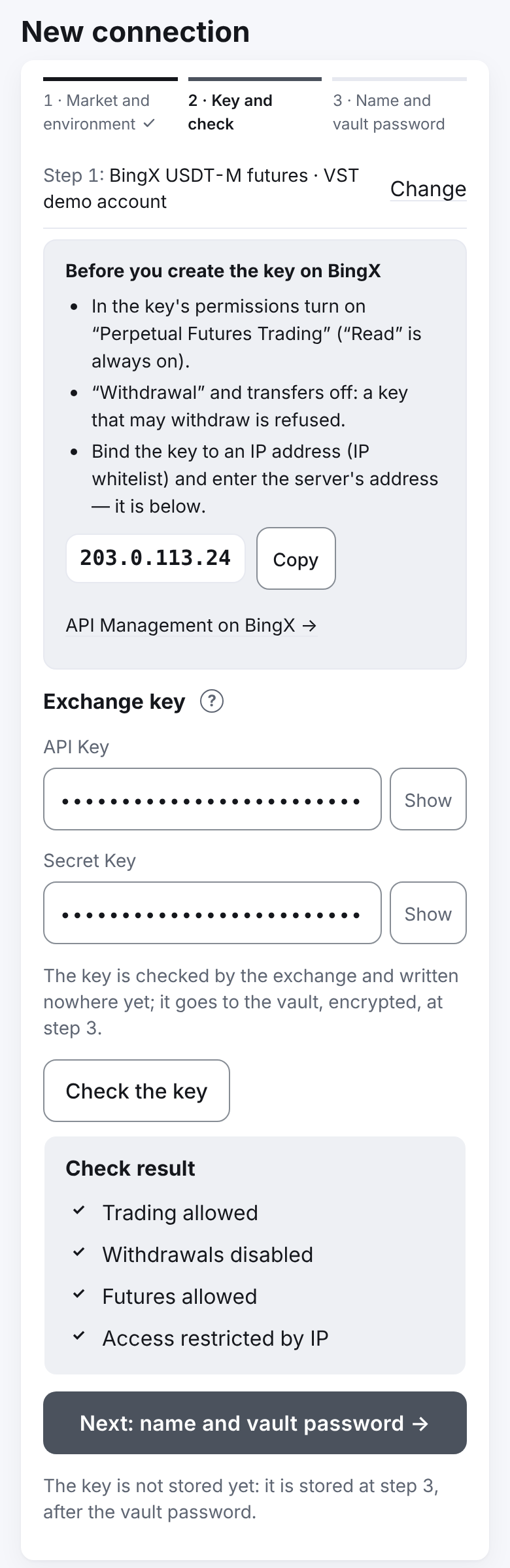
Important. The server reaches BingX over IPv4 only — that is the address the app shows. If the server's address is not in the key's IP list, the check answers "The server's address … is not in this key's IP list — add it in the key's settings at the exchange and check again". After the server moves to another address the BingX keys have to be updated — the system administrator will tell you.
Important. Enter the key and the secret only into the app's form. The app takes key parts of 32–128 characters without spaces; the rest is checked by the exchange itself.
The VST demo account
BingX has demo futures trading — an account with virtual USDT the exchange calls VST. It is the "VST demo account" environment of the "BingX USDT-M futures" connection: the same key, the same contracts, no real money.
- Choose the market "BingX USDT-M futures" and the environment "VST demo account". The key is checked on the demo account; "Add" does not ask about real money.
- The quote currency of such a connection's strategies is called VST — the demo USDT.
- BingX has no demo spot: the "BingX spot" connection is live only. If you came with "For tests", a yellow note under the environment: "This market has no test environment — only real money here.". To try spot, use a small budget (say, 20 USDT on BTC-USDT): the 200 USDT of the "First steps" checklist is only the hint's threshold, not the exchange's rule. Whether the sum is enough the strategy form shows: it does not save parts below the exchange minimum.
Moving money between accounts
Money on BingX sits in several accounts: deposits arrive in the Fund account, spot trading uses the spot account, futures trading the perpetual futures account. The strategies see only the spot and the futures accounts: the line "Free on the account" under the budget in the strategy form and the warning "Free on the account … the budget …" are counted from them.
Move the sum on BingX: "Assets" → "Transfer", from the Fund account to the spot or the futures one. The strategy's key makes no transfers — that right is off.
Setting up the futures account
The strategy trades futures only in Hedge Mode, with cross margin and one margin asset. On BingX Hedge Mode is the default. In another mode the strategy waits and shows the reason on the strategy's screen:
- "The account is in One-way mode: switch on Hedge Mode — on BingX: Futures → settings (the gear) → Position Mode". The mode is one for the whole account and switches only with no open positions or orders.
- "Multi-Assets mode is on: switch it off — on BingX: Futures → settings → Asset Mode → Single-Asset". The VST demo account has no such mode.
- "The pair's margin is isolated: switch to Cross — on BingX in the contract's order panel (Isolated / Cross)".
The leverage on BingX is one per contract; the strategy sets it for both sides (long and short) — only when the contract has neither a position nor orders, as on Binance (Leverage).
Differences from Binance
- A market buy on spot goes for a sum. The strategy sends a sum in USDT (the planned quantity × the best ask), and the exchange buys as many coins as that sum gets. The strategy counts what was bought as it is; without a current price the order is not sent — the strategy tries on its next step.
- Fees. On spot the exchange takes the fee in the asset received (on a buy — in the coin), on futures in USDT (on VST — in VST). For the TP plan the strategy reads your account's maker rate from the exchange (the TP is a limit order), as on Binance; entries and averaging orders are counted by the fee the exchange really charged. So that after the fee in the coin the planned quantity is left for the TP, a spot purchase (entry, averaging, manual) buys one quantity step more.
- The exchange silently cuts extra digits of a price or a quantity. The strategy compares what the exchange recorded with what it sent; if they differ (the pair's steps changed), the strategy goes into an emergency with the reason "the instrument's rules changed (lot, ticker or precision)" — check the pair's rules and press "Continue the cycle" or "Start a new cycle".
- Request limits. BingX counts each method's requests per second per account (orders — 10 a second). The TP after a fill is placed first; a new averaging order may wait one step. On "too often" — the account pauses; on an address ban (a few minutes) — a Telegram message to everyone trading on BingX. Sometimes BingX closes for a while (up to 15 minutes) only the placing of orders and leaves the cancelling open. While it does, the strategy does not take its TP off to replace it: the old TP stays on the exchange, and the new one — for the whole position after an averaging — is placed as soon as the exchange accepts orders again.
- The exchange answers late. For 10–40 seconds after a fill BingX may still answer "no such order". For the first 10 minutes the strategy takes such an answer as an unknown outcome: it waits for the trade and places nothing again for that role. Trades (spot and futures) also appear in the exchange's history late — the strategy reads the last 10 minutes again and counts each trade once, when it appears.
- An order cancelled by the exchange itself. BingX cancels the strategy's orders, for example when you closed the position by hand. The strategy learns of it from the order history. The exchange may be asked "where is the order?" by its number only a limited number of times: if "no such order" is answered too often, BingX forbids the account such questions for a while. So the strategy does not ask about a vanished order on every step but looks at the order history between the questions; the number of such questions is kept below the exchange's limit.
- The exchange's memory. Order history — 7 days; an order found by its number — 2 hours. After a pause longer than 7 days the strategy does not guess a lost order's outcome — an emergency with a reconciliation.
- The event stream. On futures the exchange itself reports fills. By default (the compare mode) the strategies count trades by the exchange's trade history, as before, and the stream's trades are only compared with it; differences are written to the server's log (the fee's last decimal and a time within a second are no difference, only counted). After a week without differences the system administrator may switch on the mode in which a trade from the stream is a fact at once (the TP is placed sooner), and the trade history is read for the reconciliation every 5 minutes and when there is a reason — a late trade, a broken stream. On a difference with the exchange the strategy stops trusting the stream and goes back to the trade history. This is a server setting (
[service] bingx_fills_from, "Server settings" in the administrator's guide);fills_from = "rest"turns the stream facts of all exchanges off. On spot the strategies do not use the event stream: BingX spot strategies poll the exchange, the TP within the strategy's step; messages of the stream that are not events are skipped and do not break the stream. The log of the stream's raw events ([diagnostics]) is switched on only at the developer's request; it holds no keys, listenKey or signatures. - A TP's trade shown late. BingX sometimes shows a trade after several minutes. While the exchange says the TP filled, the strategy waits for its trade up to 12 minutes and does not go into the "less asset on the account than counted" emergency (Emergencies and faults). A trade whose order the exchange has not shown yet comes later and is not lost; the trades of a filled order are read again after 2 minutes.
- Strategies of one account may trade with each other: one trade — two rows, each strategy counts its own. A trade the exchange never linked to any strategy's order is not counted, with the message "a trade not counted for any strategy"; if the exchange does not give the trades of some second for 10 minutes — "the exchange does not show some trades" (Messages).
- Not offered: BingX contracts on shares, currencies, indices and commodities: they have their own hours and other rules.
- Reports. The venues in the grouping are "BingX" (spot) and "BingX futures". The rates for the total come from your first live crypto exchange: Binance when it is connected, else BingX — the line under the summary says which.
If something is off
| What you see | What it means |
|---|---|
| "The exchange does not accept this key." | The key or the secret is wrong, the key was deleted or the request is not signed |
| "The server's address … is not in this key's IP list …" | Put the server's address into the key's IP whitelist on BingX |
| "Futures not allowed" / "Spot trading not allowed" | The key has no right to the connection's market — turn on "Perpetual Futures Trading" or "Spot Trading" |
| "Free on the account … the budget …: the parts … are not placed" in the strategy's form | The money is in the Fund account — move it to the spot or the futures account |
| The strategy waits with a reason about Hedge Mode / Cross / Multi-Assets | Switch the mode on BingX (see above); the strategy switches nothing itself |
| "BingX banned the server's address" in Telegram | The exchange closed the server's address for a few minutes: every strategy on BingX waits, the orders stay on the exchange; the strategy goes on by itself |
Next: Bybit