Copying trades
A strategy can be created in the "Copy trades" mode. Such a strategy — a copy — trades by the rules of another user's strategy — the lead strategy — with your money and at your exchange's prices. A user whose strategies can be copied is a trader: they allowed it themselves in their profile. The settings, manual commands and the decisions to start and stop are the lead strategy's; the copy has only its balance, start and stop.
Rules, not prices
A copy repeats the lead strategy's rules, not the prices of the lead strategy's orders. Prices differ between exchanges, and a trade cannot be repeated at the exact price. So:
- the entry (limit or market), the ladder of averagings in percent from the entry, the re-placing of a limit entry by its own timer and the take profit in percent from the average — the copy works all of it out at its own exchange's prices, from its own entry and its own average;
- the copy gets not a single price from the lead strategy;
- the copy makes no market orders beyond the rules: it does not "catch up" with the lead strategy by the market. By the market — only where the lead strategy is by the market too: a market entry and a manual averaging by the market;
- the lead strategy's "not above" filter the copy applies to its own exchange's price;
- the lead strategy's trades on the exchange past the strategy are not copied — the lead strategy's strategy does not see them itself.
A strategy of the same market type can be copied (spot → spot, futures → futures), with the same direction and leverage. The copy's exchange may differ from the lead strategy's if it has a pair of the same assets. Your own strategy and a copy (a copy of a copy) cannot be copied.
The copy's environment is the same as the lead strategy's: a live copy is made only from a live strategy, a test one only from a test strategy. The form does not offer a connection of another environment, and if one is sent anyway, the server refuses.
Create a copy
- On the "Strategies" tab press "+ New strategy" and in the block "How the strategy trades" choose "Copy trades" (instead of "Own settings").
- Trader. The list — users who switched on "Show me as a trader", under their name for subscribers; on the right — the best result for 30 days. Only traders with at least one running strategy with its own settings are listed. You are not in the list. If there is nobody — "Nobody lets others copy their trades yet.".
- The trader's pair. The chosen trader's strategies: pair, exchange, market, direction (for futures — long or short and leverage), "cycles closed: N · 30 days: X % of the budget" ("cycles closed" counts only the cycles closed by the TP). The percent is the profit over the budget, as in the reports. A "sell first" strategy with the profit in USDT has its budget in the coin (BTC): its value in USDT is taken at the price the cycles of these 30 days sold at. Where no percent can be counted (a budget and a profit of different currencies without such a price), the line says "no percent: the budget and the profit are in different currencies" instead. Under the chosen pair — its rules: "Rules: 5 parts, step 2 %, step growth 20 %, volume growth 50 %, TP 1.5 %, market entry. Cannot be changed — they are the lead strategy's.".
- Connection. Only your connections of the same environment as the lead strategy's strategy (live or test), of the same market type, whose exchange has this pair and where the administrator allows this pair ("Trading pairs" of the connection's market). The connections that do not fit are listed below with the reason (for example, "The pair … is not allowed by the administrator."). Copies made earlier go on working even if the pair is forbidden later.
- The copy's balance — how much money the copy uses in a cycle; the lead strategy's ladder is scaled to it. Under the field — the minimum (see below). On futures the balance is a position size, like the lead strategy's budget; under the field — "Margin ≈ X USDT".
- The name fills itself; you may change it.
- Check "Summary": the mode and the connection, the trader and the pair, the copy's ladder in money and coins at your exchange's current price, your exchange's fee and the warning "The copy trades at its own exchange's prices, not the trader's: cycles and the result will differ. The trader's manual commands are repeated in percent from your average.".
- At the bottom of the form are two buttons in one row: "Create" (the copy stays stopped until "Start" on its screen) and "Start" (the copy is created and started at once; the confirmation window is "Create and start a copy…", its button — "Create and start"). Press the one you need and confirm. If the copy could not be created, a card "The copy is not created" with the reason stands above the buttons.

The first cycle. A started copy begins its first cycle at once, by the lead strategy's rules and at its own price, even if the lead strategy's cycle is already going. After that the copy goes at its own pace: it closed a cycle by the TP — it starts a new one at once while the lead strategy works. The reason to wait reads the same in the strategies list and on the copy's screen. The copy's "Cycle" line appears with its first cycle.
The minimum balance
Every order of the copy's ladder — as it will be placed, rounded to the exchange's step and after a fee in the coin — must be at least two quantity steps and 20 % above the copy's exchange's minimums. The form works this minimum out at the current price and shows it: "The smallest balance for this ladder at your exchange is …". A copy cannot be created with less: "Below the minimum … — the copy cannot be created.".
The minimum depends on the price, so it is checked again at every start of the copy's cycle. If the balance is not enough (the price rose or the lead strategy changed the rules), the cycle does not start, the copy shows "waits: the balance is below the minimum for the lead strategy's rules", and the message "The copy's balance is below the minimum" with the sum needed comes. Raise the balance with "Change balance" — the copy starts the cycle by itself.
On spot where a purchase's fee is taken in the coin bought (BingX, Bybit; Binance when the account does not pay its fees in BNB) a copy, like an ordinary strategy, buys one quantity step more: the planned quantity must remain after the fee.
Important. A lead strategy's manual averaging beyond the lead strategy's budget is repeated by the copy too — as a share of its balance beyond it. Keep some free money on the copy's account.
What a copy can do
| Action | A copy |
|---|---|
| "Start" | Yes — the copy begins a cycle at once |
| "Stop after this cycle" | Yes |
| "Stop" | Yes — takes the copy's orders off; the asset is not sold |
| "Change balance" | Yes — from the copy's next cycle, not below the minimum |
| "Settings", "Levels", "Average", "TP" | No — the lead strategy gives the manual commands, the copy repeats them |
Change the balance: on the copy's screen — "Change balance" in the "Controls" block → the screen "Change the copy's balance" → the new value ("The new balance applies from the copy's next cycle; it must be at least the minimum for the lead strategy's rules.") → "Save".
The copy's screen
In the list of strategies a copy has the mark "copy". On the copy's screen — the card "The lead strategy's rules":
- "Trader · pair" — the trader's name and the pair;
- "Lead strategy" — the lead strategy's state: "running", "stops after the cycle", "paused", "stopped" or "left — the copy ends its cycle";
- "Rules" — the lead strategy's settings the copy trades by;
- "From the next cycle" — the new rules, if the lead strategy changed them;
- "The lead strategy's command" — the last manual commands in percent, for example "averaged: 10 % of the budget at −1.75 % from the average", "bought at the market: 10 % of the budget", "moved the TP: +1.97 % from the average, follows the average", "closes the cycle at a loss: TP −0.5 % from the average", "took the strategy's TP back", "took the manual order off", "brought the manual order back", "cancelled levels 3–5", "restored level 4";
- at the bottom: "The lead strategy's prices, keys, balance and orders are not shown — the copy trades at its own exchange's prices.".
The copy's reasons to wait: "the lead strategy stops after its cycle", "the lead strategy left", "nothing known of the lead strategy yet", "the balance is below the minimum for the lead strategy's rules". The reason shows on the screen and in the list; when the lead strategy stops after its cycle, Telegram gets one message "The copy waits for the lead strategy".

The lead strategy's manual commands
The lead strategy's manual commands reach the copies in percent:
- A manual averaging "A USDT at price P" becomes the rule "budget share A / the lead strategy's budget at −X % from the average" (X — from the lead strategy's average at the moment of the command; on futures both A and the budget are position sizes, the leverage plays no part in the share; an averaging beyond the budget gives a share above 100 %). The copy places the same step: the same share of its balance at −X % from its own average, as a limit order. Message: "The lead strategy averaged by hand — the copy too".
- A "Market" purchase of the lead strategy — the copy buys at the market too, for the same share of its balance ("A step by the market, as the lead strategy's, … % of the balance"). Even if the lead strategy's purchase failed, the copy buys with its own money. Failed at the copy — "Manual N: the market buy was not made" with ⚠️, no retries.
- Taking a manual order off and bringing it back. The lead strategy took off his manual order — the copy takes off its own. The lead strategy brought a cancelled order back — the copies whose order of that command was cancelled too bring theirs back (the same number, the unfilled rest), without a separate message. If the lead strategy's exchange refused his manual order before the copy repeated it, the copy places nothing and says nothing.
- Cancelling and restoring levels — the copy cancels and restores the same levels of its ladder: "The lead strategy cancelled levels — the copy too", "The lead strategy restored levels — the copy too".
- A TP in percent ("+Y % net") — the copy sets its TP at +Y % of net profit over its own position cost and counts it by its own fees (the copy's entry fee and its maker rate): the lead strategy and the copy have the same percent, and different prices. The TP follows its cost until the cycle ends: after each of its DCA fills it is counted again. A TP at a price T is turned into a percent of the lead strategy's average (without fees) at the moment of the command; the copy puts its TP at the same percent of its own average and it then stays at that price until the cycle ends (it does not follow the cost). From the next cycle — the TP of the rules again. Message: "The lead strategy moved the TP — the copy too".
- The lead strategy's TP at a loss. The lead strategy confirmed a TP worse than the break-even — the copy sets its TP at the same percent (with its own sign) of its own cost and closes the cycle at a loss with him, without asking its own consent (the lead strategy gave it): "The lead strategy closes the cycle at a loss — the copy too". If the lead strategy's TP is in profit, but a loss for the copy with its fee (which is higher), the copy keeps the strategy's TP: "The lead strategy's TP is a loss for the copy". If the lead strategy's TP already held at the copy and the copy's fee rose later, the copy takes the strategy's TP back: "The lead strategy's TP price is a loss for the copy".
- If the copy has no open position at that moment (or is already closing the cycle, or still has the previous manual order, or the step is below its exchange's minimum), the command is skipped: the message "The lead strategy's command was not applied" with the reason; the copy goes on with its cycle.
The lead strategy's rules changed. The lead strategy's new settings ("from the next cycle" for the lead strategy) the copy takes from its own next cycle; it finishes the current one by the old ones. Message: "The lead strategy's rules changed".
When the lead strategy stops or leaves
| The lead strategy | What the copy does |
|---|---|
| "Stop after this cycle" | A copy in a cycle stops after its own cycle too; message "The lead strategy stops after its cycle". A copy without a cycle of its own starts no new one and shows "Waiting: the lead strategy stops after its cycle"; when the lead strategy's cycle closes and it stops, the copy stops too ("the lead strategy left"). If the lead strategy changed its mind ("Stop", then "Continue the cycle"), a copy without a cycle may have stopped already — start it again |
| Stopped, emergency, strategy deleted or archived, the trader switched "Show me as a trader" off or was blocked | Ends its current cycle by the last rules and stops; message "The lead strategy stopped" — once |
| Paused | Keeps its orders, starts no new cycles |
| Back before the copy's cycle ends | Goes on; message "The lead strategy is back" |
The copy waits for its own TP — it does not close a cycle by the market. A stopped copy can be started again: it begins a cycle at once while the lead strategy works. If the copy's cycle is not finished and you choose "Start a new cycle", the old cycle closes as interrupted once the exchange confirms the removal of its orders (until then the screen says "Closing: waiting for the orders to be cancelled"); fills that arrive before that are counted in the old cycle.
Accepted differences
The cycles of a copy and its lead strategy drift apart in phase over time: the copy has another price, its own TP and its own pace. The lead strategy may change the rules and begin a new cycle while the copy is still in the old one — the copy takes the new rules from its next cycle, so it lags by one cycle at most. A lead strategy's manual command applies to the copy's current open cycle; if the copy has no position at that moment, the command is skipped. This is accepted on purpose: in real life everyone's prices differ; what matters is that everyone trades by the same rules in the same phase of the market, not at the same prices. So the copy's result will differ from the lead strategy's — both ways.
The trader's profile
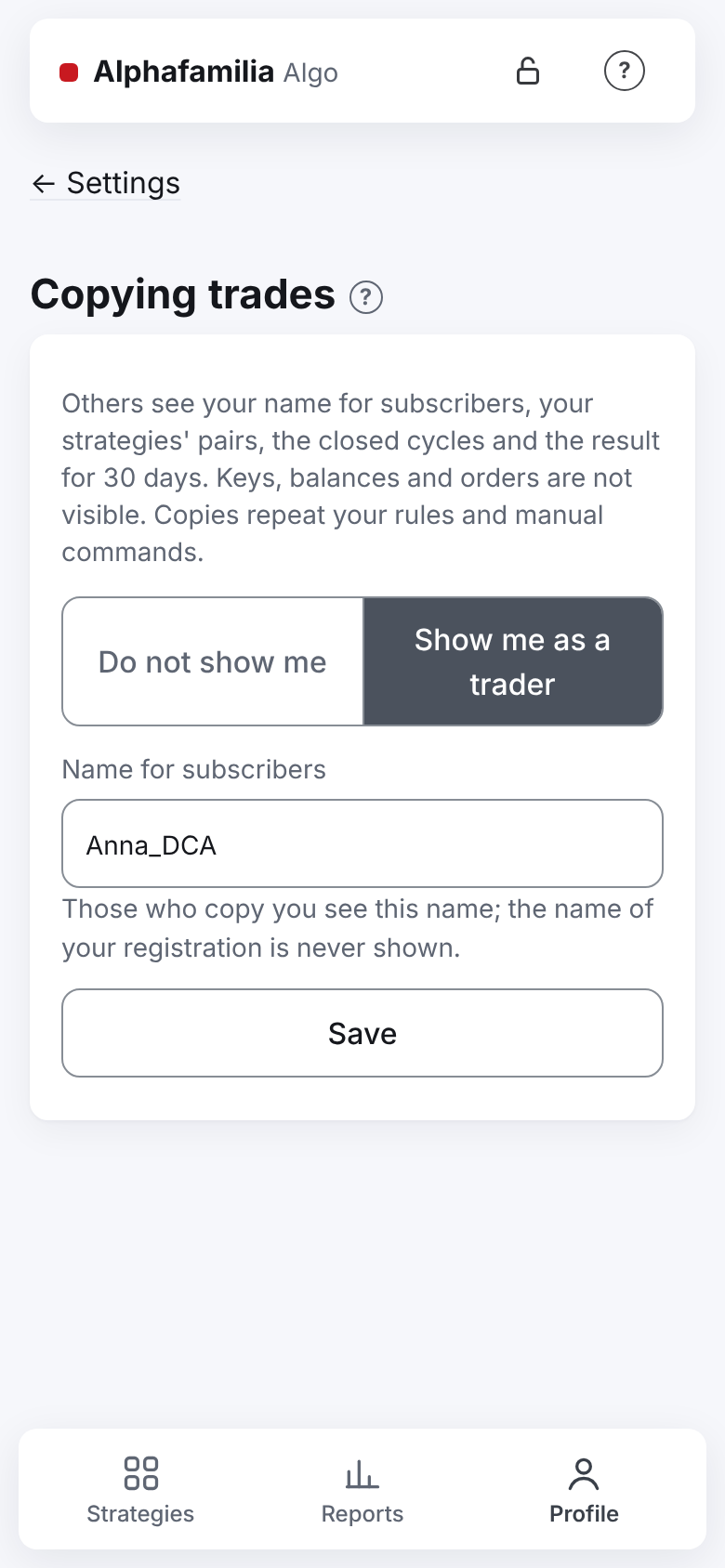
To let others copy your strategies: "Profile" → "Settings" → "Copying trades".
- Choose "Show me as a trader" (the default is "Do not show me").
- Enter "Name for subscribers" — a pseudonym: required, unique (case aside), 2 to 32 characters (letters, digits, space, ".", "-", "_"). The name of your registration is never shown to subscribers.
- Press "Save".
After "Save" the button reads "Saved ✓" for a couple of seconds, under it a marked line says "✓ Saved. Other users see you in the list of traders as “…”" and a short message appears. While you have no running strategy with your own settings, the line "You appear in the list of traders once you have a running strategy with your own settings." is shown.
What subscribers see: your name for subscribers, the pairs of your running strategies (exchange, market, direction, leverage), the number of closed cycles, the 30-day result in % of the budget and the strategy's rules. Nobody sees keys, connections, balances, orders, prices or events.
What you see: on the screen of a strategy that has copies — "Copied by: N". Nothing more of the copies is shown.
What the copies repeat: your rules, manual averagings (limit and market), taking manual orders and levels off and back, TP moves (in percent), changes of settings (from the copies' next cycle), "Stop after this cycle" and stopping.
Switch it off: choose "Do not show me" and "Save" — "You are out of the list; the copies end their cycles and stop".
Next: Coinbase