T-Invest shares and funds
The strategy trades shares and funds of the Moscow Exchange through the broker T-Invest by the same rules as on Binance. The differences are in lots, trading sessions, day orders and the broker's fee.
Connection
- Create a token — see Keys on the exchange side.
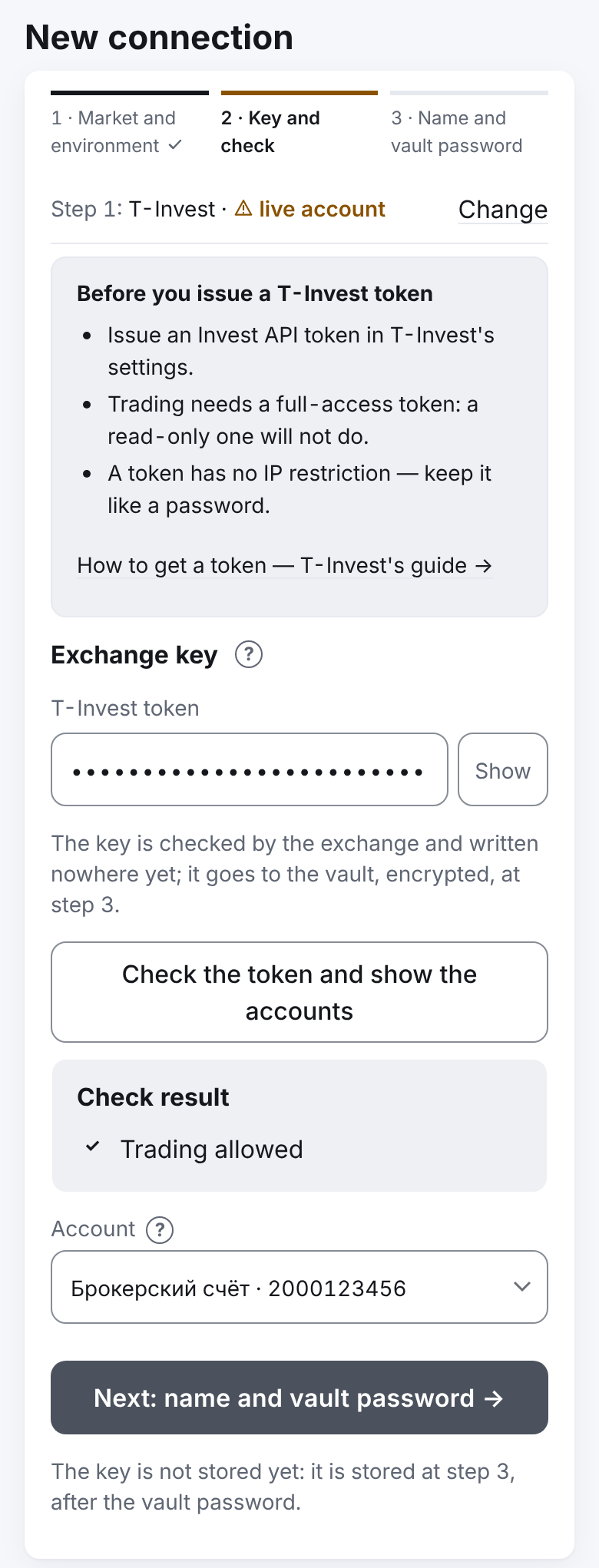
- In "Profile" → "Settings" → "Exchange connections" press "+ New connection" and choose the market "T-Invest".
- Choose the environment: "sandbox" (no real money) or "live account" (the default; marked yellow, with a triangle — it is real money). Click "Next: the key →".
- Paste the "T-Invest token". Above the field is a reminder: a token with full access is needed (a "read only" one will not do), a token has no IP restriction, and a link to T-Bank's guide. The sandbox has its own reminder: "Issue a sandbox token in T-Invest — not a live one.", "No sandbox account — after the token check, open one with the button: the app tops it up with 100,000 virtual ₽.", "The token has no IP restriction.".
- Click "Check the token and show the accounts". If the sandbox token has no account yet, the check says so: "The token has no sandbox account. Open one with the button below." Click "Open a sandbox account (with a test balance of 100,000 ₽)" — the app opens the account and tops it up with 100,000 virtual roubles.
- Choose the account for the strategies. Accounts marked "read only" cannot be chosen.
- No tariff is typed: the broker does not tell its rate through the API, so the TP is planned with the broker's maximum rate — 0.3 % (the "Investor" plan); once the strategy's trades reach 1,000 RUB or more, the strategy learns the fee the broker really charged and, if it is below 0.3 %, plans the TP with it. The fee of trades already made is always the actual one in the accounts.
- Click "Next: name and vault password →", enter the connection's name and the vault password and click "Add" (for a live account — "Add the live key" and the confirmation "is real money"). The steps in detail — Connections and the key vault.
While the system administrator has allowed no security on this market, the checklist's "Top up the account" step says: "The system administrator has not allowed securities on this market yet — ask him. The account cannot be checked until then." (the account is read through an allowed security). When the account has less than the budget, the strategy form warns "Free on the account …, budget …", and the checklist says "Top up the account chosen in the connection.".
If no account is chosen, the app says "Choose the account.". If the token has no trading rights on the account — "The token cannot trade on this account.".
A strategy on securities
- In "What we trade" choose the ticker, for example SBER (from the administrator's list), "Profit currency" — RUB.
- The budget is in roubles for "buy first" and in securities for "sell first".
- The fee for the TP calculation is the broker's maximum rate of 0.3 % until the strategy knows the actual one (see "The broker's fee" below); the form only shows it — in the line under "TP | Leverage".
- A step below 0.5 % gets a warning in the form: on securities such averagings fill on ordinary swings (The form's warnings).
Lots
- Each grid part is rounded down to a whole number of lots.
- An incomplete lot is carried to the next cycle, like dust on Binance.
- If even one part is smaller than one lot, instead of the grid you see the message "Grid parts the exchange would refuse …", and a strategy with such settings cannot be saved. If this happens later, the cycle does not start, with the reason "a grid part is below the exchange minimum".
- A larger budget or fewer parts helps.
- A manual "Market" purchase is for an amount in roubles: the strategy turns it into whole lots (down); the sum bought may come out smaller than the amount asked (the lots are rounded down); the market execution price and the broker's fee can move the total a little either way; the "Average" screen shows "Quantity ≈ … (N lots)".
Trading hours
- The strategy trades all the time the exchange accepts limit orders: the morning, main and evening sessions, weekends, auctions.
- The schedule is taken from the exchange for each security separately. If the security trades in the evening or at the weekend, the strategy works. If not, it waits for the morning.
- When there is no trading, the strategy waits quietly ("market closed"), without messages. At night and at weekends this is not a fault.
- A market entry — only in continuous trading. During the opening or closing auction the strategy waits; the limit DCA and TP orders stay and are placed meanwhile.
Day orders
- The exchange cancels orders at the end of the trading day.
- This is not a manual cancel: there is no "Strategy's order removed by someone else" message.
- When trading opens, the strategy places the DCA and the TP again. What filled yesterday is counted.
Price band
The exchange refuses an order outside the price band. This is an ordinary refusal: "🟠 The exchange refused an order" and retries after 5, 15, 30, 60 minutes, then once an hour. The TP stays.
No short selling
The broker accepts a sale of securities that are not on the account (a short position). Before each opening sale the strategy checks how many securities are free and sells no more than that.
The broker's fee
The actual rate is known once the strategy's fully paid orders reach a turnover of 1,000 RUB or more: from one small order the rate is just the rounding of kopecks. Then the TP is planned by the actual rate if it is below 0.3 % (the 0.3 % ceiling stays); before that — by 0.3 %. The turnover adds up across cycles too and survives a restart. On the strategy's screen the line "Fee for the TP plan" shows "actual … %".
While the actual rate is not known, the TP is planned by the broker's maximum rate (0.3 %). A strategy made before version 2.0.21 moves to it from its next cycle: the open cycle is finished with its TP as it was, and the strategy's page shows the card "From the next cycle": the settings in it are as before (or your new ones), only the line "Fee for the TP plan" changes — to 0.3 %. Cancelling the new settings drops your changes, not the rate. The fees of the cycle's past trades are the actual ones charged.
The broker may send the fee later than the trade. The strategy counts it once, when it comes.
If the cycle closed earlier, its result is marked "needs clarification" until the fee comes. The late fee is shown in the cycle's history.
The message about the closed cycle then has the line "Needs clarification: the broker's fee has not come yet.".
Dividends and corporate events
- Dividends are not part of the strategy's profit. They are shown in the cycle history, in the "Dividends" card: "The owner's money: not part of the strategy's profit.".
- A split, a change of lot or ticker, delisting — an emergency, like any mismatch: the strategy's own orders are cancelled, the securities are not sold.
- The strategy rereads the security's rules once a day. It is delisting only when the broker answers plainly that the security is gone. If the broker does not answer or its answer cannot be read, the strategy keeps the rules it had and asks again — no emergency.
Orders changed in the broker's app
When you change a strategy's order in the T-Invest app, the broker makes it a new order. The strategy sees this as a cancel of its own order: it counts the fills and places the order again by its plan. Your new order stays on the exchange; the strategy does not touch it.
Unknown order outcome
If the broker's answer to an order was lost, the strategy sends the same order again under the same key. The broker will not create a second order for that key. If the outcome still cannot be found out for 28 days, the strategy goes into the emergency "an order's outcome unknown longer than the broker keeps its key". The exception is your manual "Market" purchase: the strategy repeats it like this only for 2 minutes from the first sending; not found — the purchase ends with the error "nothing was bought", one message, no retries.
An answer that did not come from the broker (a gateway's error page, an empty answer) is not taken as an answer: the order is counted neither placed nor cancelled, and the money and securities on the account are not taken as zero. The same while the broker is still loading the account's limits: the strategy skips the step and asks again, no emergency.