Something went wrong — how to fix it
A path by what you see on a strategy's screen or in the list of strategies: what it means, what the strategy has already done by itself and what you should do. If a Telegram message came — its sign and its last line “What to do” are explained in the messages reference. An unfamiliar word — in the glossary.
What you need
- The app open. The strategy's messages about troubles lead straight to its screen with the “Open strategy” button.
- For an emergency and for money — access to the exchange or the broker (site or app), to compare the orders and the balance.
Steps
- Open the “Strategies” tab. The strategies that need your attention are on top, under “Need attention (N)”. Each has a coloured badge with the reason: “Not enough funds”, “Exchange refused”, “Fault”, “No connection”, “Result to clarify” and others. An emergency has a card with the reason instead of a badge; a strategy waiting for the vault or a start has only the state mark on the right (“waits for the vault”, “waits for start”).
- Press the strategy. Under the title read the state mark and the lines below it: the “Needs attention” block (the reason and “What to do: …”), “Waiting: …”, “Emergency reason: …” and “What to do: …”, “Retry … at …”.
- Find that line in What you see and what to do below.
- Do what the “What to do” column says. Often — nothing: the strategy copes by itself.
- The strategy's details are in the “Events” card at the bottom of its screen.
What you see and what to do
“Waiting: …” — nothing to do
The strategy breaks nothing: the orders it placed stay on the exchange and may fill.
| On the screen | What it means and what the strategy has done | What to do |
|---|---|---|
| “Waiting: no price”, “Waiting: price is stale” | The exchange sends no fresh price. The strategy changes nothing, its orders stay on the exchange | Nothing. If the fault lasts over 5 minutes, “🟠 Technical fault” comes |
| “Waiting: fee rate unknown” | The exchange has not told the account's fee yet; without it the TP cannot be counted. The strategy asks again by itself | Nothing |
| “Waiting: market closed” | The exchange does not trade: night, weekend or holiday (T-Invest) | Nothing — the strategy goes on when trading opens |
| “Waiting: the exchange's fee is 10 % or more — the strategy waits” | The exchange reported an implausible fee. The strategy does nothing | Nothing. Longer than an hour — write to the exchange's support |
| The strategy is “stopped”, “No cycle right now.”, no “Waiting” line | You pressed “Stop after this cycle”, the cycle closed at the TP — the strategy stopped by itself | Nothing. To trade on — “Start” |
| “Waiting: entry condition” | The price is above your “Not above” (below “Not below”). A new cycle does not begin | Wait, or change the field: “Change” in the “Settings” card — there is no cycle, so at once |
“Waiting: …” — your action is needed
| On the screen | What it means and what the strategy has done | What to do |
|---|---|---|
| “Waiting: a grid part is below the exchange minimum” | At the current price some part of the ladder is below the exchange's smallest order. A new cycle has not begun | “Change” in the “Settings” card: a bigger budget or fewer parts. No cycle — applies at once |
| “Waiting: entry below the exchange minimum” | The entry at the current price is below the exchange's smallest order; the strategy does not place it | Raise the budget or lower the number of parts (from the next cycle) |
| “Waiting: TP below the exchange minimum” | What the cycle bought is below the exchange's smallest order — no TP can be placed. The strategy keeps the next averaging on the exchange | Usually nothing: when the price reaches the level and the averaging fills, the position grows and the TP is placed by itself. Until then the cycle has no TP. No levels left or you do not want to wait — the “Average” button, a purchase for a sum after which the position is above the exchange minimum. For the future — a larger budget or fewer parts |
| “Waiting: the account is not in Hedge Mode / cross margin — switch it on the exchange” | Futures: the account is not in the mode needed. The strategy does not trade | Switch on hedge mode and cross margin on the exchange; where exactly — the “Futures” card says. The strategy goes on by itself |
| “Waiting: another leverage on the exchange and it cannot be set…” | Futures: the exchange has another leverage for the pair, and it cannot be changed while there is a position or orders | Set the strategy's leverage as on the exchange — or wait until the position closes |
| “Waiting: the account does not agree in …” | The check found the account holding less of the asset (coin, proceeds, part of a position) than the asset's strategies hold by their records, by more than the dust on them. The line gives the figures (“the strategies on BTC need …, there is …”) and the strategies of this asset. The strategies with a share are in an emergency; this strategy has no share of its own, so it is not in an emergency: it starts nothing and keeps no orders on the exchange. If nobody is in an emergency (a stopped strategy's coins sold), one message “The account does not agree” comes | Deal with the asset's strategies in the emergency: the lost one — “Start a new cycle” or the archive, the others — “Continue the cycle”; a stopped strategy's coins sold — “Start a new cycle” or the archive for it. Once the account agrees, the waiting strategy starts by itself |
| “Waiting: checks the account: waits for the neighbours' trades, places nothing new” | The account holds less of the asset than its strategies hold by their records, but a trade of a neighbour (or of the strategy itself) the exchange has not shown yet may explain it. The strategy waits for that trade (usually seconds, at most 2 minutes plus the exchange's usual delay) and places nothing new; the orders already resting stay | Usually nothing: the trade comes, the account agrees, the strategy goes on by itself. If the trade never comes, the shortage is dealt with as usual (“The account does not agree” or an emergency) |
| “Waiting: the check waits for the account's strategy ‘…’ to be loaded” | After a restart of the service the account check waits until every strategy of the account is loaded (usually seconds): without their records the sum cannot be compared. After 10 minutes the strategy takes its orders off and waits on. A strategy switched off by a program error, and one whose stop is not saved yet, count by their records | Usually nothing: the wait ends by itself. If it does not — open the named strategy: “Start”, “Stop” or “To the archive” |
Futures in detail — in USD-M futures.
A copy waits
| On the screen | What it means | What to do |
|---|---|---|
| “Waiting: nothing known of the lead strategy yet” | No link to the trader's strategy, usually for seconds. The copy changes nothing | Nothing |
| “Waiting: the lead strategy stops after its cycle” | The trader pressed “Stop after this cycle”. A copy without a cycle of its own begins no new one; in Telegram, once — “ℹ️ The copy waits for the lead strategy”. When the trader's cycle closes and he stops, the copy stops too — it will show “Waiting: the lead strategy left”. A copy in a cycle does not show this line: it ends its cycle and stops | Nothing, or stop the copy yourself |
| “Waiting: the lead strategy left”, the copy stopped | The trader stopped his strategy, the strategy is in an emergency or the trader hid himself. The copy finished its cycle (or had none) and stopped | Choose another trader: “+ New strategy” → “Copy trades” |
| “Waiting: the balance is below the minimum for the lead strategy's rules” | At the current price or by the trader's new rules the ladder does not fit the balance. No cycle begun | The “Change balance” button — the copy begins the cycle by itself |
How a copy works — in I want to repeat another user's trades.
Not enough money
It looks like this: the strategy under “Need attention” with the “Not enough funds” badge, on the strategy's screen — “DCA2: the exchange refused — not enough funds. Retry at …” and “What to do”, in “Events” — “not enough funds” with “needs … · free …” and the exchange's reply, in Telegram — “🟠 Not enough funds”. The strategy's budget is a plan, not money set aside: an order is not placed when the exchange account has less free money than it costs (for example, other strategies hold the money).
| When | What the strategy has done | What to do |
|---|---|---|
| For the entry (nothing bought in the cycle yet) | Bought nothing. Tries again after 5, 15, 30, 60 minutes, then hourly | Top up the account — the strategy places the entry by itself at the next try. A smaller budget in “Change settings” applies only from the next cycle |
| For an averaging (the cycle is on) | The entry is bought, the TP stays and can close the cycle. The averaging is tried again on the same schedule | Top up the account by the missing amount — the strategy places the order by itself. Or lower the budget from the next cycle |
When it works, “✅ Funds are enough” comes.
Your manual purchase (“Average”):
- a limit order waits for money the same way — in “Levels” the “Manual N” row says “Waiting for funds”; once placed — “✅ Manual N — the order is on the exchange”;
- “Market” is not repeated: “🔴 Manual N: the market buy was not made” comes with “Needed … free …”. Top up the account and buy again.
The exchange refused an order
It looks like this: the “Exchange refused” badge, on the strategy's screen — a line with the reason and “Retry at …”, in “Events” — “order refused” with the reason and “Exchange reply:
- What the strategy has done: changed nothing; it repeats the order by itself on the same schedule (5, 15, 30, 60 minutes, then hourly). When it works — “✅ Order placed”.
- Your manual order refused by the exchange's rules (the price, the minimum amount, the step) is not repeated: it is taken off at once, “🔴 The exchange refused the manual order” comes. Correct the price or the amount and buy again.
- What to do: usually nothing. If the refusal repeats — read the reason and the exchange's reply: changing the step or the budget often helps. If not — press “Download diagnostics (no secrets)” at the bottom of the screen and send the file to the developer.
Emergency
It looks like this: the mark “emergency”, a line “Emergency reason: …”, under it “What to do: …” and a folded “Details” — under it “Code for support: …” (the reason's code in Latin letters for the developer). If the exchange refused the TP, under the reason — “Exchange reply:
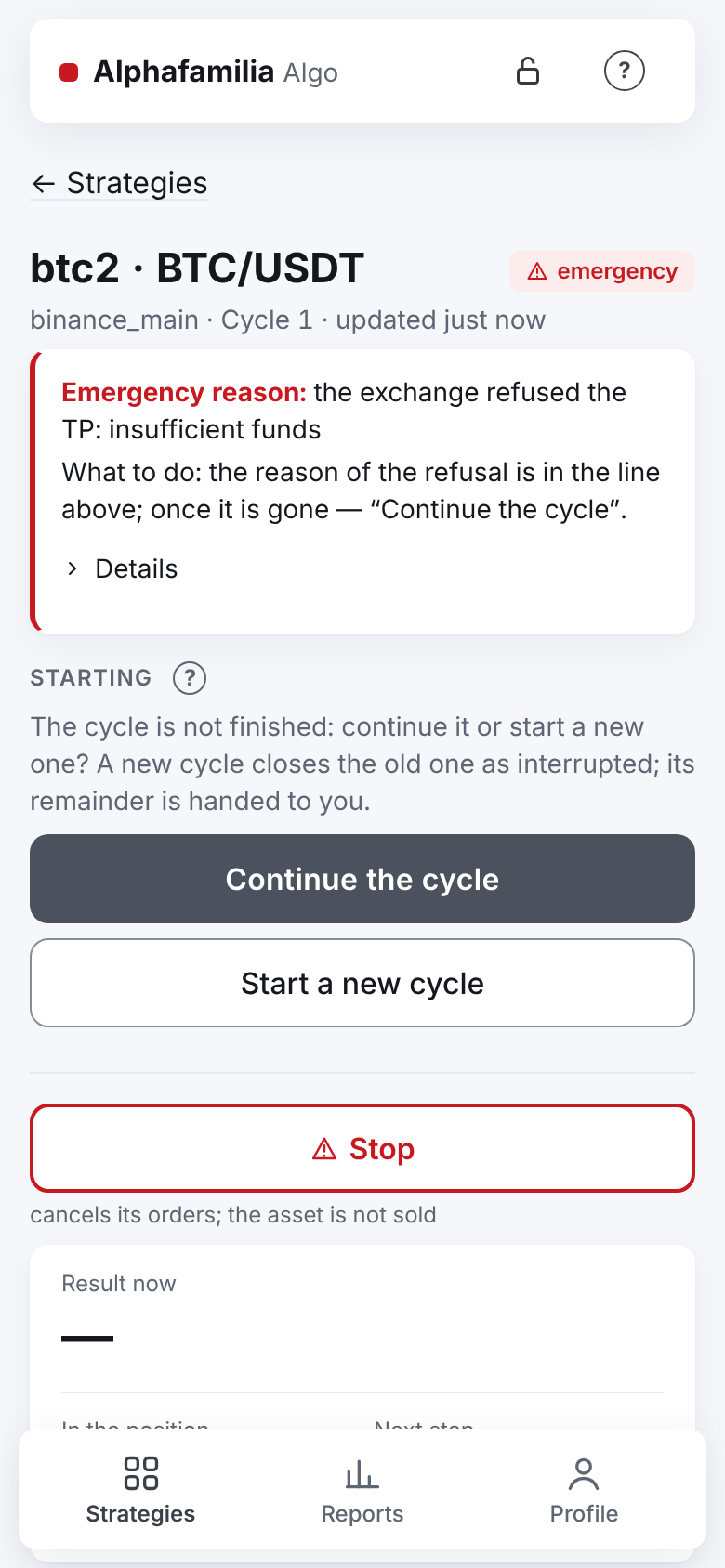
- What the strategy has done: cancelled its orders, did not sell what it bought, did not close the position. The other strategies work on (except in the emergency “less asset on the account than counted”: all the working strategies of this asset with a share are in it). The strategy never leaves an emergency by itself.
- What to do:
- Do what the “What to do” line says.
- Compare the orders and the balance on the exchange with the “Strategy's orders” and “Cycle” cards.
- The cause is gone — “Continue the cycle” (the “Starting” block at the top of the screen): the strategy checks its records against the exchange again and finishes the cycle.
- To begin anew — “Start a new cycle”: the old one closes as interrupted, the remainder is yours.
- The cause is unclear — “Download diagnostics (no secrets)” and send it to the developer.
All the reasons one by one — in Emergencies and faults.
The vault is locked after a server restart
This happens after a reboot of the server, and when the vault was locked before the program restarted; after an ordinary update an open vault opens by itself (“✅ Service started, the strategies work”).
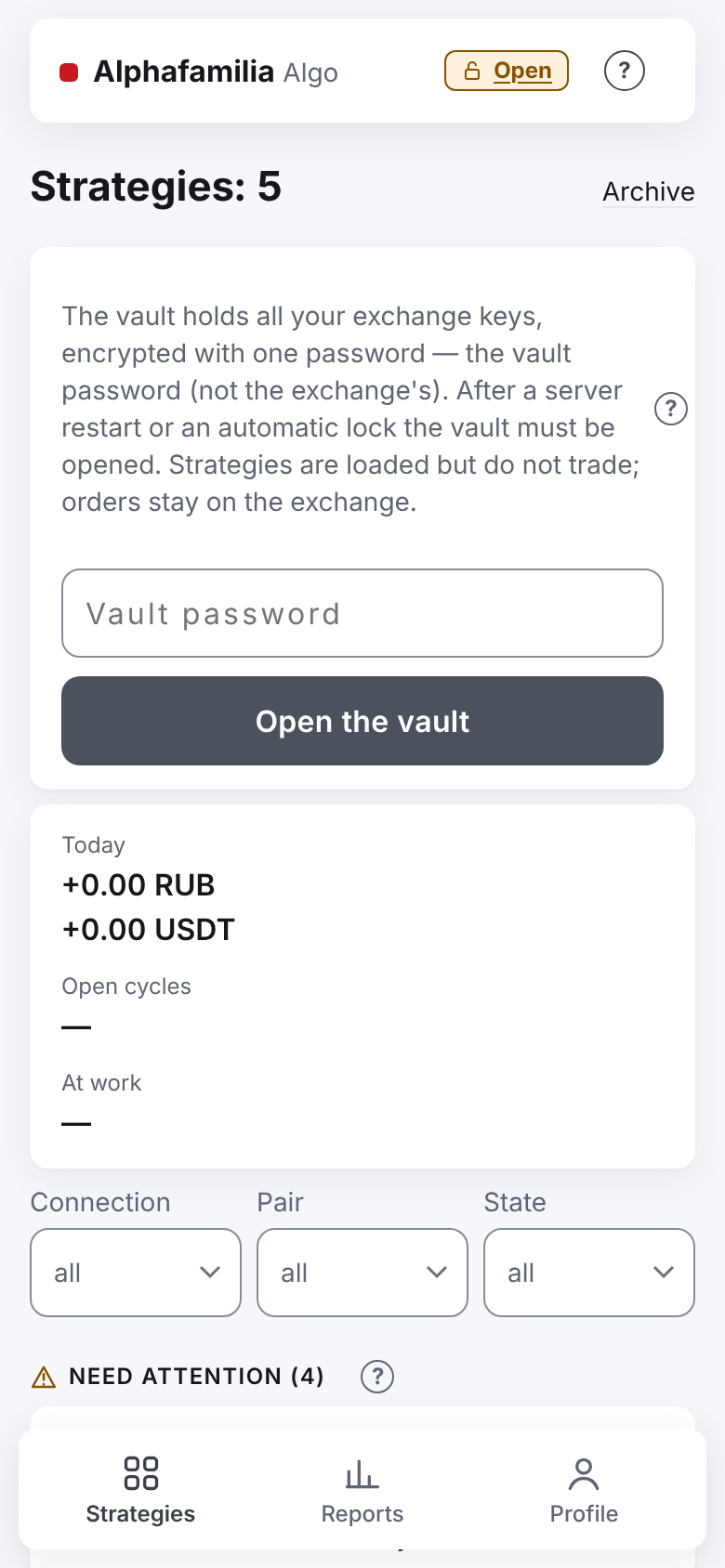
It looks like this: in the header — a yellow “Vault locked” with “Open”, the strategies say “waits for the vault”, after opening — “waits for start”. In Telegram after a restart — “🔴 Service started” with “What to do: open the key vault in the app and start the strategies”; if the vault stays locked for long — “🔴 The strategies wait for you”.
- What the strategy has done: nothing; its orders stay on the exchange and may fill.
- What to do:
- Press “Open” and type the vault password.
- Press “Start” on each strategy that “waits for start” — or the group “Start” under the list (it starts every strategy shown that is not running, including the ones you stopped, but passes emergencies by: filter first if needed).
- If a strategy has an unfinished cycle — “Continue the cycle”.
In detail — in Server restart and update.
Technical fault
It looks like this: the “No connection” or “Fault” badge, on the strategy's screen — “Last step: no connection to the exchange.” or “For several minutes the strategy cannot make a working step with the exchange.”. If the fault lasts over 5 minutes — “🟠 Technical fault” in Telegram, a reminder every 30 minutes, afterwards — “✅ Recovered”.
- What the strategy has done: skips steps and tries again by itself. It does not touch its orders on the exchange and never sends anything again blindly.
- What to do: nothing. Longer than an hour — check whether the exchange works (the status page on its site).
“No connection to the server, retrying…” at the top of the app is the link between your phone or computer and the server, not between the strategy and the exchange. The strategies work; the page reconnects by itself.
Warnings about orders
“Order stuck”, “Strategy's order removed by someone else”, “Cancel not confirmed”, “Trades are late”, “Orders left on the exchange” — what each one means and what to do, in Emergencies and faults. The main rule: do not cancel or change the strategy's orders in the exchange's app — manage with the strategy's buttons.
On futures, the “Close to liquidation” message — see futures and Liquidation.
How to know it worked
- The “Needs attention” block, the lines “Waiting”, “Retry … at …” and “Emergency reason” are gone, the mark says “running”.
- The strategy moved from “Need attention” to “Others”.
- Telegram brought a message with the ✅ sign: “Funds are enough”, “Order placed”, “Recovered”.
What you risk
- While a strategy is stopped or in an emergency, its position lives without a TP: the price may go away and there is no sale.
- “Start a new cycle” leaves the old cycle's remainder with you — the strategy no longer sells it.
- Orders cancelled or changed by hand on the exchange are placed by the strategy again; an asset sold by hand leads to the emergency “less asset on the account than counted”.
- The group “Start” passes strategies in an emergency by — they stay in the emergency. Sort each one out and start it with the button on its screen.
- A “Market” purchase that failed for lack of money is not repeated by itself — not even after a top-up.
If something goes wrong
| What you see | What to do |
|---|---|
| After “Continue the cycle” the strategy is in an emergency again | The cause is still there — read “What to do” again; if it does not help — diagnostics to the developer |
| Your case has no line here | Emergency reasons — in Emergencies and faults, messages — in the messages reference |
| A message came, but the app shows everything fine | Likely it has recovered already: look for a following message with the ✅ sign |
Next
- I want to manage my strategies — start, stop, settings.
- I want to understand the settings — budget, parts, the exchange's minimums.
- Getting started — how a strategy works and what your money risks.