I want to trade shares
At the end of this path a strategy trades shares or funds of the Moscow Exchange through the broker T-Invest and has passed its first cycle. The strategy works as with crypto: the entry, the averaging, a TP on the whole amount.
Read Getting started first: how the strategy works and what the money risks.
What you need
- Access to the app — Getting started.
- A brokerage account at T-Invest. Better — a separate account for the strategies only.
- A T-Invest API token — you issue it in T-Invest's settings. The official description (in Russian): Token — T-Invest API.
- For a try — a sandbox token (a test account with no real money): Sandbox — T-Invest API.
- A sandbox account with test roubles. If there is none yet, the app opens it itself with the button "Open a sandbox account (with a test balance of 100,000 ₽)" after the token check.
- From 15 000 RUB on the account.
- Allowed pairs. The pairs for strategies on each market are allowed by the system administrator. If the strategy's form says “The administrator has not allowed any pair on “…” yet — no strategy can be created here.”, write to the system administrator in Telegram — @alphafamilia: which pairs you need. The list of pairs can be extended on request.
- 20–30 minutes.
Steps
The sandbox first
Open the app. In the “First steps” checklist press “Set the vault password” — the “Key vault” screen opens. Think of a password of 10 characters or more, type it twice and press “Set the vault password”. The password cannot be recovered — keep it. If the vault exists already, skip this step.
Issue a sandbox token in T-Invest. Copy it — the broker shows the token once. The token begins with
t..On the “Strategies” tab, in the “Connect an exchange” item, press “For tests”. (Later the same place: “Profile → Settings → Exchange connections” → “+ New connection”.)
At the step “1 · Market and environment” choose the market “T-Invest” and the environment “sandbox”. Press “Next: the key →”.
Paste the token into the “T-Invest token” field. Press “Check the token and show the accounts”.
Choose the account. Accounts marked “read only” cannot be chosen.
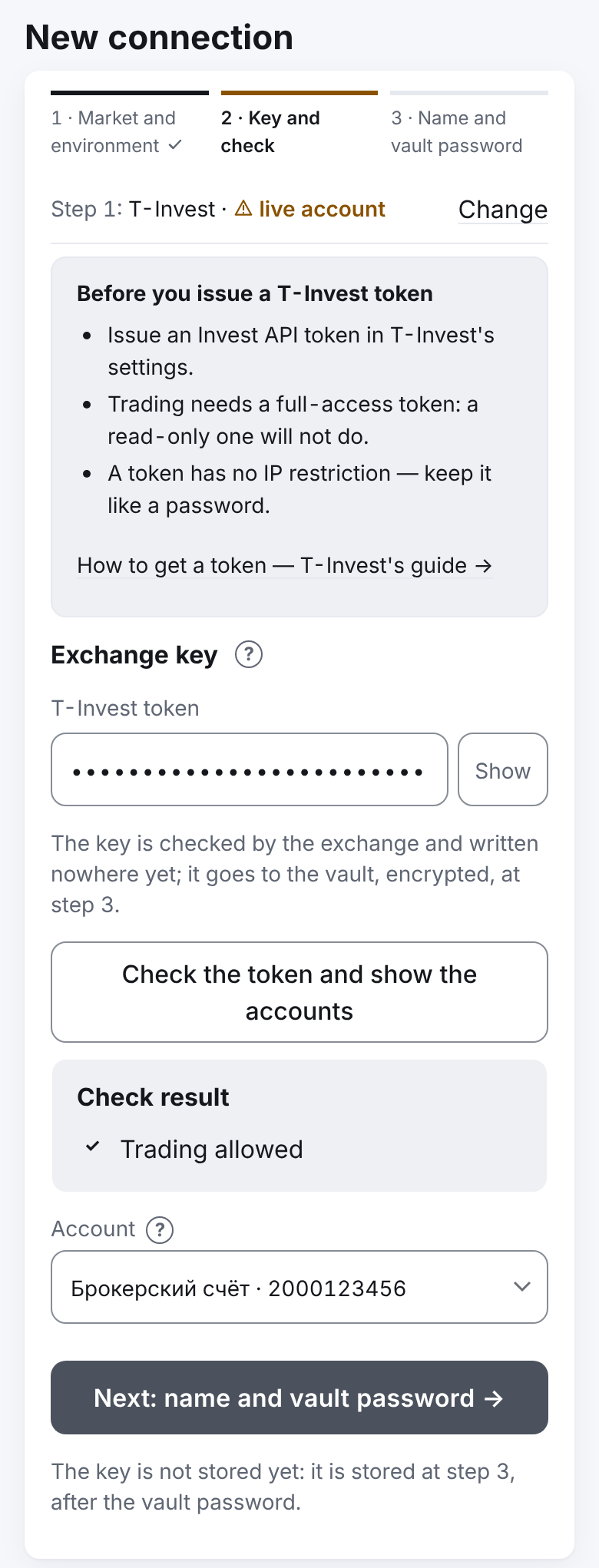
Press “Next: name and vault password →”. The name fills in by itself (
tinvest_test). Type the vault password into “Vault password — to save the key into the vault” and press “Add”.Create a strategy and pass one cycle as in steps 12–16 below. So you see how the strategy works with lots and sessions without risking money.
Then — the real account
- Issue a T-Invest token that may trade. A “read only” token will not do. If the broker offers to choose the accounts — leave only the account for the strategies.
- Add a new connection: market “T-Invest”, environment “live account”. The switch turns yellow — this is real money. Then as in steps 5–7; the button will be “Add the live key”, confirm.
- Check the money: the checklist's “Top up the account” item shows how many roubles are free on the account. From 15 000 RUB is needed. Topped up — press “Check again”.
The strategy
Press “+ New strategy” and choose the connection.
In “What we trade” choose a security, for example SBER. “Profit currency” — RUB. The list of securities is allowed by the system administrator; no securities — see If something goes wrong.
Type the “Budget” in roubles. The other fields are filled in already: 5 parts, a step of 3 %, a TP of 1 %.
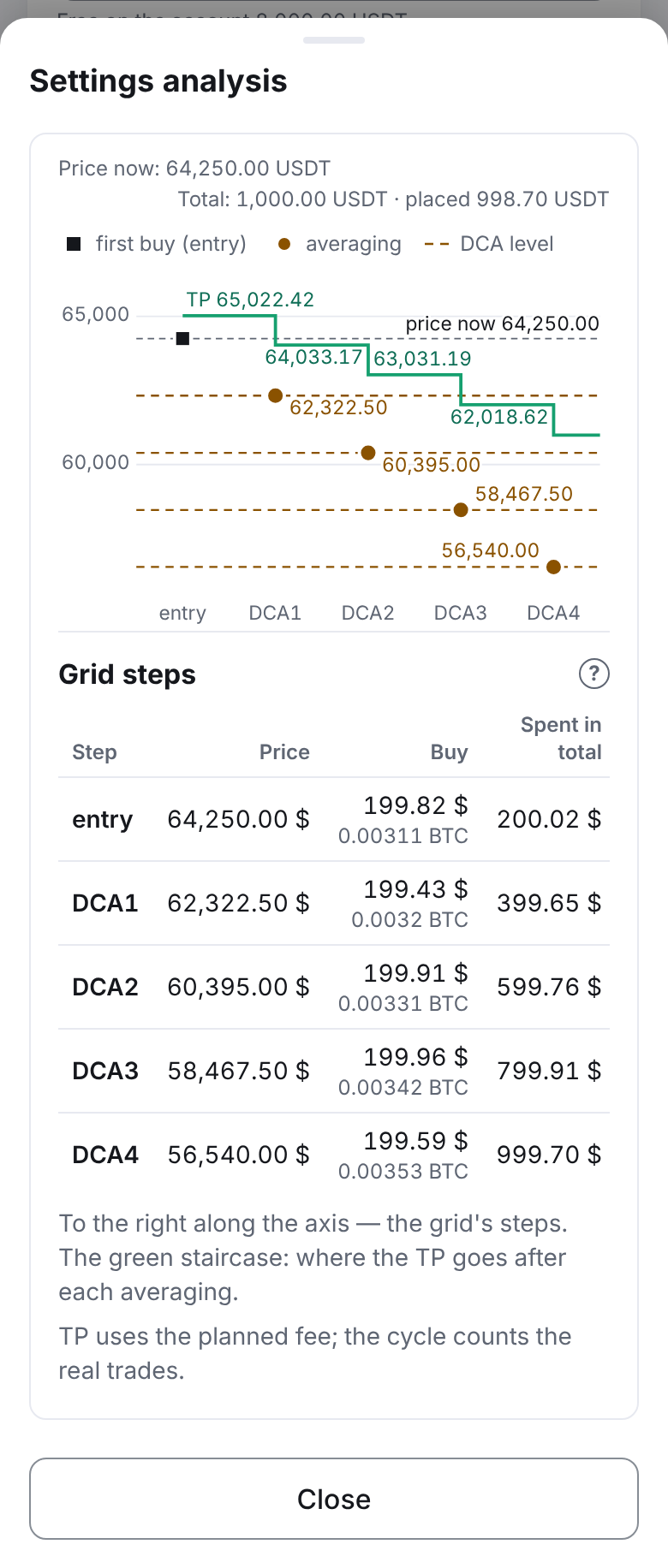
Press “Settings analysis” and look at the grid at the current price: the chart and the steps' table. Each part is rounded down to whole lots. If a part is less than one lot, the strategy cannot be saved: raise the budget or lower the number of parts.
Press “Start” — it saves the strategy and starts it at once — and confirm in the window “Save and start…”.
How to know it worked
- Telegram brought “▶️ Strategy started”.
- In the list the strategy is “running”. On the strategy's screen, “Strategy's orders” shows the entry.
- If the exchange is not trading now, the strategy's screen says “Waiting: market closed”. This is not an error: the strategy places the entry when trading begins.
- The entry has filled — “🟢 Buy filled: entry”. The TP has filled — “💰 Cycle 1 closed”.
Lots and trading hours
- Lots. Securities are sold in lots — for example, of 10 shares. Each part of the grid is a whole number of lots. An incomplete lot passes to the next cycle.
- Trading closed — the strategy waits. At night and on days without trading the strategy waits quietly (“market closed”) and sends no messages. The strategy takes the schedule from the exchange for each security.
- Day orders. The exchange cancels the orders at the end of the trading day. When trading opens the strategy places them again. This is not a fault.
- The broker's fee. No tariff needs to be entered. While the strategy does not know the actual fee, the TP is planned by the broker's highest rate (0.3 %). Once the strategy's trades reach 1,000 RUB or more, the TP is planned by the actual rate if it is below 0.3 %. The “Settings” card shows “Fee for the TP plan: 0.3 % · actual …”. The cycle counts the fee the broker really charged.
In detail — T-Invest shares and funds.
What you risk
- The price falls below the last level. The whole budget is bought, the strategy waits for the TP. There is no stop-loss: the strategy does not sell at a loss by itself.
- “Stop” does not sell. The orders are cancelled, the securities stay on your account.
- Dividends and events of a security. Dividends are yours, they are not in the strategy's profit. A split, a change of the lot or the ticker — the strategy stops in an emergency and waits for your decision.
- The token. A token has no IP restriction. Keep it like a password, type it only into the app's form.
How to limit the risk: start in the sandbox, then — with a small budget on a separate account.
If something goes wrong
- "The token has no sandbox account". Click "Open a sandbox account (with a test balance of 100,000 ₽)" under the check — the app opens the account and tops it up with 100,000 virtual roubles. If the account runs out of money — write to the system administrator in Telegram — @alphafamilia, who tops it up.
- “The administrator has not allowed any pair on “…” yet — no strategy can be created here.” Write to the system administrator in Telegram — @alphafamilia — which pairs you need; the list of pairs is extended on request.
- “The token cannot trade on this account”. Issue a token that may trade on this account.
- “Grid parts the exchange would refuse …”. A part is less than one lot: raise the budget or lower the number of parts.
- The strategy does not begin a cycle for long. Look at “Waiting: …”. “market closed” — wait for trading.
- You changed a strategy's order in the broker's app. The strategy places its order again; yours stays. Do not change the strategy's orders by hand.
The rest — Something went wrong — how to fix it.