How much have I earned
At the end of this path you know where the profit is shown — on the strategy's screen, in the reports for a period, in the export for Excel and in the morning Telegram summary — and why a cycle's result sometimes differs from the TP you set. How a cycle works is in Getting started; an unfamiliar word — in the glossary.
What you need
- A strategy that has closed at least one cycle. Until then the history says “No cycles yet.”.
- For a “Total” in one currency — an open vault and a live (not test) connection to a crypto exchange: the rates are read with its key. Without them the profit is shown per currency and the “Total” is “no rate”.
- For the export — Excel or another spreadsheet program.
Steps
One strategy's profit
Open the “Strategies” tab. Each strategy in the list shows its signed profit and the number of closed cycles. Above the list is a summary: “Today” (the profit of the cycles closed since midnight, Madrid time), “Open cycles” (the result if closed now) and “At work” (how much money is in open positions now).
Press the strategy. The “Recent cycles” card: the first line “Profit · N cycles” is the total over the strategy's life, below it — the last five cycles in a table: the result and its percentage to the budget. Press a cycle to open its trades, result and settings. If there are more cycles, under the table is the link “All cycles (N)” into the history.
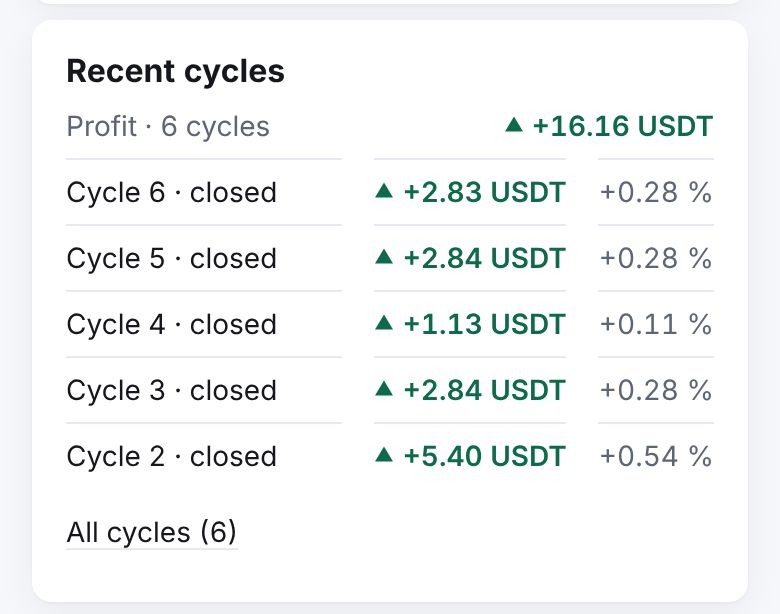
With an open cycle, at the top of the screen under the title, in large type — “Result now” (if the position were closed at the current price), and in the “Cycle” card — “Break-even”. It is not earned yet: it is earned when the TP fills.
Press “History” in the “Controls” block. Cycles are newest first: the status (“open”, “closed”, “interrupted”), “Entry price”, “DCA filled” and “Profit”: the amount, in brackets — the percentage of the cycle's purchases, after “·” — the percentage to the budget. Tap the amount to see the exact one.
Press a cycle — its trades with their fees, the “Carried remainder” and the settings it ran with open.
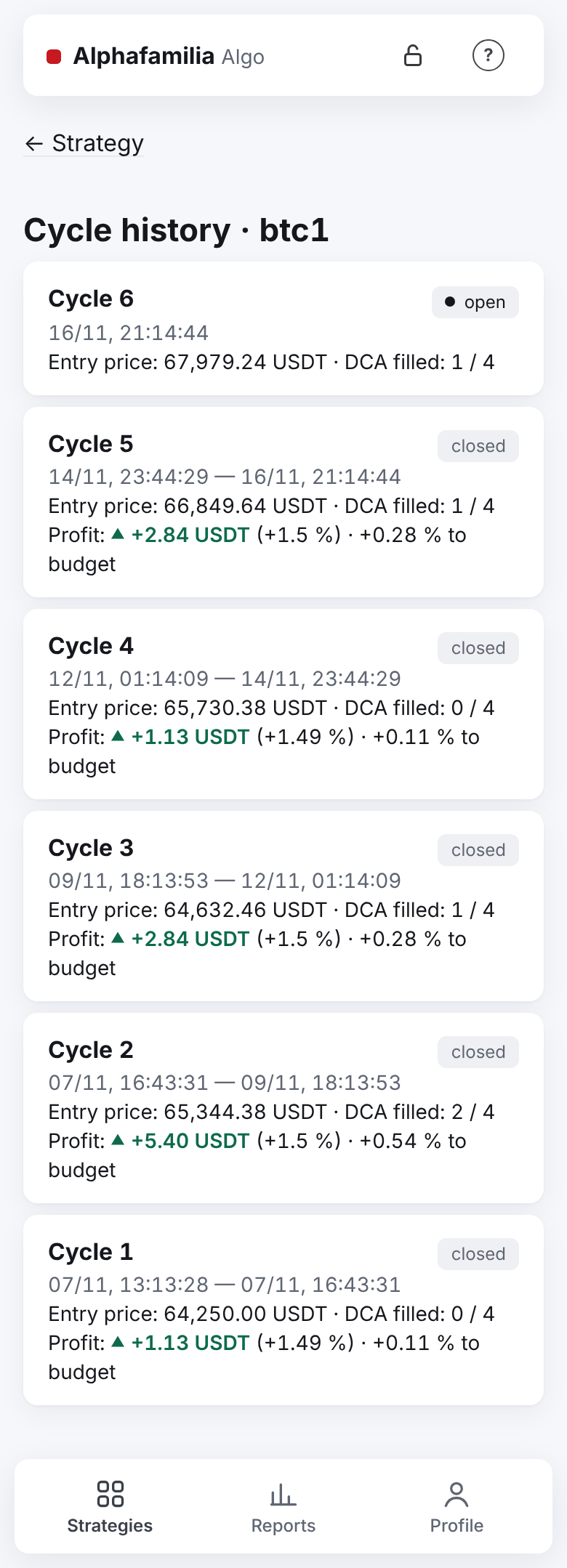
In detail — in Cycle history.
Profit for a period, all strategies
Open the “Reports” tab (at the bottom, second from the left).
Choose the “Period”: “Today”, “This month”, “All time” or “Custom” with dates.
Choose “Group by”: “strategy”, “connection”, “venue” or “all strategies together”.
Choose the “Total currency”: USDT or RUB.
Read from the top: the “All strategies” summary (with strategies on both live and test connections — “Live trading” and “Demo — test accounts” under it), the rates under it, then the cards of the grouping, and at the end — “Open cycles now”.

The main lines of the summary:
| Line | What it means |
|---|---|
| “Profit, USDT”, “Profit, RUB”, “Profit, BTC”… | The profit in each currency separately; under the sum, as a small line, — “to budget” in per cent |
| “Total in USDT” (or RUB) | All the profit in one currency at today's rates; no rate — “no rate” |
| “Turnover, …” | What the cycles' purchases cost — this is not profit |
| “Funding (within the profit), USDT” | Futures: how much funding went into the cycles' profit |
| “Cycles closed” | Closed at the TP and, after “·”, interrupted |
Archived strategies stay in the reports: their cycles count as before. All the lines — in Reports.
Export the trades to Excel
- On the “Reports” tab choose the “Period”.
- Press “Export the period's trades (CSV)”. At the bottom of the screen — “Trades exported: N”.
- Open the file in Excel: every trade of the period with exact figures and fees; for futures also the funding lines.
The file is made for Excel in Russian (“;” between fields, a decimal comma). Its name follows the period's first day, for example fills-2026-11-01.csv; for “All time” — fills-all- and today's date, for example fills-all-2026-11-03.csv. The columns — in Export trades to CSV.
The morning summary and the cycle messages
- Every morning at 09:00 Madrid time “ℹ️ Alphafamilia Algo summary” comes: how many strategies work, wait, are in an emergency or stopped; how many cycles are open and their result if closed now; “Profit of the last 24 h” — by the cycles closed in the last 24 hours, each currency separately. The last line says what to do today, or “Nothing to do.”.
- After each TP “💰 Cycle N closed” comes: “Profit of the cycle”, “Last 30 days”, “All time”. You can turn it off with the switch in the “Notifications” card on the strategy's screen — then the buy messages stop too. Emergencies, faults and missing funds always come.
The summary has the line “Compared with the exchange: N cycles, no differences”: every night the system itself compares the results of your cycles closed in the last day with the exchange's trade history. The comparison only reads the history — it places no orders and does not disturb the strategies. If a cycle's result does not match, a separate message comes: “⚠️ Comparison with the exchange: differences” — tell the system administrator. “Beside a manual position: N” — a futures strategy worked beside your own manual position on the same contract: the exchange counts the result from the average price of the whole position, so its figure for such a cycle is different. The strategy's records are right; there is nothing to do. “Not yet” means your vault was closed at night; the comparison runs by itself while the vault is open.
The summary comes while you have at least one strategy that is not archived. All its lines — in the messages reference.
Why a cycle's result looks “strange”
| What you see | Why |
|---|---|
| The cycle's percentage in the history is a little below the TP (exactly 0.9991 % with a 1 % TP) | The percentage in the history is of all the cycle's purchases, the remainder carried from the last cycle included, while the TP is counted on the cost of the sold part only. No money is lost |
| After the TP a little of the coin is left on the account | It is the carried remainder (dust): below the exchange's smallest order, it cannot be sold. It goes into the next cycle with its cost (the “Carried remainder” line) and is not in the profit |
| The profit is above the TP | The TP is set with room for the fee: at the higher of the rates, yours and the exchange's (at T-Invest — at the broker's highest rate of 0.3 % until the strategy's trades reach 1,000 RUB; then at the actual one if it is lower). The actual fee is lower — for example, the BNB discount — and the difference is a plus. On futures funding received is a plus too |
| A closed cycle's profit changed a few hours later | Futures: a funding payment that came after the TP corrects the closed cycle's result. T-Invest: the broker sent the fee after the trade — until then the result is marked “needs clarification” |
| On futures the profit is now above, now below the TP | Funding is part of the cycle's profit: paid funding lowers it, received funding raises it. The TP price counts the funding known when it is set; what comes later changes the result (funding) |
| An interrupted cycle with a small profit or none | An interrupted cycle's profit is only the filled part of the TP. The remainder is yours: the strategy did not sell it, and it is not counted as a loss |
| The profit is in BTC (or in shares), not in USDT | The strategy was made with the profit in the asset: the profit is the coin, it stays on your account. In the report — a separate “Profit, BTC” line |
| A COIN-M strategy's profit is in BTC and is not in the "Total" | On COIN-M futures the money is BTC. The line “Profit, BTC” is marked “BTC of COIN-M futures — apart, not in the total · In USD at the close price ≈ … USD”; the summary says “+0.00047679 BTC (≈ 45.47 USD)”. USD is for reference, at each cycle's close price (COIN-M) |
| “Today” in the strategies list, “Today” in the reports and “Profit of the last 24 h” in the summary differ | The list counts from midnight Madrid time, the report — from midnight of your device's time, the summary — the last 24 hours |
| The cycle ran from October, the profit is in November | The report puts a cycle into the period of its closing date |
| A month's funding differs in the report and in the CSV | The report puts funding into the period the cycle closed, the CSV — at the date of the payment itself, as the exchange's statement does |
| “to budget” did not change after a new budget | It is counted on the budget the period's cycles ran with, not today's |
| A Telegram amount differs by a cent | Messages round amounts to two decimals; the exact one is in the cycle history (tap the amount) and in the CSV |
| Dividends are not in the profit | Dividends and their tax are your money; they are shown in the cycle (“Dividends”), but not in the strategy's profit |
Fees are on top of the budget, and the TP is the net profit after all fees. How it is counted in detail — in The strategy's rules and in a cycle with figures.
How to know it worked
- In the history a cycle is “closed” with a signed profit; a profit without the “needs clarification” mark is final.
- In the report for the period the strategy has a “Profit, …” line and “Cycles closed” above zero.
- The export opened in Excel in columns, the numbers with a comma.
If something goes wrong
| What you see | What to do |
|---|---|
| “Total in USDT” — “no rate” | Open the vault; with no live connection to a crypto exchange the “Total” is not counted — read the profit per currency |
| “needs clarification” on a cycle or in a report | Nothing: wait for the broker's fee or the funding payment — the result corrects itself. About funding without the strategy's share “⚠️ Funding needs clarification” comes |
| “Too many trades — choose a shorter period.” | Choose a shorter period — up to 100,000 trades are exported at a time |
| In Excel everything is in one column | Your Excel is not Russian: open the file with the data import, the separator “;” |
| A trade marked “not counted in the cycle” | The strategy could not count it — see Emergencies and faults |
| A strategy is not in the list, but its profit is in the report | The strategy is archived: “Strategies” → “Archive” → “Cycle history” |
| The morning summary did not come | All your strategies are archived, or the message is still on its way after a Telegram fault |
Strategies' errors — in Something went wrong.
Next
- Top up or withdraw money, change the budget — how to put the profit to work.
- A Telegram message came — what the signs of the messages mean.
- I want to understand the settings — the TP, the parts and the step.