Server restart and update
In short
- An update or a restart of the program: the vault opens by itself, the strategies go on — nothing comes to you and there is nothing to do ("✅ Service started, the strategies work" goes to the system administrator alone).
- A reboot of the server: the vault is locked — "🔴 Service started" comes; open the vault and press "Start" for the strategies.
- In both cases the orders stay on the exchange; the strategy loses nothing.
- The strategy never sends an order twice blindly: it first asks the exchange what became of it.
Restarts are of two kinds, and they behave differently:
- Only the program restarts — a version update, a rollback, a failure of the program. The keys stay with the keeper on the same server: if your vault was open, it opens by itself and the strategies that were running go on. This is the usual case — updates come often.
- The server reboots (or the program was stopped for long) — the keys disappear from memory, and every user's vault is locked. It does not open by itself: by design, so that the keys never open without you.
What happens to the orders
- The strategies' orders stay on the exchange and may fill while the server restarts.
- The strategy loses nothing. After the start it fetches from the exchange all the trades made while it was down, even if there are hundreds of them, and finds out what happened to the orders sent just before the break.
- The strategy never sends an order a second time blindly. While an order's outcome is unknown, it finds it out from the exchange by the order's number.
What you will see
- If only the program restarted (an update, a rollback, a fault) and your vault was open, the vault opened by itself and the strategies that were working go on. Nothing comes to you: there is nothing to do; the other steps are not for this case ("✅ Service started, the strategies work", with the number of strategies that went on, goes to the system administrator alone). More — What happens on a restart.
- Otherwise Telegram gets "🔴 Service started": the key vault is locked, the orders on the exchange are untouched; the last line is "What to do: open the key vault in the app and start the strategies.". The message gives the version.
- In a browser, the app asks you to sign in again. In Telegram, you are signed in again automatically.
- In the header — the yellow mark "Vault locked" with "Open".
- Strategies that were not stopped are marked "waits for the vault". Stopped strategies are shown as stopped.
What to do
- Click "Open" in the header (or open the "Strategies" tab).
- Enter the password in the "Vault password" field and click "Open the vault".
- The strategies get the mark "waits for start". The strategy's screen shows the hint: "The strategy was loaded again (after a server restart or opening the vault) and does nothing until started (before that: …). Its orders stayed on the exchange."
- Open each strategy and click "Start". Such strategies are at the top of the list, under "Need attention".
- If the strategy's cycle is not finished and the strategy was stopped or in an emergency, choose "Continue the cycle" or "Start a new cycle".
"Start" takes seconds, also right after the vault is opened: the strategy only waits until the other strategies of its account finish their current step; the strategies of other accounts start meanwhile.
Start the strategies of one coin or one contract on one account together (the group "Start" under the list). At the start the account is compared with the sum of the records of every strategy of that asset — one rule for all: the check waits until every strategy of the account is loaded and has read its trades, and the outcomes of orders are known (a neighbour's TP may have filled while the server was down; BingX, Bybit and Coinbase show a trade late — up to 12 minutes, on other exchanges it waits up to 2 minutes). Still short then — an emergency of every working strategy of the asset with a share, a strategy without one waits with "the account does not agree". A position liquidated in that time is called a liquidation by the check. In detail — Emergencies and faults.
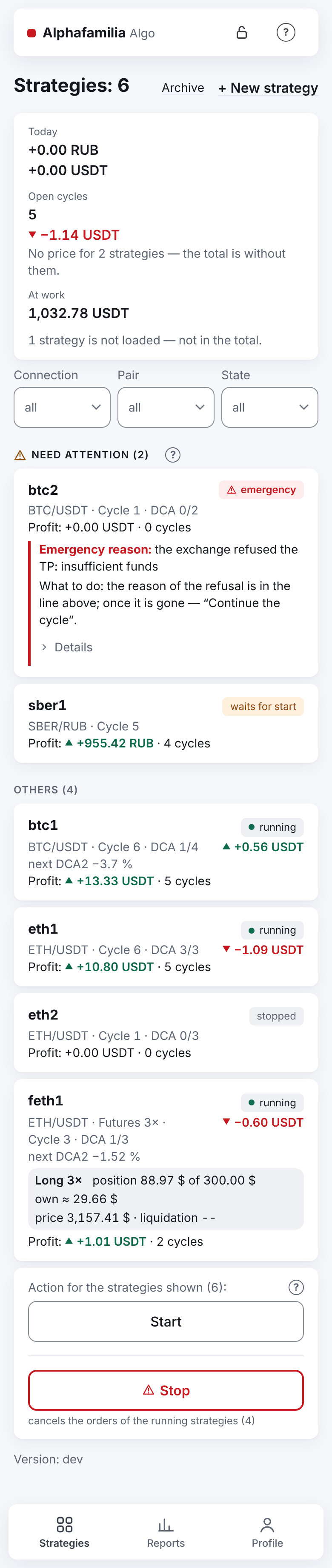
The mark "waits for start" (one, on the right of the name: under "Need attention" it has no separate badge with a reason) is shown for all strategies except stopped ones: for those that were running or in an emergency (and for a strategy paused earlier — there is no "Pause" button). After "Start" the strategy runs.
Important. The group "Start" button under the list starts all the strategies shown that are not running, including the ones you stopped; it passes strategies in an emergency by — they are started one by one, after you have looked into them. If some strategies were stopped on purpose before the restart, start the strategies one by one or filter the list first.
Until you open the vault or click "Start", the strategy does nothing. Every hour the reminder "🔴 The strategies wait for you" comes, with the number of waiting strategies and how long they have waited. The morning summary reminds you too, in its last line: "What to do: open the vault and start the strategies…".
Each user opens their own vault. While your vault is locked, your strategies do not trade, and other users' strategies work.
Maintenance
While the service is being updated or restarted, the app shows the "Maintenance" screen: "The service is being updated or restarted. Actions are unavailable; the page comes back by itself.". It has no buttons. Usually the page comes back by itself in a minute or two.
If you clicked a button at that moment, the app says "Maintenance: the command was not sent, try again later.".
Messages during an update
The server sends the messages marked * itself, and only in Russian; the English words here are a translation.
A user gets one message during an update, and only when there is something to do (owner's decision 19.11):
| Message | What it means | What to do |
|---|---|---|
| "🔴 Service started" | The new version is running, the vault is locked | Open the vault and start the strategies |
If the vault opened by itself and the strategies went on, nothing comes to you. The other messages of an update go to the system administrator alone:
| Message | What it means | What the administrator does |
|---|---|---|
| "🛠 Alphafamilia Algo update: installing version …" * | The update is starting. The strategies stop for a few minutes; orders on the exchange stay. The message says whether the strategies go on by themselves | Wait for "Service started" |
| "✅ Service started, the strategies work" | The new version is running, the vaults opened by themselves, the strategies go on (how many — of every user together) | Nothing |
| "🔴 Update to … failed" * at the check, the service was not stopped | The previous version works as before | Nothing |
| "🔴 Update to … failed" * asking to open the vault | The service was stopped; the previous version was put back (and, if needed, the database from a copy) | The users whose vault is locked get "🔴 Service started" from the service itself |
| "🔴 Update to … failed, and the rollback failed" * | The service is not running. Orders on the exchange stay | Look into it (journalctl -u vnext2); if needed, cancel the orders on the exchange by hand |
If the service crashed
If the service crashed or hung, the server itself sends the system administrator "🔴 The Alphafamilia Algo service crashed" (in Russian) and restarts it. If your vault was open, the strategies go on by themselves and nothing comes to you; if the vault is locked, "🔴 Service started" comes: open the vault and start the strategies.
If crashes repeat (five restarts in 10 minutes), the server stops restarting the service and sends the administrator "🔴 The Alphafamilia Algo service crashed and stopped" (in Russian). Orders on the exchange stay; the strategies do not manage them until the administrator starts the service.
All messages are in the reference Telegram messages.
Next: History and reports