Managing a strategy
In short
- Every button asks for confirmation first; the outcome is "Done" at the bottom of the screen or the reason of a refusal at the button's place.
- "Stop" cancels the orders and does not sell the asset; "Stop after this cycle" finishes the current cycle.
- New settings work from the next cycle.
You manage a strategy with the buttons on its screen. Every button asks for confirmation first, in the app's own window: the question, what will happen, "Cancel" and the action's button (see Confirmations). If the server's answer was lost because of a bad connection, the app repeats the request, but the command is carried out only once. "Done" is shown at the bottom of the screen. If the server refused, the reason stays at the button's place — a card with a red bar on the left: "Not done: …", the "Retry" button (the same press again, with the same confirmation) and "×" to close it. If the command's outcome is not known yet (the service is stopping and can neither carry it out nor check it — "accepted" or "the outcome cannot be checked now"), that is no refusal: the card has no "Not done", and its button is "Check the outcome" — it asks the server about the same command without sending a new one, so the command never runs twice. While the outcome is unknown the card stays; if the server did not answer at all (no connection), the card says so and the "Check the outcome" button remains — the same command, the same id. The card is not wiped by the screen's refresh; leave the screen and it is gone.
Strategy states
| Mark | What it means | What to press |
|---|---|---|
| running | runs its cycle by plan | "Stop" or "Stop after this cycle" |
| stopped | orders cancelled, the asset not sold | "Start"; an unfinished cycle — "Continue the cycle" or "Start a new cycle" |
| emergency | stopped by itself and waits for you | read the reason on the strategy's screen, then "Continue the cycle", "Start a new cycle" or "Stop" |
| waits for the vault | the server restarted, the key vault is locked | "Open" in the header and the vault password |
| waits for start | loaded again after the vault was opened | "Start" |
| archive | out of the list, history kept | "Bring back" in the archive |
Only a strategy paused before version 2.1.9 can be "paused": it can be started or stopped.
The strategy's buttons
The set of buttons depends on the state. The buttons are gathered in blocks with a small heading and laid out by their weight:
- "Starting" — for a strategy that is not running (stopped, in an emergency, paused, waiting for a start) at the top of the screen, under the title: it is what the screen is opened for. The main button — "Start" (or "Continue the cycle") across the whole width, under it "Start a new cycle" if the cycle is not finished. A paused strategy and a strategy in an emergency with an unfinished cycle have "Stop" here too — it stands apart: lower, behind a line;
- "Controls" — under what matters most (the result, the chart): the buttons with icons "Settings", "History", "Levels", "Average" and "TP" in two columns of one width (the last three for a running strategy past its entry, see Manual control); while your own TP stands, below them — "Back to the strategy's TP" across the whole width (a manual order is cancelled only in "Levels" → "Manual orders" → "Cancel");
- "Stopping" — for a running strategy, at the very end of the screen: first "Stop after this cycle" — a plain button across the whole width (there is no "Pause" button: urgently — "Stop", finish the cycle and leave — "Stop after this cycle"), under it, apart and last, "Stop" — half the width, on the right;
- "Stop" — with a red frame and a triangle, as tall as the buttons beside it; what it does is a line under it: "cancels its orders; the asset is not sold" (on futures — "cancels its orders; the position stays without a TP"). "Done" comes once the exchange confirmed the orders are off — not before. Some exchanges (Bybit) first only accept a cancel and take the order off a moment later; if the exchange did not confirm the removal within a second, instead of "Done" you see "The stop is recorded, but the exchange has not confirmed yet that these orders are off" with their numbers. Until an order is off it may still fill — check on the exchange; the strategy takes it off itself and counts a fill if one happens (with the vault locked — once it is opened). The button does not say "Done ✓" then. If the service restarted while the stop ran, a repeat of the command cancels the orders again and names the ones the exchange did not confirm; with the vault locked it says the exchange could not be asked;
- at the very bottom of the screen — the rare ones: "Archive" and "Download diagnostics (no secrets)".
Each block has one "?" — beside its heading, not beside every button. It opens one window with the hints of all the block's buttons: for each button — its name, what it does, the risk and what is allowed, and a link to the help. The rare buttons at the bottom ("Archive", "Download diagnostics"), "Withdraw" of the new settings and the notifications switch keep their own "?".
| Button | When it is shown | What happens |
|---|---|---|
| "Start" | The strategy is stopped or in an emergency without an unfinished cycle, paused, or waits for start | The strategy checks with the exchange and works. The wait after exchange refusals is reset; the strategy tries at once |
| "Continue the cycle" | The strategy is stopped or in an emergency, and the cycle is not finished | The strategy checks with the exchange and finishes the cycle on the same grid |
| "Start a new cycle" | The same | The old cycle is closed as "interrupted"; its remainder is handed to you and is not sold. The strategy starts a new cycle from the current price. The action's button in the confirmation window is red. Telegram gets "⏹ Cycle N interrupted" (if the fill messages are on): what is left and that it is yours now. If the exchange has not confirmed yet that the old cycle's orders are cancelled, the strategy's screen says "Closing: waiting for the orders to be cancelled": the old cycle closes once none of its orders can still be on the exchange, and a fill that comes before that is counted in the old cycle. If the TP filled in full meanwhile, the cycle is recorded as completed at the TP, with its profit. "Stop" pressed while the old cycle closes — the cycle closes once the orders are off, and the strategy stays stopped |
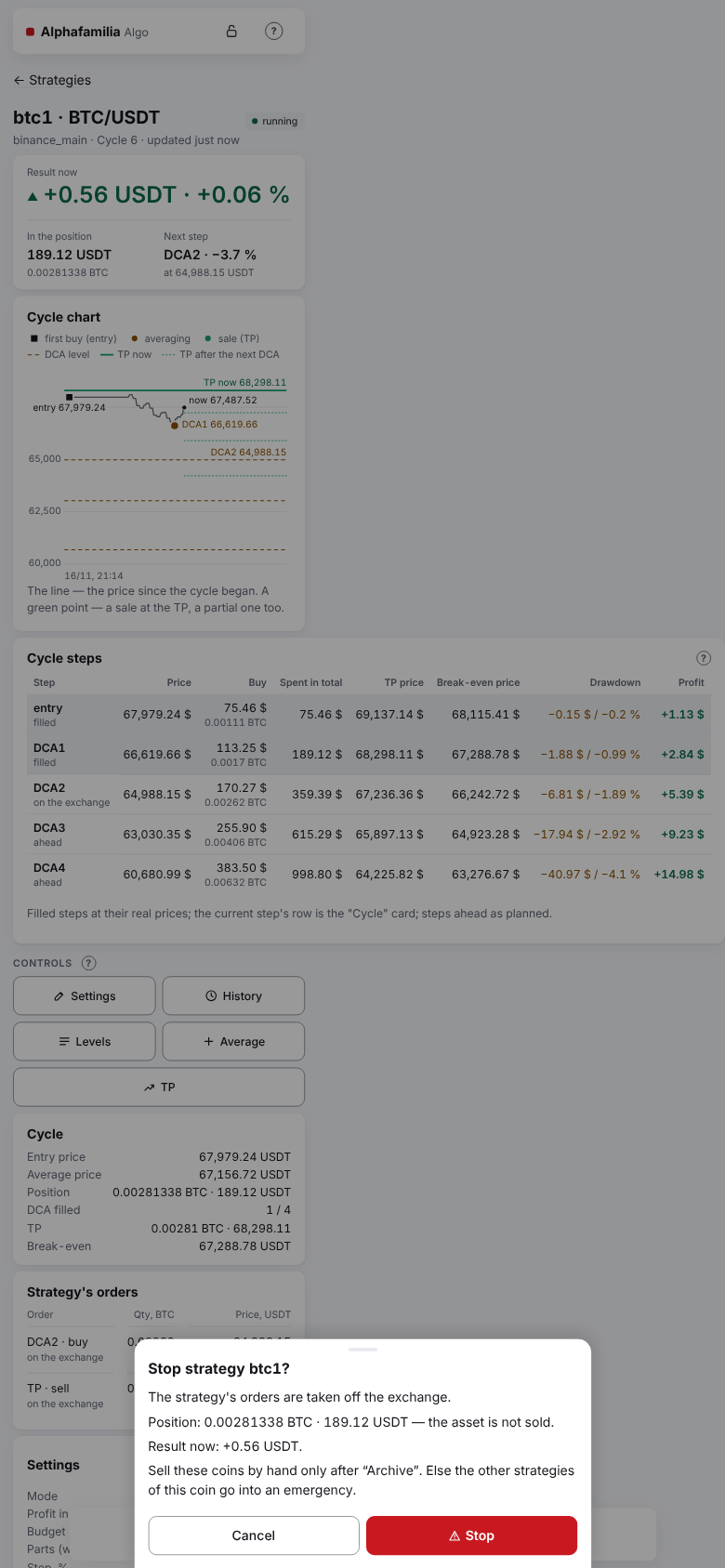
| "Stop" | The strategy is running, paused, or in an emergency with an unfinished cycle | The strategy cancels its own orders. The asset is not sold. The confirmation window says what happens to the position: "The strategy's orders are taken off the exchange.", "Position: … — the asset is not sold." (on futures — "— stays open without a TP.") and "Result now: …"; without a position — "No open position.". On spot with a position — also "Sell these coins by hand only after “Archive”. Else the other strategies of this coin go into an emergency." (Top up or withdraw money). The "Stop" button in the window is red |
| "Stop after this cycle" | The strategy is running | The current cycle is finished, no new one starts. While the cycle runs, this button is not on the screen — this shows the command was accepted. There is no separate label for it. When the cycle closes at the TP, the strategy is "stopped" at once: you see "Start" and "No cycle right now.". The command is kept through a system update, locking the vault and the group "Start" under the list |
For a strategy with an unfinished cycle a line above the buttons says: "The cycle is not finished: continue it or start a new one? A new cycle closes the old one as interrupted; its remainder is handed to you."
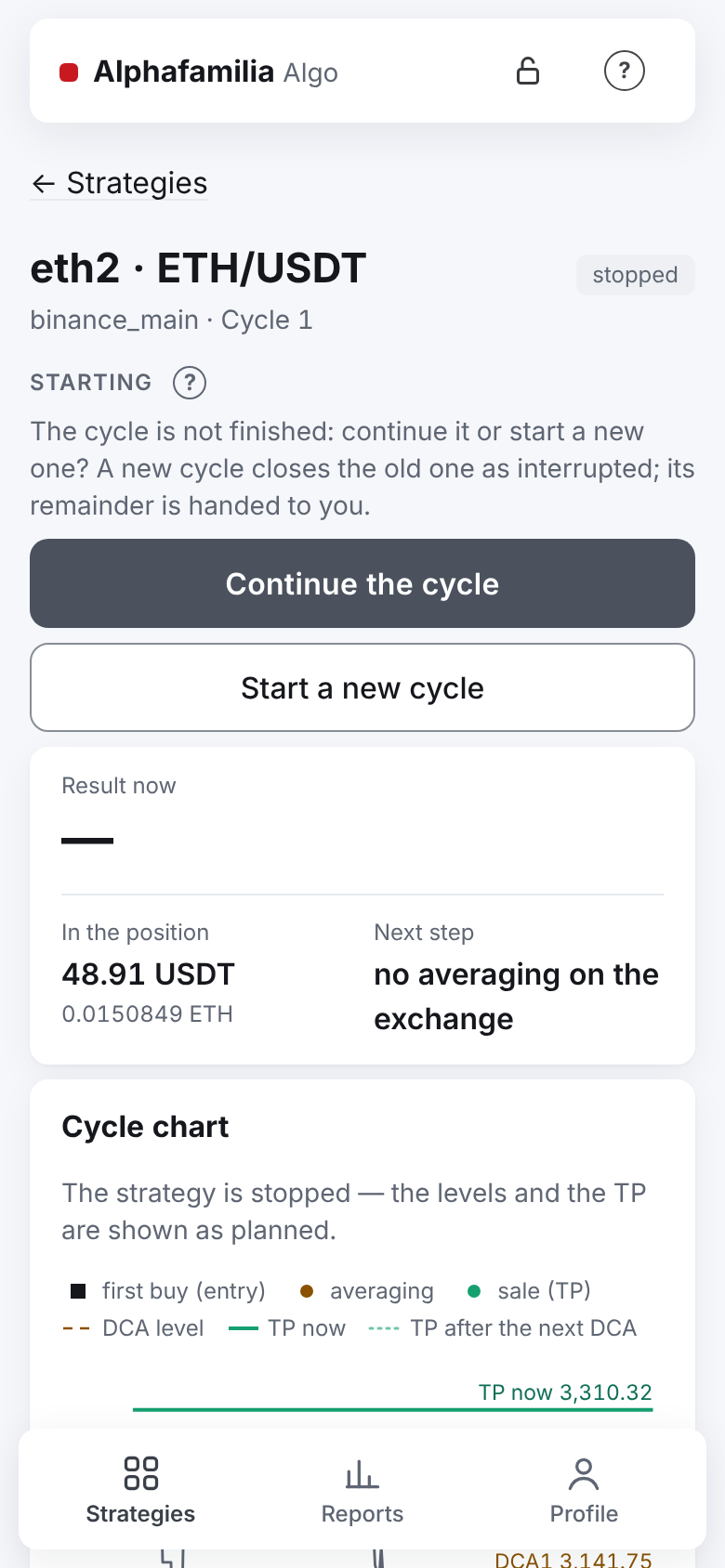
Important. There is no button that cancels "Stop after this cycle": while the cycle goes on, only "Stop" stays on the screen. Changed your mind — press "Stop", then "Continue the cycle": after "Stop", a strategy with an unfinished cycle shows "Continue the cycle" and "Start a new cycle" at once instead of "Start". The strategy's orders are taken off and placed again.
A copy's buttons
A copy (Copying trades) has its own buttons: "Start" (the copy begins a cycle at once), "Stop after this cycle", "Stop" and, in the "Controls" block, "Change balance" (the new balance applies from the copy's next cycle, not below the minimum for the lead strategy's rules). A copy has no "Settings", "Levels", "Average" or "TP" buttons — the lead strategy gives the manual commands, the copy repeats them. The copy's "Controls" block says: "A copy has no “Settings”, “Levels”, “Average” or “TP” — the lead strategy does them." A copy has no pause, in the group commands either.
Important. "Stop" does not close the position. The asset bought stays on your account. If the outcome of some order is not known yet, the other orders are cancelled at once, and this one as soon as the exchange shows it.
Change settings
You can set new settings at any time. The current cycle lives out its own grid, and the new settings apply from the next cycle. If there is no cycle right now, they apply at once.
- On the strategy's screen, tap "Settings" in the "Controls" block or "Change" in the title of the "Settings" card. The "Change settings" screen opens.
- Change the budget, the leverage (for futures), the number of parts, the step, the growth of the parts and steps, the TP or the entry. The form is that of a new strategy — compact, with "?" hints, the summary line under "TP | Leverage" and warnings (Creating a strategy). The fee is not typed: the strategy's rate is used, or the exchange's if higher. A new leverage applies from the next cycle and only while the pair has no position and no orders — this is said under "TP | Leverage". If a strategy's growth is above 50 % (made earlier), it is shown and kept until you change it; a new one is from 0 to 50 % with at most 2 decimals (a finer growth set earlier, e.g. 0.125 %, is kept as it is). A leverage shared with a running strategy of the pair is filled in and does not change; another leverage is not saved: "A running strategy trades this pair with leverage …× — the leverage must be the same.".
- Press "Settings analysis" — the window shows the grid at the current price: the chart and the steps' table (as in the new strategy form).
- Click "Save" (that the new settings apply from the next cycle is said in the window of the link "What do the buttons do?" under the button). The confirmation window names only what changes — a line for each change, e.g. "Budget: 1,000.00 USDT → 1,500.00 USDT", "TP, %: 1.2 → 1.5"; percents and prices are written as in the app's language; if nothing changes — "No changes.". Confirm.
While the new settings wait, the "Settings" card on the strategy's screen has a "From the next cycle" block — only the rows that will change — and a "Withdraw" button (it withdraws the new settings).
The connection, the pair, the market, the cycle mode and the profit currency cannot be changed: "The cycle mode and the profit asset are not changed: create a new strategy for that.".
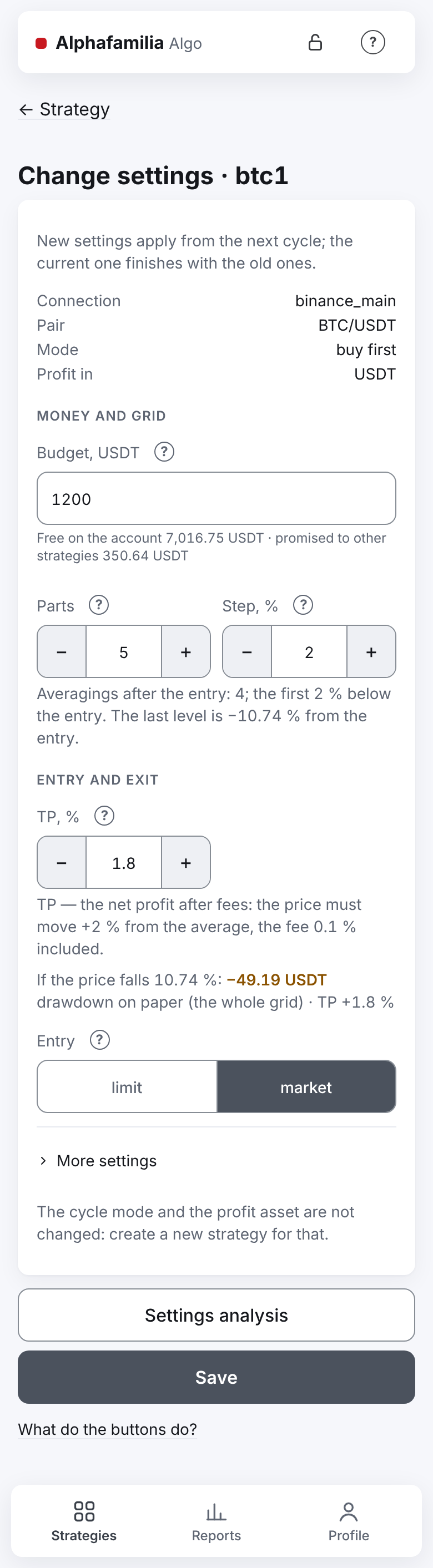
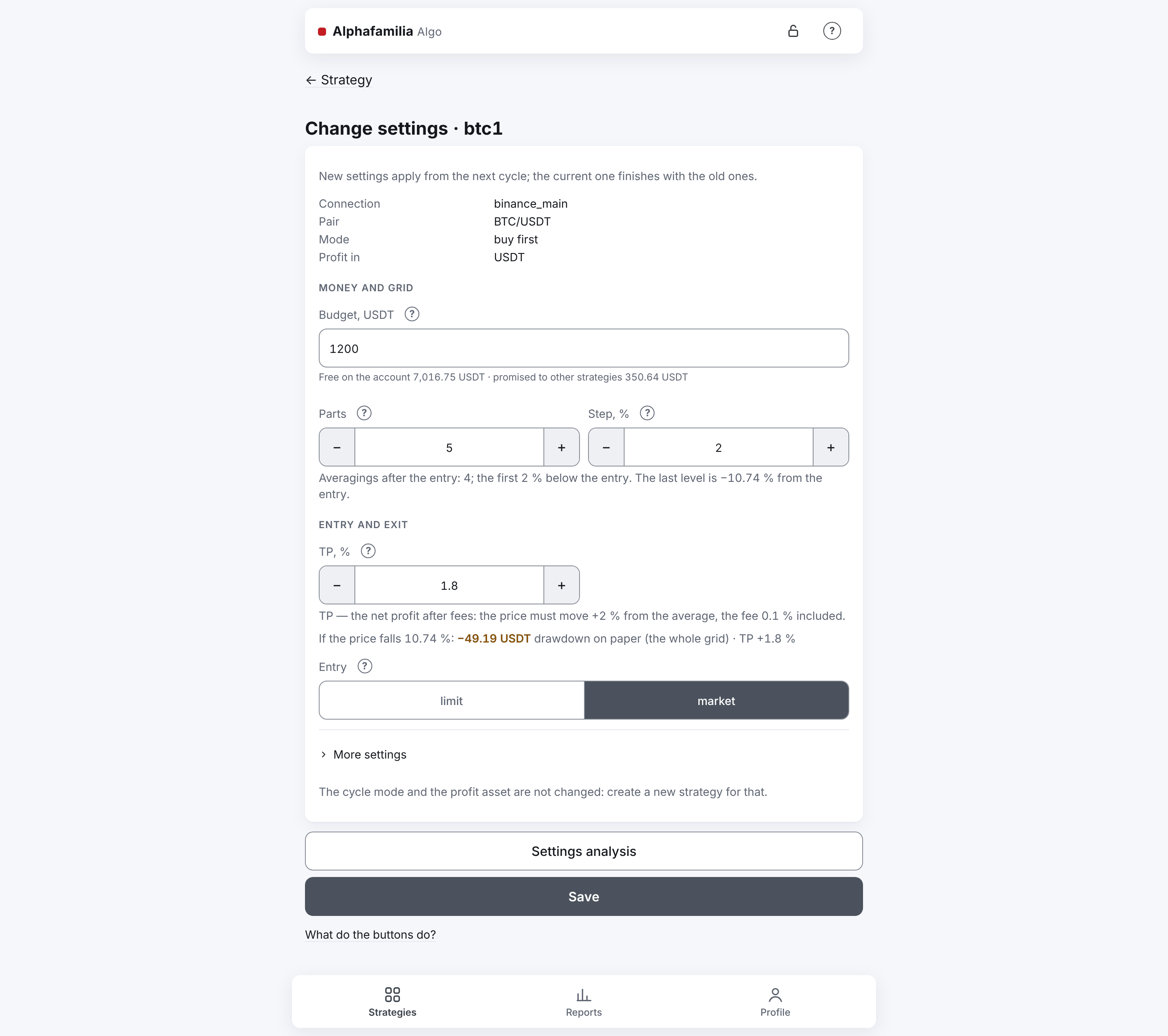
The settings form is laid out as the new strategy's form: one column, under the fields — the warnings, "Settings analysis" and under it "Save" — both across the whole width, below them the link "What do the buttons do?". If saving failed, a card "Not saved" with the reason stands above the buttons.
Manual control
A running strategy past its entry has three buttons in its "Controls" block: "Levels", "Average" and "TP". Every action is done at once, with one tap: there is no draft, no ticks and no "Apply" button. A confirmation window comes only in dangerous cases (see below). Manual actions change only the current cycle: a new cycle goes by the strategy's settings.
Only a running strategy takes changes. If the strategy was loaded after a restart but "Start" has not been pressed yet, the top of the screen says "The strategy is not running — only a running strategy takes changes.", and the buttons are off.
The hints to the three buttons are in the window of the "?" of the "Controls" block on the strategy's screen; on the "Levels" screen the blocks "DCA levels" and "Manual orders" have a "?" of their own.
Levels
The "Levels" screen — what is planned in the cycle and what is bought already.
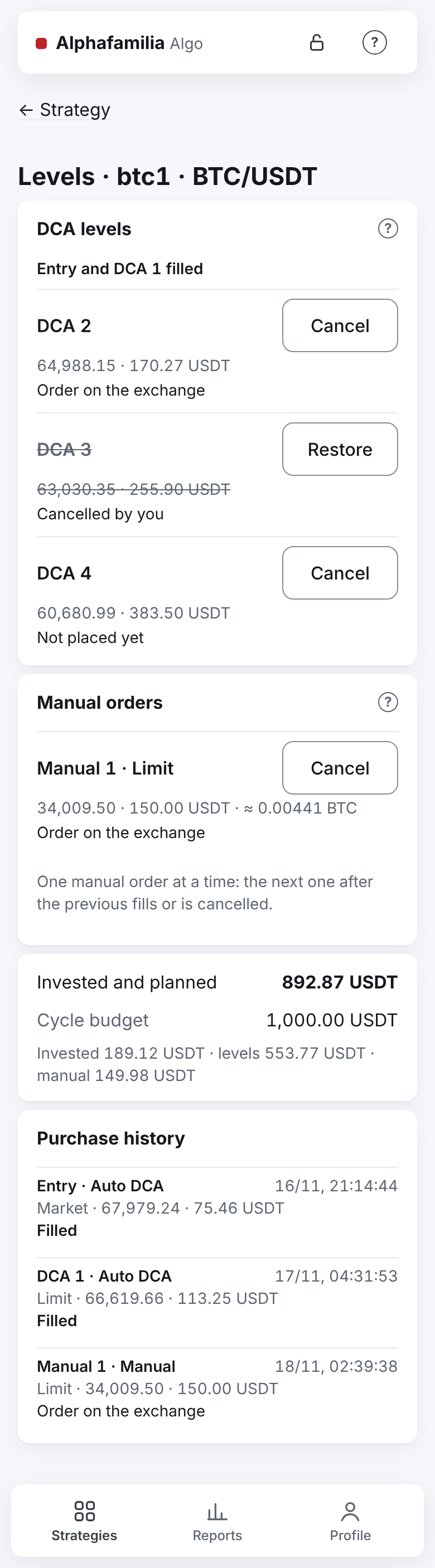
"DCA levels". The filled levels are gathered in one line: "Entry and DCA 1 filled". The rest — each in its own row: price, amount and state.
| State | What it means |
|---|---|
| "Order on the exchange" | The level's order stands on the exchange |
| "Not placed yet" | The strategy places the level in its turn |
| "Waiting for funds" | The exchange refused: not enough money. The strategy retries by itself |
| "Not placed yet — the exchange refused, the strategy will retry" | Another refusal of the exchange; the strategy retries on schedule |
| "Partly filled 0.001 of 0.002" | Part of the level is bought; such a level cannot be cancelled |
| "Partially filled · remainder cancelled" | Part is bought, the rest is taken off |
| "Skipped" | The exchange would not take such an order (below its minimum) |
| "Cancelling…" | The order is being taken off the exchange |
| "Cancelled by you" | You cancelled the level; the strategy does not buy on it until the cycle ends |
The level's row has a "Cancel" button (the level is taken off until the cycle ends, the TP stays) or, for a cancelled one, "Restore" (the level is back in the ladder, the strategy places it in its turn). The entry cannot be cancelled — that is what "Stop" is for. Only a level not filled can be cancelled.
"Manual orders". Your purchases beyond the grid are called "Manual 1", "Manual 2"… — the number does not repeat within a cycle, and a manual order never becomes a DCA level. A row: "Manual 2 · Limit" (or "· Market"), the price (for a limit one), the amount, the quantity and the state:
| State | What it means |
|---|---|
| "Not placed yet" | The order is not sent yet |
| "Waiting for funds" | A limit order: not enough money; the strategy retries on the DCA schedule |
| "Checking…" | The exchange's answer did not come; the strategy finds out the outcome and does not send it again |
| "Order on the exchange" (· filled …) | The order stands; if part was bought — how much |
| "Cancelling…", "Cancelled by you" (after … filled) | You cancelled the order |
| "Filled", "Partially filled" | Bought in full or in part |
| "Error: not enough funds" | A "Market" purchase bought nothing. Also: "refused by the exchange's rules", "the market is closed", "the exchange refused", "not sent within 2 minutes", "closed without trades" |
A manual order is one at a time: the next one after the previous one is filled, cancelled or failed. A limit order not bought in full can be taken off with "Cancel" in its row; the filled part stays in the position. A cancelled one can be brought back with "Restore" — with the same number and the unfilled rest. A "Market" purchase cannot be cancelled.
"Invested and planned" against "Cycle budget": what is invested already plus the rests of the levels and manual orders that may still be bought. Under them — "Invested … · levels … · manual …". If the sum is over the budget, the line is red and says "Over the budget by …".
If the answer to "Cancel" or "Restore" is lost, the row says "Checking… The exchange's answer did not come — not sent again.", then "Done." or "Not confirmed — not sent again. See the status in the row.".
The strategy's screen has no button of its own to cancel a manual order: a manual order is cancelled only here — "Levels" → "Manual orders" → "Cancel".
Purchase history
Every purchase of the cycle: "Entry", "DCA 2" or "Manual 1", the source ("Auto DCA" or "Manual"), the time, the type (limit or market), the price, the amount and the result ("Filled", "Partially filled", "Cancelled", "Error: …"). The history is kept after a cancel, a restore and a restart.
Average
A purchase beyond the grid. No grid step is used. The switch at the top — "Limit order" or "Market".
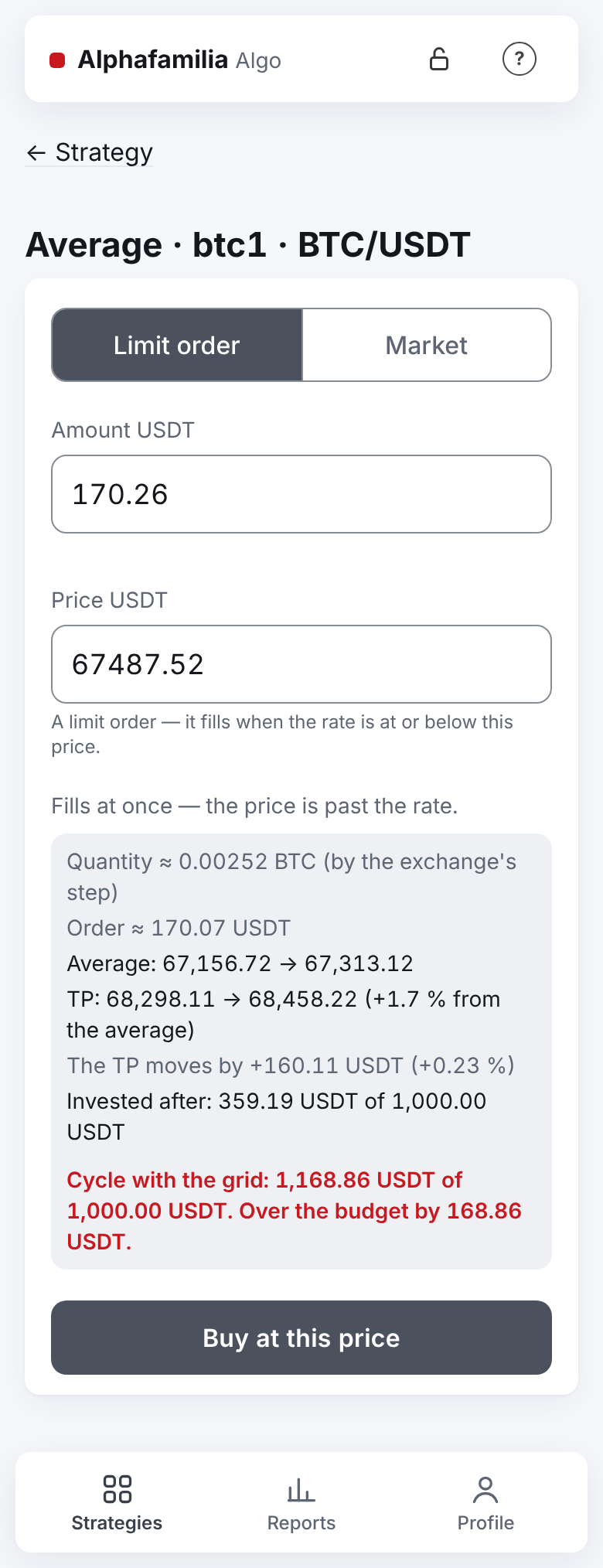
- "Amount" — by default the amount of the grid's next level, rounded down to cents (in a coin — to the exchange's quantity step) so as not to exceed the level. For "buy first" and for futures — in the quote currency (USDT), for "sell first" on spot — in the coin. On futures the amount is the position's size (the leverage does not multiply it), and the margin is shown next to it: "The order's total amount, the 3× leverage is already counted; margin — …". This is not the same as the strategy's budget: there the field shows the margin of the whole cycle. On COIN-M the amount is in BTC (8 places); the next level's amount gives exactly its contracts, and any amount is turned into whole contracts, down: "Quantity ≈ 12 contracts (by the exchange's step)", "Order ≈ 0.0125 BTC" (COIN-M).
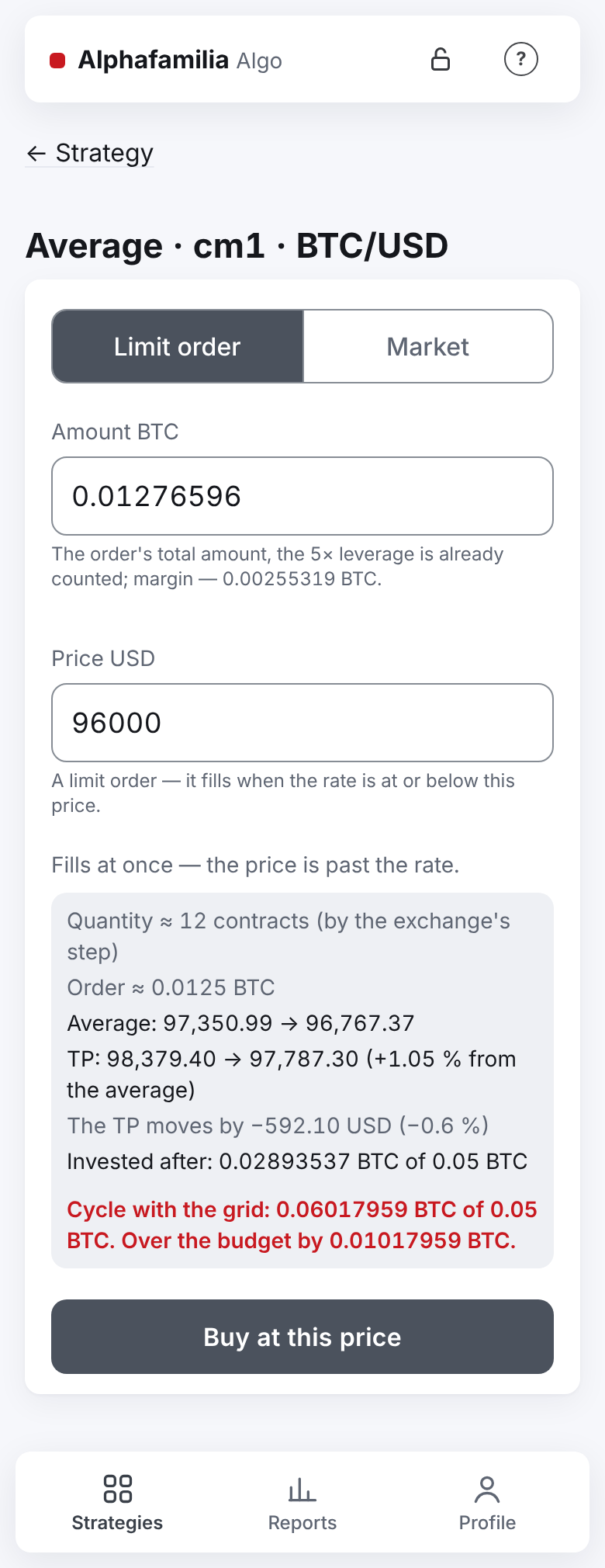
- "Price" (limit only) — by default the current rate; until you touch the field, the price follows the rate. Under the field: "A limit order — it fills when the rate is at or below this price." (for "sell first" and short — "at or above"). The exchange's price step is the system's care: the price is rounded to the step by itself, and if it differs from what you typed, you see "Will be placed at … — the exchange's price step is …".
- "Market" has no price field: "Rate now (for reference): …".
As you type, the system counts and shows: "Quantity ≈ … (by the exchange's step)" (on T-Invest — in lots too), "Order ≈ …", "Average: … → …", "TP: … → … (… from the average)", "The TP moves by …", "Invested after: … of …" and "Cycle with the grid: … of …" (in red — "Over the budget by …"). The hints under the fields:
- "The price is … times off the market — most likely a slip." (red; only when the price is more than 2 times off the market, for example "2.1 times");
- "Fills at once — the price is past the rate." (grey) or, if the price is worse than the market by over 1 %, "The price is worse than the market by over 1 % — the order fills at once.";
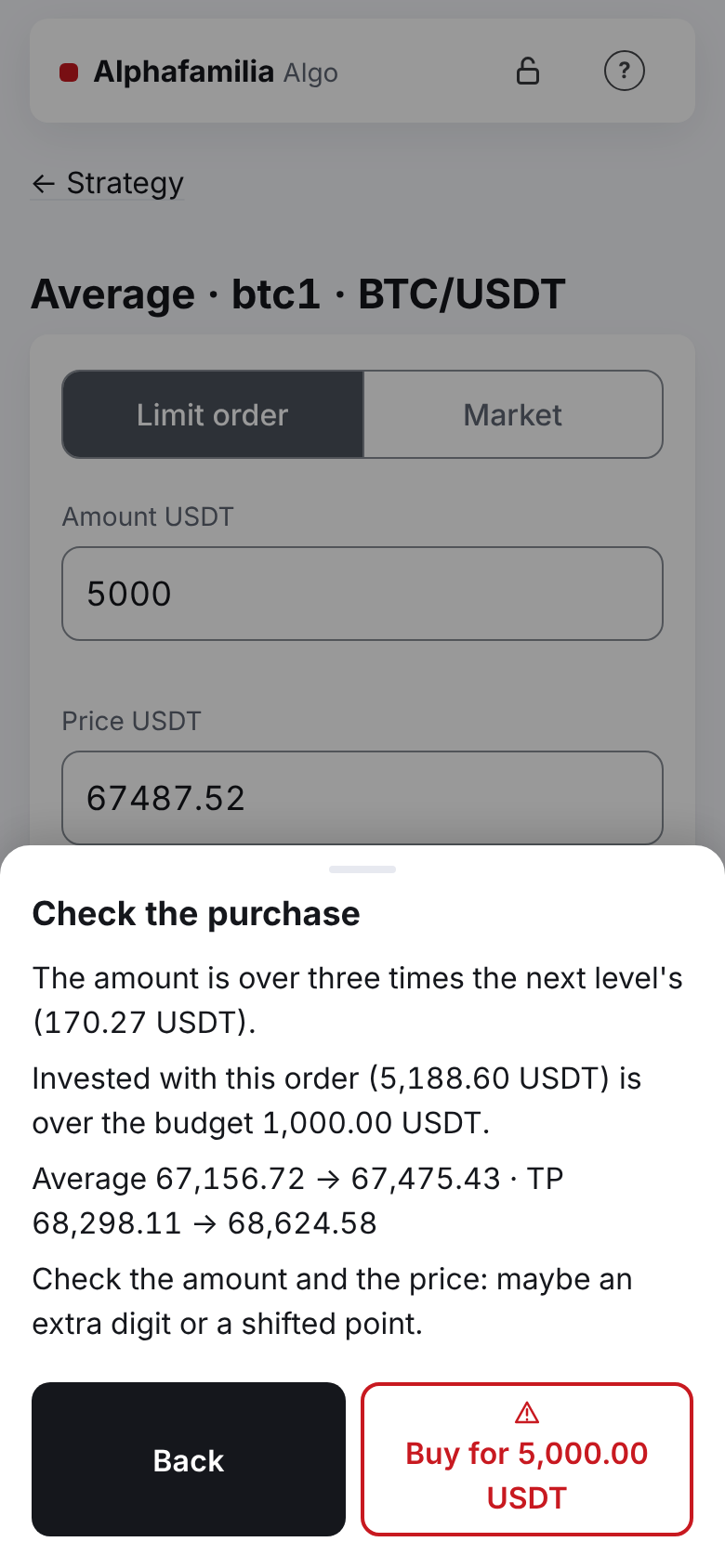
- "The amount is over three times the next level's (…).";
- "Invested with this order (…) is over the budget ….";
- on spot where a purchase's fee is taken in the coin bought (BingX, Bybit; Binance when the account does not pay its fees in BNB) — "The order is for … — a step more: the fee is taken in the coin.";
- for "Market" — "Not enough funds: … needed, … free.".
The button — "Buy at this price" or "Buy at the market" (for "sell first" and short — "Sell…"). A window comes only for the reasons in the list below. After the tap the app takes you to "Levels": there is the row "Manual N" with its status, and the fill comes as a Telegram message ("Buy filled: Manual 2" — always, even when the strategy's trade messages are off).
A limit order stands until it fills. Short of money — the strategy retries as with DCA (status "Waiting for funds", one message "Not enough funds" per run of refusals); once the order is placed — "Manual N — the order is on the exchange". With a price worse than the market, the quantity is counted at the market price. If the exchange refused the order by its rules (price outside the band, amount below the minimum), it is taken off at once — the message "The exchange refused the manual order"; correct the price or the amount and try again. Passing refusals (no money, no answer from the exchange, market closed) are retried on schedule.
Market — a plain market purchase for the amount, without a protective price limit. The strategy counts the quantity by the exchange's step (down; on T-Invest — in whole lots). The order is sent once. Not enough funds, the exchange's refusal, limit-only trading — the purchase ends with the error "Manual N: the market buy was not made", with no retries, even after a top-up: buy again. If the order could not be sent within 2 minutes after the command, it is not sent at all ("Error: not sent within 2 minutes").
Rules of a manual order:
- it is cancelled when the cycle closes and on "Stop";
- after it fills, the TP is recalculated at once (your TP in percent — from the new cost);
- once the TP starts to fill, it is too late to average: "The TP is filling — too late to change.";
- copies repeat your manual order with the same share of their balance — a limit one from their own average, a "Market" one at the market (Copying trades).
TP
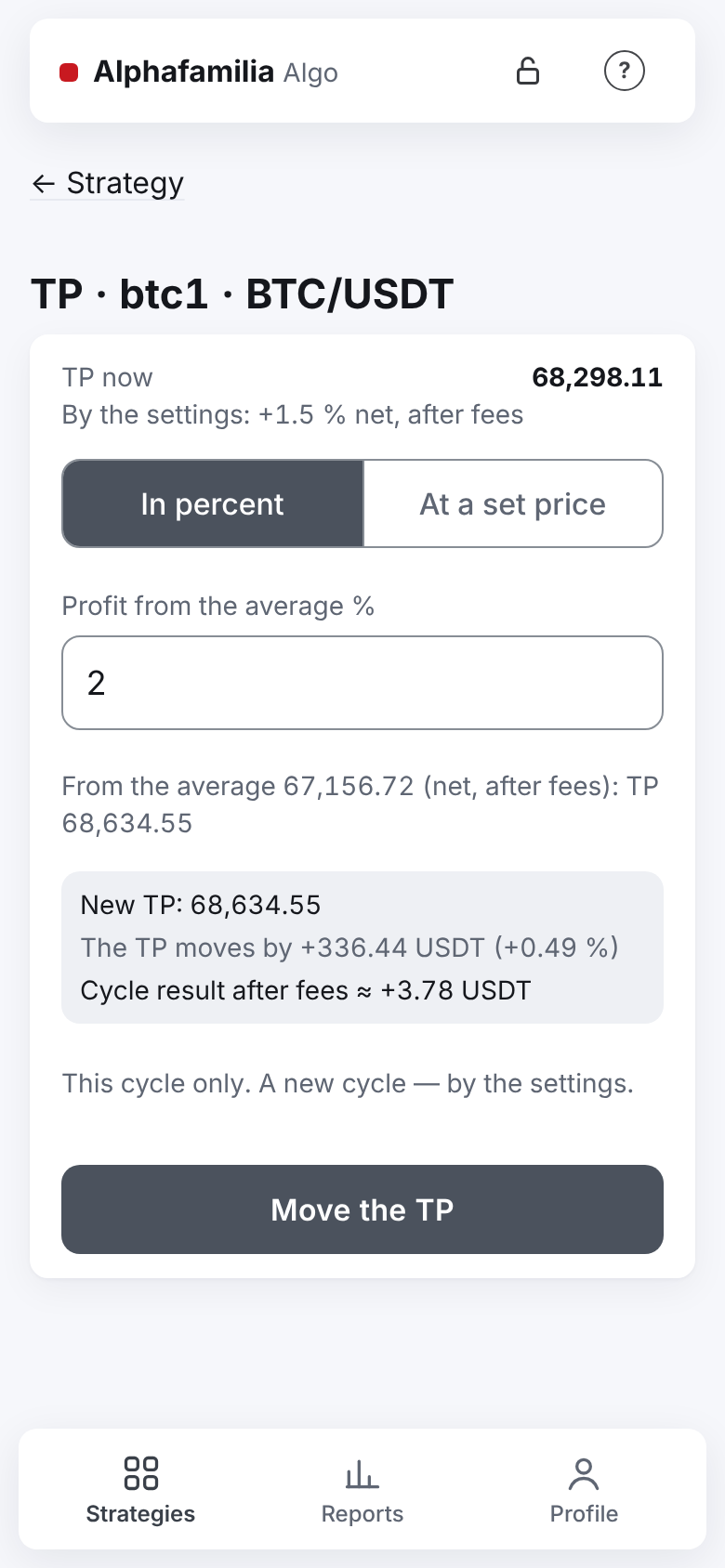
Your own TP for the current cycle. At the top — "TP now" and how it is set: "By the settings: +1.5 % net, after fees", "Set by you: +2 % net, follows the average" or "Set by you: a fixed price".
The percent of the "Profit from the average" field is net, like the settings' TP percent: the profit after the entry's and the exit's fees. The TP price is counted so: the position's cost per unit with the entry's fee × the break-even factor (the exit's fee is in it) × (1 ± %/100). So "0 %" is the real break-even, and +1.5 % in the field is the same +1.5 % net as in the settings. An example: an entry at 60,000 with a 0.1 % fee on the entry and the exit, a TP of +5 % — 63,126.19 (not 63,000). The field starts with the percent of the TP now.
The switch "In percent" / "At a set price":
- "Profit from the average", % — the net profit after fees: TP = the entry cost (with the entry's fee) × the break-even factor × (1 + %/100) (for short — below). Under the field: "From the average … (net, after fees): TP …". Such a TP follows the cost: after every DCA fill it is counted again from the new cost — until the cycle ends. The price is rounded to the exchange's step from the average towards the profit (for a long — up, for a short — down), so the profit is not below the percent set — as with the TP of the settings. On COIN-M the percent is a profit in BTC, the average is by BTC; “+1 %” is the same TP as the settings' TP of 1 %.
- "TP price" — a fixed price for the whole position until the cycle ends. Under the field: "That is … net profit from the average …". The price is rounded to the exchange's step by itself.
Below — "New TP: …", "The TP moves by … (… %)" and "Cycle result after fees ≈ …". The result is counted as for the strategy's TP: the exit fee at the larger of the set rate and your account's maker rate at the exchange (a TP is a limit order); the same rate is in the confirmation window and in the order itself; on T-Invest the broker's fee not charged yet is counted too.
The "Move the TP" button works only for a new value that differs from the TP now. The "By the settings: TP … (+1.5 % net)" button (shown when the TP is set by you) only puts the strategy's TP price into "TP price" — the same "Move the TP" takes the strategy back to the strategy's TP: from then on it is counted by the settings again, with the fees, after every purchase. The button "Back to the strategy's TP" in the "Controls" block on the strategy's screen does the same. Under the button: "This cycle only. A new cycle — by the settings.".
If the TP is worse than the break-even — a red hint "The TP is worse than the break-even … — the cycle closes at a loss." and a confirmation window. For a percent TP the hint names the percent too: "A TP of −0.5 % at the present cost is worse than the break-even … — the cycle closes at a loss.". If the TP is past the rate — "Fills at once — at the rate …", and the loss in the window is counted at the current rate.
The consent to a loss holds for the position it was given for. A percent TP is different: you chose the percent yourself and the TP follows the cost, so the consent holds for the whole cycle ("0 %" is a percent TP too). If your TP without such a consent became a loss — the exchange's fee rose or a DCA moved the break-even — the strategy takes it off, puts the strategy's TP back and sends "Your TP price became a loss".
If the answer is lost: "Checking whether the TP moved… Not sent again.", then "The TP is moved." or "Not confirmed — not sent again. See “TP now” above.".
Confirmation windows and errors
A window comes only for what is dangerous — from the bottom of the screen, one for all reasons. The safe button is first and dark, the dangerous one is outlined in red and names the action. Enter, Esc and a tap outside the window choose the safe one.
| When | Window | Buttons |
|---|---|---|
| The DCA price is more than 2 times off the market | "The price is far from the market — probably a mistake" | "Buy for … USDT" / "Back" |
| A limit price worse than the market by over 1 % (fills at once) | "Check the purchase" | the same |
| The amount is over three times the next level's | "Check the purchase" | the same |
| Invested with this purchase is over the budget | "Check the purchase" | the same |
| "Restore" a level or a manual order: price worse than the market by over 1 % and/or the invested goes over the budget | "Restore …?" | "Restore" / "Do not restore" |
| TP worse than the break-even | "The TP is worse than break-even — the cycle closes at a loss": new TP, average, break-even with fees, rate, loss | "Move the TP" (if it fills at once — "Close at a loss ≈ −…") / "Back" |
The purchase window has all the reasons, "… will be invested with a budget of …", "Average … · TP …" and "Check the amount and the price: maybe an extra digit or a shifted point.". For a "Market" purchase the window comes only for a big amount and for going over the budget.
A price near the market (worse by less than 1 %) brings no window — only the grey note "Fills at once". A plain purchase, cancelling and restoring a level, a TP in profit — no window.
Errors are shown in place, under the action, saying what to do. "Try again." — only for a plain refusal that may pass by itself (no rate, the exchange is busy). Frequent ones: "There is a manual order already — wait for it to fill or cancel it in “Levels”.", "Not enough funds on the exchange — lower the amount or top up the account.", "The amount is over the exchange's limit for a market order — lower it or buy with a limit order.".
Do not change the strategy's orders on the exchange
Change the strategy's orders only with the strategy's buttons, not in the exchange's or broker's app. The strategy counts only its own orders.
- If you cancel or change a strategy's order in the exchange's app, what was filled before that is counted. The strategy places the order again by its plan and sends "Strategy's order removed by someone else".
- An order changed in the T-Invest app becomes yours: the broker creates a new order. It stays on the exchange next to the strategy's order; the strategy does not touch it.
- The strategy does not count your own manual trades on the same pair.
The list of strategies and filters
At the top of the "Strategies" tab — "Strategies: N" (how many strategies you have), and on the same line on the right the "Archive" link with "+ New strategy" beside it (when the vault is open). A new user sees the "First steps" checklist below (Access and sign-in). Under them — a summary of three cells (side by side on a computer, one under another on a phone):
- "Today" — the profit of the cycles closed since midnight (by the morning summary's time, Madrid);
- "Open cycles" — how many cycles run and their result if closed now;
- "At work" — how much money is in open positions now; on futures — the margin (value ÷ leverage), not the notional.
The amounts are per currency. While the vault is locked, "Open cycles" and "At work" show "—"; if not every strategy is loaded — a note at the bottom of the summary: "1 strategy is not loaded — not in the total." ("2 strategies are not loaded — not in the total."). If a strategy holds a position but the exchange gave no price, its cycle is counted, but its result is unknown and is not in the "Open cycles" sum — a grey line under the cell says "No price for 2 strategies — the total is without them." (for one — "No price for 1 strategy — the total is without it.").
Below are the strategies. Those that need your attention are on top, under the heading "Need attention (N)" (in the plain text colour, with a yellow triangle and a "?" sign): the reasons are below. The rest are under "Others (N)". If there are no such strategies, the list has no headings.
Each strategy in the list shows: name, the mark "copy" (for a copy), on the right — the state; below — pair (for futures — "Futures" and the leverage, e.g. "Futures 3×"), the cycle number and, with an open cycle, the averagings done of all ("DCA 1/4"); the connection is in the filter and on the strategy's screen. The next averaging on the exchange with its distance from the price ("next DCA2 −3.7 %") is a line of its own below. On the right, under the state, — the "Result now" with its sign and colour: in a column of its own, of one width in every card, while the line with the pair runs on its left and goes on under it; the line breaks only between its parts set apart by "·". Below — the profit with its sign and arrow (▲ green or ▼ red) and the number of closed cycles ("1 cycle", "5 cycles"). A futures strategy has a risk strip (USD-M futures). If the strategy waits, the reason is shown; if it is in an emergency now — the "Emergency reason" in words, the "What to do" line and a folded "Details": under it "Code for support: …" — the reason's code in Latin letters for the developer (see Emergencies and faults). A press on "Details" opens the code and does not open the strategy; opened, it does not fold when the screen refreshes. Once a strategy in an emergency is stopped, the emergency reason is no longer shown, and it alone does not put the strategy under "Need attention".
A long strategy name (up to 64 characters) is shown whole: if it does not fit the line, it wraps, and the state mark goes under the name, on the right. The same on the other screens: the strategy's screen, the reports, the archive.
With 4 strategies or more, above the list are the filters "Connection", "Pair" and "State". "State" has the option "need attention" — the same strategies as in the top section. With fewer strategies there are no filters.
Under the list — the system's version, for example "Version: 2.1.32".
Needs attention: why and what to do
A strategy that needs attention has a coloured badge with the reason in the list (with several reasons — the first, most urgent one and "and N more"). On the strategy's screen, at the top, is the block "Needs attention": each reason in a line and "What to do" under it. An emergency has no "Needs attention" badge — neither in the list nor on the strategy's screen: it is shown by its own card with the reason and "What to do" (Emergencies and faults). A line names the order as the program writes it: "DCA2: …", a manual order — "Manual 1: …".
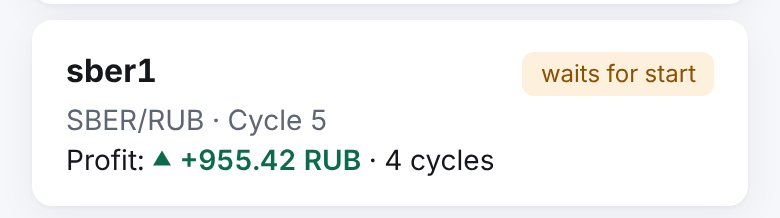
Strategies waiting for the vault or for a start are under "Need attention" too, but they have no badge with a reason: the state mark on the right says it once — "waits for the vault" or "waits for start". What to do: open the vault with its password or press "Start" (on the strategy's screen — the "Starting" block).
| Badge | Line | What to do |
|---|---|---|
| "Not enough funds" | "DCA2: the exchange refused — not enough funds. Retry at …" | Top up the account or free the funds — the strategy retries by itself |
| "Exchange refused" | "DCA2: the exchange refused — the order breaks the exchange's rules. Retry at …" (or "the market is closed", "another reason") | It usually passes by itself. If it repeats — open "Events" and download the diagnostics |
| "Fault" | "For several minutes the strategy cannot make a working step with the exchange." | The strategy retries by itself. If it lasts — check the key and the connection to the exchange, download the diagnostics |
| "No connection" | "Last step: no connection to the exchange." | It usually passes within a minute |
| "Result to clarify" | "The exchange has not charged a trade's fee yet — the cycle's result will be clarified." | Nothing: the result is counted again by itself |
| "Funding to clarify" | "Funding payments (N) are not placed in a cycle — the result needs clarification." | Check the funding payments in the exchange's history; the strategy works as usual |
A retry after a refusal gives the mark only with an open cycle of a loaded strategy. While a strategy is not loaded (the vault locked after a restart), it retries nothing and gets no mark from a kept retry time. If the refusal's reason was not kept after a restart, the line says "the reason was not kept after a restart".
Several strategies at once
When the vault is open and the list shows more than one strategy, under the list there are "Start" and "Stop" ("Action for the strategies shown (N):"). "Start" acts only on the strategies not running: stopped, paused and waiting for a start (strategies in an emergency it passes by); "Stop" — on the running, paused and waiting ones. With nothing to act on, the button is off and says why: "Nothing to start: every strategy shown is running or in emergency." (for "Stop" — "Nothing to stop: every strategy shown is stopped or in emergency."). "Stop" has a red frame. There is no group "Pause".
- Filter the strategies you need, for example by connection.
- Click the button under the list.
- Check in the confirmation window whom the command touches, and confirm. The window names only the strategies the command acts on and the split by their state: "Now: running N, waiting for a start N, paused N, stopped N." (only those that are not zero; there are no strategies in an emergency in the window — the command does not touch them).
Important. The group "Start" starts all the strategies shown that are not running, including the ones you stopped. It passes strategies in an emergency by — they stay in the emergency: an emergency is looked into one strategy at a time, with its reason, and started with the button on its screen. If you do not want to start all of them, filter the list first. The strategies begin one after another, 2 seconds apart.
If stopped strategies have an unfinished cycle, the group start asks once "Continue the cycle" or "Start a new cycle" and applies the choice to all such strategies. If everything was done — a short "Done". If someone was skipped, a window with the result stays until "OK": "Done for N of M", who was done and who was skipped and why — for example, "not loaded (vault locked or a setup error)". A strategy whose state changed while you read the window is skipped too: "already running — left as it is" for "Start", "not running — nothing to stop" for "Stop"; an emergency one — "an emergency stop — started only from its own screen, once the reason is looked into". The group "Start" also skips the strategies you stopped while the database did not answer and whose stop is not recorded yet: they stay stopped, and only a strategy's own "Start" button starts it.
The group "Stop" works when the database does not answer too — like a single strategy's "Stop": the chosen strategies stop trading at once, their orders are taken off the exchange, the strategies waiting in the start queue leave it, and the stop is recorded as soon as the database answers; a recorded stop holds after a server restart too. Until the database answers, the stop is only in the server's memory: if the server restarted before that, the stop is not recorded — once the vault is open, press "Stop" again (as for a single strategy). The strategies count as stopped ("Done for N of N"), and the result window says it strategy by strategy: whose stop is not recorded yet; for each strategy whose orders the exchange did not confirm off, its name and what to check on the exchange; whose orders are off. Stopped strategies and strategies in an emergency are passed by at that time too, even when they are not loaded yet after the vault was opened or a restart: "not running — nothing to stop", their orders are left alone, the emergency stays. The summary message in Telegram comes once the database answers and names the strategies by their names.
Telegram gets one summary message instead of a separate one for each strategy: "ℹ️ Start: N" or "ℹ️ Stop: N".
The server command "start all" (vnext2ctl start all) is the same as the group "Start": it starts all the strategies that are not running, stopped ones included. Strategies in an emergency are passed by and stay as they are. A stopped strategy with an unfinished cycle, for which you gave no choice (--continue or --new-cycle), also stays stopped; its name is in the command's answer in the kept_stopped list. Start such a strategy with the button on its screen or with start <bot> --continue / --new-cycle.
Archive
You can move a stopped strategy or a strategy in an emergency to the archive if it has no orders on the exchange.
- Stop the strategy and wait until its orders are cancelled.
- Scroll the strategy's screen down and click "Archive" (the line under the button: "the strategy leaves the list; it can be brought back from the archive"), then confirm. After archiving, the list of strategies opens.
If the cycle is not finished, it is closed as interrupted; the remaining asset is yours, and Telegram gets "⏹ Cycle N interrupted" (if the fill messages are on). An archived strategy is not loaded and not shown in the list. Its history is kept, and its name stays taken.
The archive is on the "Strategies" tab: the "Archive" link beside "+ New strategy" (back — "← Strategies"). There each strategy has a card: the name, the pair, the profit signed and coloured as on the strategy's screen ("+1.50 USDT") and the number of cycles ("1 cycle", "5 cycles"), the link "Cycle history" and, when the vault is open, the "Bring back" button. With no strategies in the archive — "The archive is empty.". A strategy brought back appears in the list, stopped.
Command journal
"Profile" → "Command journal" shows all the commands: the time, the command, the strategy, the result ("done", "refused", "running", "interrupted"), the reason for a refusal and who gave the command (your Telegram or "server console").
A command sent at the moment the service is stopping (an update, a restart) is not taken: "The service is stopping (an update or a restart) — the command was not taken. Try again in a minute."; nothing changes. The commands taken before, the service carries to their end before it stops, and when the app asks again about a command already sent, it gets that command's real outcome ("Done" or "still running"), not this message. If the command journal is unavailable at that moment too, the app asks again by itself for a few seconds, then says: "The service is stopping and the command's outcome cannot be checked now — try again in a minute. A command carried out will not run twice."
If the service restarted during a command, the command may or may not have been carried out. A strategy's "Pause", "Stop" and "Start" are checked by its saved state: if the strategy is already in that state, the app shows "Done" and the journal "done" (for "Stop" — after the orders are cancelled once more, see above). Otherwise the journal shows "interrupted", and the app says "The service restarted while the command ran: it may or may not have been carried out. Check the state and repeat if needed.".
Diagnostics
At the bottom of the strategy's screen — "Download diagnostics (no secrets)". This is a file with the strategy's state, orders and latest events. It has no keys or passwords. You can send it to the developer. Its telegram field is the state of the messages: wait_s — how many seconds Telegram asked the bot to wait (0 — it did not), queued — how many messages wait to be sent.