A second exchange, a new key
At the end of this path you have one more connection — another exchange, another market or another account — or an old connection has a new key. What a connection is — in Connections and the vault; an unfamiliar word — in the glossary.
What you need
- The vault password (the same as for the first connection).
- The new exchange's key or a new key of the old one — without the withdrawal right, with the server's address in its IP list. How to create it — Keys on the exchange side: Binance, BingX, Bybit, Coinbase, T-Invest.
- To replace a key — the connection's strategies stopped.
- 10–15 minutes.
The main rule: one market of an account — one connection
A connection is one market of one exchange account: "Binance spot", "Binance USD-M futures", "Binance COIN-M futures", "BingX spot", "BingX USDT-M futures", "Bybit spot", "Bybit USDT futures", "Coinbase spot" or "T-Invest".
- Spot and futures of one account are two connections. The key is entered for each (it may be the same key).
- The same market of the same account a second time cannot be connected: "This market of the exchange account is already connected as '…'…". A new key for it goes through "Replace key" on the old connection.
- Someone else's account cannot be connected: "This exchange account is already connected by another user."
- Another account of the same exchange (a subaccount, say) is a separate connection with its own key.
- The test and the live environment are different connections.
Steps
Add a second connection
Open "Profile" → "Settings" → "Exchange connections". Your connections are shown.
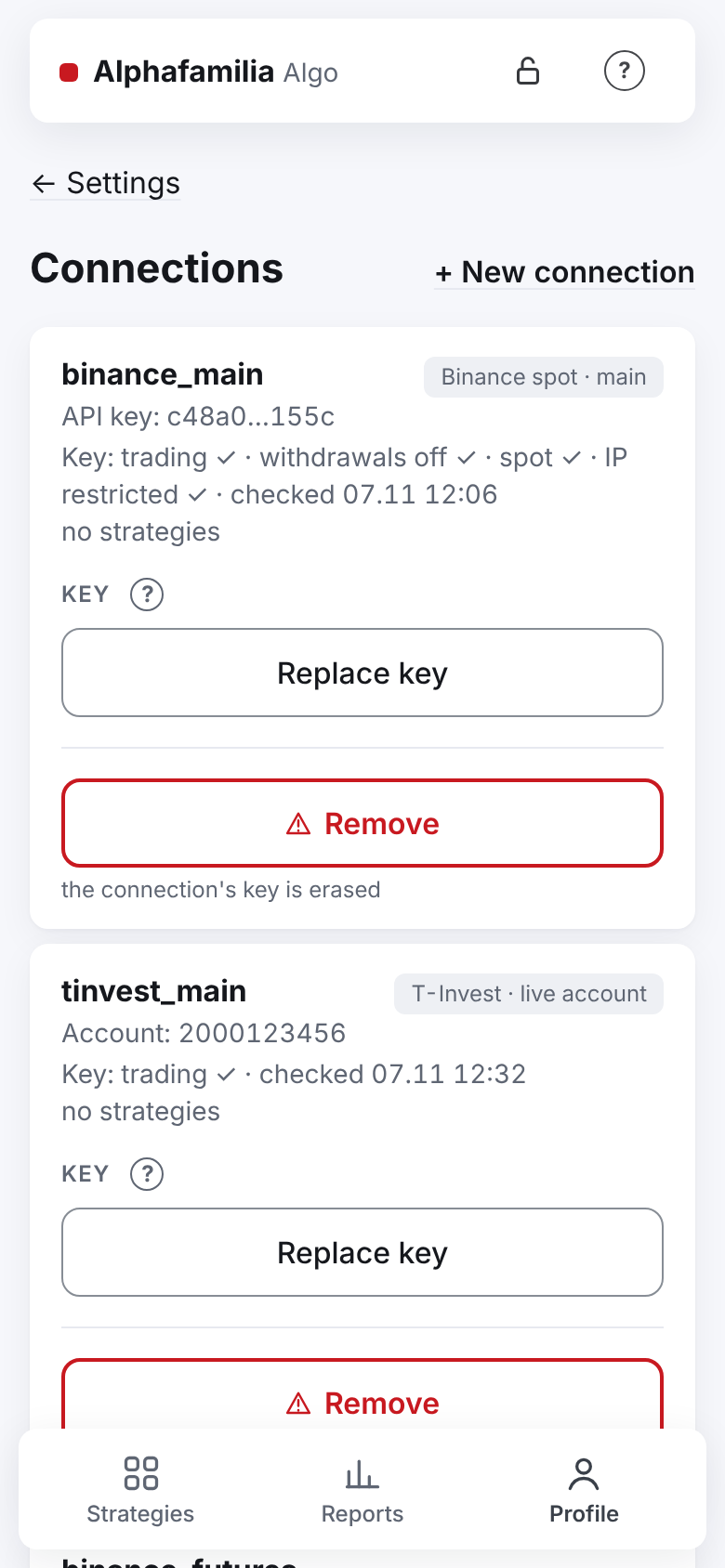
Press "+ New connection".
Step "1 · Market and environment": choose the market (say, "BingX spot" or "Bybit USDT futures") and the environment. On the screen the environments are called:
Market Real money No real money Binance spot, Binance USD-M and COIN-M futures "main" "test network" BingX spot "live account" (no choice) — BingX USDT-M futures "live account" "VST demo account" Bybit spot, Bybit USDT futures "live account" "demo" Coinbase spot "live account" (no choice) — T-Invest "live account" "sandbox" The real-money environment is chosen by default — the switch is yellow. Press "Next: the key →".
Step "2 · Key and check": read the memo above the fields — each exchange has its own. The server's address is shown right there, with a "Copy" button.
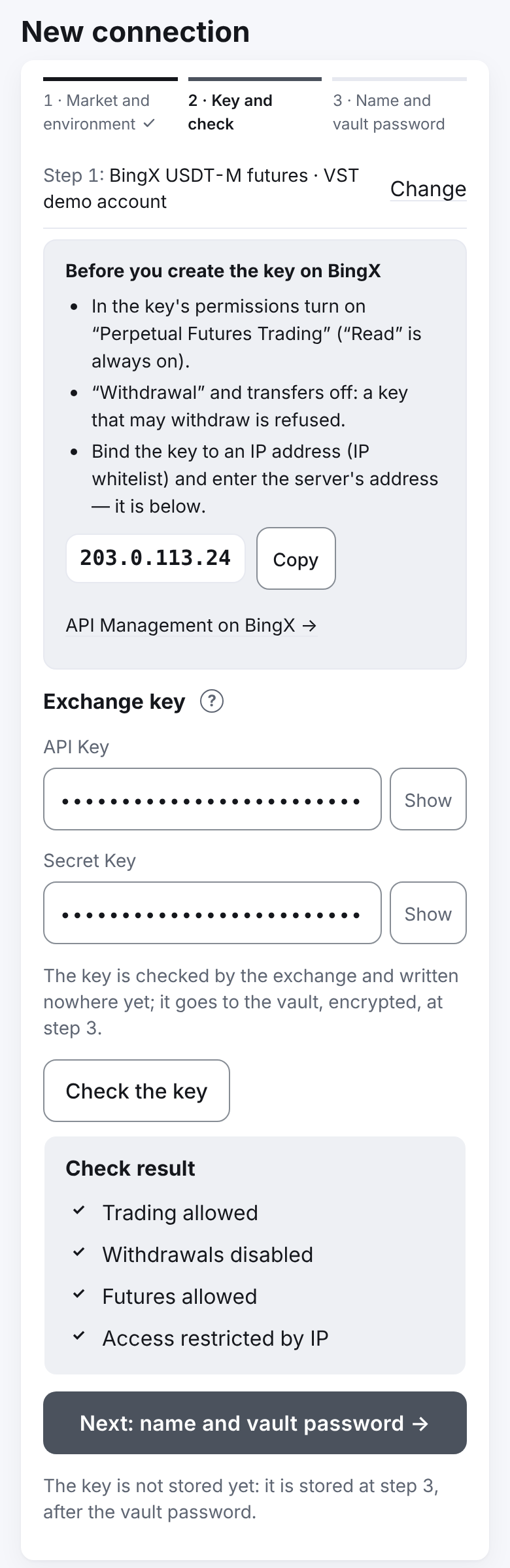
Paste the "API Key" and the "Secret Key" (for T-Invest — the token). Press "Check the key" and look at the "Check result": ✓ — good, ✗ — the key will not be accepted. Press "Next: name and vault password →".
Step "3 · Name and vault password": the name fills in by itself — the market and the environment, for example
bingx_spot_prodorbybit_futures_test. If you already have a connection of that name, the app offers the next free one:bybit_spot_prod_02, then_03. You may type your own (2–24 characters: lower-case Latin letters, digits and "_", a letter first), for examplebinance_spot_sub. A connection cannot be renamed later.Enter the vault password in "Vault password — to save the key into the vault" and press "Add" (for the live environment — "Add the live key" and a confirmation).
The answer "Connection added.". If the vault is open, the key is available to strategies at once.
Create a strategy on the new connection: "+ New strategy", choose this connection in the form. An existing strategy's connection does not change — a strategy cannot be moved to another exchange, only a new one created.
BingX and Bybit next to Binance
Strategies of different exchanges work side by side and do not disturb each other. How the exchanges differ:
| Exchange | What to keep in mind |
|---|---|
| BingX | Spot is the live account only; the VST demo account is for futures only. If the key has an IP list, the server's address must be in it — otherwise the key is not accepted. BingX sometimes shows a trade several minutes late: the strategy waits for the TP's trade up to 12 minutes and does not go into an emergency. In detail — BingX |
| Bybit | A Unified Trading Account is needed. Spot and futures of one account share one wallet: the second connection brings a "shared wallet" warning. A key without an IP list works for 90 days. As on BingX, the strategy waits for the TP's trade up to 12 minutes. In detail — Bybit |
| Coinbase | Spot is the live account only, pairs against EUR and USDC (an EEA account). The key is made on the CDP portal (ECDSA, View and Trade, no Transfer); a separate portfolio for the strategies is best; put the server's address into the IP allowlist yourself — the app does not check it. There is no test environment. In detail — Coinbase |
| T-Invest | A token instead of a key; after the check choose the account. A token has no IP restriction |
Replace the key
A key is replaced when its term is running out, when the exchange no longer accepts it, when you changed the key's rights on the exchange, or simply to keep things tidy. Only a key of the same account can replace it.
- Create a new key on the exchange (do not delete the old one yet).
- Stop all strategies of this connection: "Stop after this cycle" (wait for the cycle's end) or "Stop" (the orders are taken off at once). The strategies of other connections go on.
- "Profile" → "Settings" → "Exchange connections", on the connection's card — "Replace the key".
- Enter the new key and the password in "Vault password — to save the key into the vault". Press "Replace key".
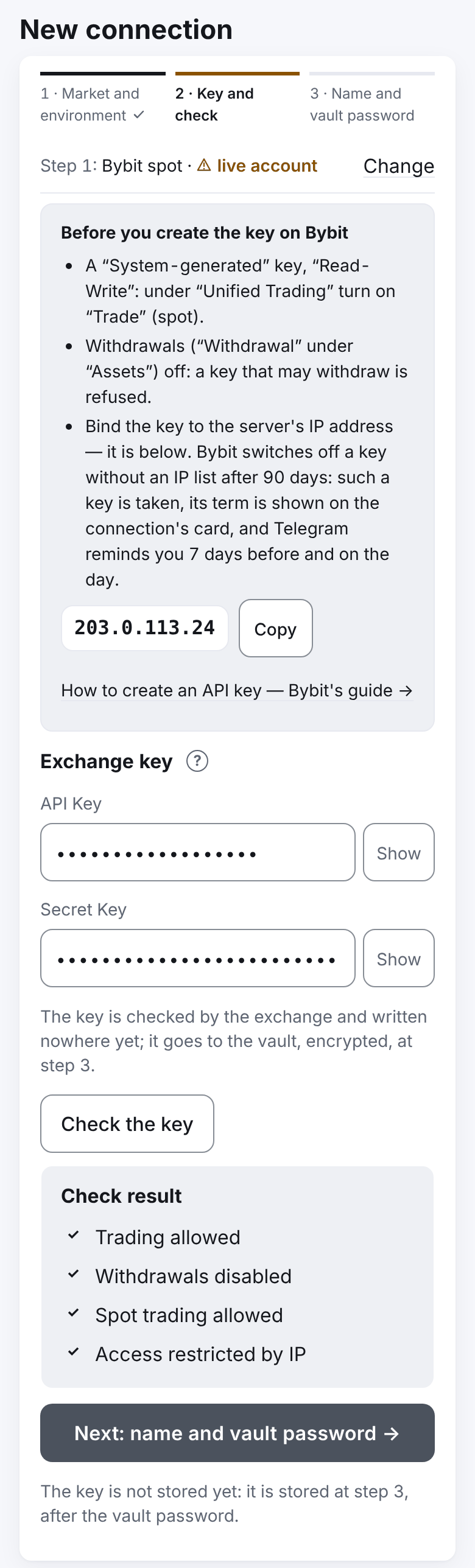
- The answer "Key replaced.". The key's state line on the card at once shows the new key's check, for example "Key: trading ✓ · withdrawals off ✓ · spot ✓ · IP restricted ✓ · checked 03.11 14:05" — the time of the replacement. A futures connection shows "futures" instead of "spot"; T-Invest has no such part. If the exchange told the key's term, below is "The key works until … (N d)"; no term — no such line. A ✗ or "IP not restricted !" — see What the exchange checks.
- Start the connection's strategies: "Start" (or "Continue the cycle" if the cycle is not finished).
- Now the old key may be deleted on the exchange.
The key's term
Some exchanges limit how long a key works — Bybit does so with a key without an IP list (90 days).
- The connection's card shows "The key works until … (N d)"; on the last day "… — it expires today", after that "The key expired on … — replace it".
- Telegram gets "⚠️ The key of connection … expires in N d — …" 7 days before and "🔴 The key of connection … expires today — …" on the day.
- Once a day the server checks the keys itself (while your vault is open) and tells you if the term changed, appeared or disappeared, if the key stopped working, if withdrawals were switched on or the trading right is gone.
Got a reminder — replace the key (the steps above). A Bybit key with an IP list has no term. All the key messages — Telegram messages.
Remove a connection
A connection without strategies, or with every strategy archived, can be removed. While any strategy is not archived there is no "Remove" button. Archived strategies never come back once their connection is removed — their history stays.
- On the connection's card press "Remove" (red frame).
- Enter the "Vault password", press "Remove". The window asks: "Remove connection …? The key is erased from the file; the connection stays in the history." — confirm.
- The answer "Connection removed.". The connection leaves the list, the key is erased from the vault. A removed connection cannot be brought back — only added anew. The name is free again: a new connection may have the same name. "Stays in the history" is the service's own record: the list of connections does not show it.
The app does not delete the key on the exchange itself — delete it on the exchange's site if you no longer need it.
How to know it worked
- The new connection is on the list: name, market and environment, the line "Key: trading ✓ · withdrawals off ✓ · …", "no strategies".
- The new strategy form offers this connection.
- After a key is replaced, the state line is updated at once: "Key: trading ✓ · withdrawals off ✓ · … · checked
", the term is the new key's (or there is no term line). The reminders about the old key's term stop.
What you risk
- The live environment is real money. The yellow-framed "Add the live key" button warns of it. A new exchange can be tried in its test environment first — I want to try without money.
- Bybit's shared wallet. The spot coins are the futures' collateral: in a liquidation the exchange may sell them, and the spot strategy goes into an emergency. For large sums — a separate subaccount for each market.
- An expired key. The connection's strategies cannot trade. Replace the key at the first reminder.
- Do not delete the old key on the exchange before replacing it — the strategies would be left without a key.
If something goes wrong
| What you see | What to do |
|---|---|
| "Stop the strategies first." when replacing a key | Stop all strategies of this connection |
| "This key belongs to another account — only a key of the same account may replace it." | The key is of another account — add it as a new connection |
| "This market of the exchange account is already connected as '…'…" | You already have this connection — replace the key there |
| "This exchange account is already connected by another user." | Another user of the service connected this account |
| "The name is taken: you already have a connection of that name." | You typed a name one of your connections already has — type another (for example, ending in _02) |
| "The server's address … is not in this key's IP list…" | BingX: add the server's address to the key's IP whitelist and check again |
| "The key is of a classic Bybit account…" | Upgrade the Bybit account to the Unified Trading Account — Bybit |
| "Too many key checks in a row — wait a minute." | Wait a minute |
| No "Remove" button | The connection has strategies (archived ones too) |
All the exchange's answers at the check — What the exchange checks.
Next
- Security — the key's rights, IP, the vault.
- I want to trade crypto with a strategy — a strategy on the new connection.
- Server restart, locked vault, forgotten password.